
Translate your Adobe InDesign files without copy-pasting or rebuilding the layout

Upload your file, translate the text in your browser, and download a finished InDesign file with every font, style, and layout still in place.
Once you start, you’ll wonder how you ever managed InDesign translations without Redokun.


Translating InDesign files manually sucks

Pulling every line of text out by hand, sending it off, then designers need to rebuild the whole layout once the translation comes back.

Each pass adds days, sometimes weeks, before your manuals, brochures, and guides are ready for another market.

And every manual copy-paste is one more place for a typo to slip in.
Enter Redokun: You design it once, Redokun handles every other language.
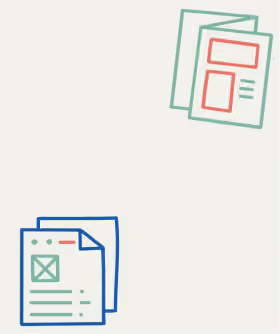


Your layout comes back exactly how you built it
- Upload your InDesign file and Redokun pullsout the text for you.
- No pasting text back in. No rebuilding pages by hand.
- When the translation is done, you download a new InDesign file with the same fonts, styles, and layout already in place.

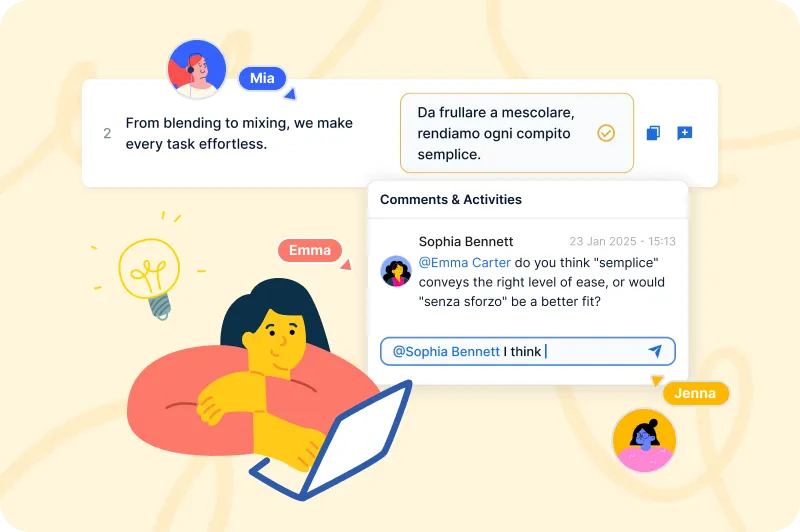
Your translators work in the browser, at the same time
- Invite your translators straight into the Web Editor.
- Several people can work on the same file at once, so you stop emailing documents around and waiting for one person to finish before the next can start.
- You watch each language’s progress in one place.
Change one line, not the whole IDML file
- When you update a document, Redokun only asks your translators for the sentences that changed.
- Everything already translated stays put, across all 10, 20, or 30 languages.
- A saved glossary keeps your wording consistent from one project to the next.

Translating InDesign files with Redokun couldn’t be easier - see for yourself


%20(1).png)

Two ways to get started right now, depending on your needs.
No subscription. Your 30 days start when you buy.
For one project with a real deadline. Right if you translate a few times a year.
For teams that translate every month across several languages and document types.
Add more seats any time
For teams translating at high volume for many markets, or connecting Redokun to their own systems.
Add more seats any time
Free for 14 days.
Try the Basic Plan free for 14 days, with 20,000 exportable words and no credit card required.
No subscription. Your 30 days start when you buy.
For one project with a real deadline. Right if you translate a few times a year.
For teams that translate every month across several languages and document types.
Add more seats any time
For teams translating at high volume for many markets, or connecting Redokun to their own systems.
Add more seats any time
Free for 14 days.
Try the Basic Plan free for 14 days, with 20,000 exportable words and no credit card required.
What designers and marketers ask before choosing Redokun.


Your layout comes back exactly as you left it: fonts, styles, formatting, and design all intact. Redokun extracts the text from your InDesign file, lets your translators work on the content in the web editor, and rebuilds the translated file in InDesign format when you export. You get a finished InDesign document ready to use, with no manual reformatting required. The same applies to Word, PowerPoint, and all other supported formats.
If you work with many InDesign files, it’s also useful to know how to create InDesign documents with translation in mind. Feel free to share this best practice and tips to your designers!
DeepL translates text. Redokun translates documents, and gives you back a finished file in exactly the same format as the original. With DeepL alone, you copy text in, get translated text out, and spend hours reformatting the result back into your InDesign or Word file.
With Redokun, you upload the file, generate the draft translation using DeepL, ChatGPT, or Google Translate within Redokun’s Web Editor, let your translators review it online, and export a finished, layout-preserved document ready to send.
Redokun also adds consistent terminology across every project, reuses approved translations automatically, and gives you full visibility into project progress — none of which a standalone translation engine provides.
Sure! Redokun’s free trial is a great way to experience how quickly you can complete your translation projects. It doesn’t require a credit card.
The free trial is based on our Basic plan and gives you access for 14 days.
You can upload a file of up to 100MB, containing up to 20,000 words.
We support various file types, including InDesign (.idml), Microsoft Office (Word, Excel, PowerPoint), HTML, SRT, JSON, XLIFF 1.2, and more. You can check the full list of supported file types here.
Once you start translating your test file and see how it works, if you’d like to continue and complete your translation project, you can simply purchase one of our plans to keep translating.
The Project Pass is designed for one-time or occasional translation projects. It gives you access to Redokun’s core translation workflow for 30 days, with a simple pay-as-you-go pricing model.
Redokun’s subscription plans (Workspace plan) are better suited for teams with ongoing or recurring translation needs, wanting to build a scalable translation workflow. They include advanced features such as translation memory, AI fine-tuning, activity tracking, and long-term workspace access. If you only need to translate a document once or don’t require long-term asset reuse, the Project Pass lets you complete your project quickly without committing to a subscription.