
ÜBERSETZE DEINE ADOBE INDESIGN-DATEIEN – OHNE COPY AND PASTE UND IM GLEICHEN FORMAT

Einfach Datei hochladen, Text im Browser übersetzen und die fertige InDesign-Datei mit derselben Schriftart und demselben Layout herunterladen.
Sobald du einmal angefangen hast, wirst du dich fragen, warum du InDesign-Dateien nicht schon früher mit Redokun übersetzt hast.


Manuelle Übersetzungen in InDesign = Stress und Ärger

Jede Zeile muss von Hand kopiert und an das Designteam geschickt werden, sobald die Übersetzung abgeschlossen ist.

Jeder Durchlauf verlängert die Wartezeit um Tage, manchmal sogar Wochen, bis deine Handbücher, Broschüren und Leitfäden für weitere Märkte fertig sind.

Und bei jedem Kopieren von Hand können sich wieder Tippfehler einschleichen.
Mit Redokun erstellst du das Design einmal. Wir übertragen es dann auf alle Sprachversionen.


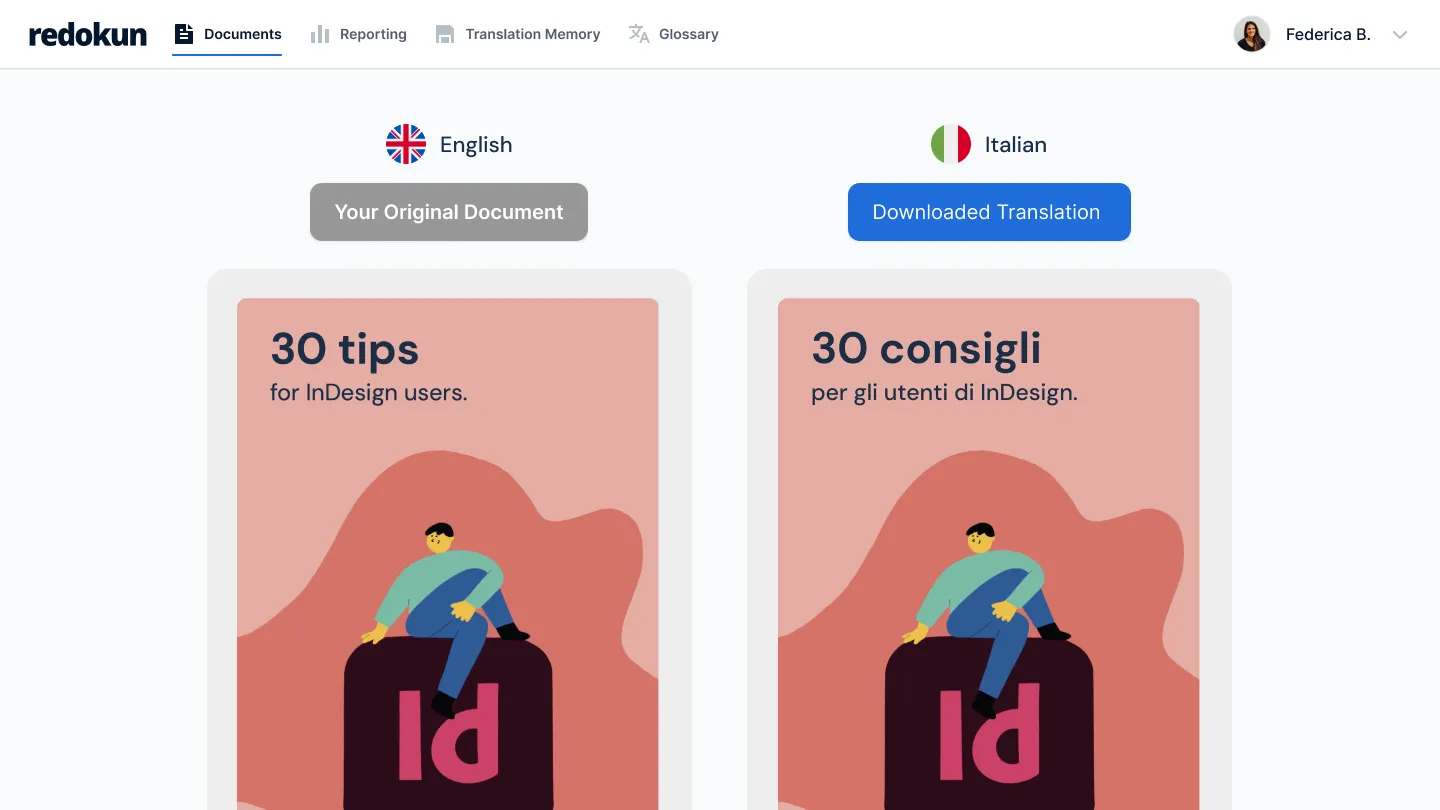
Das Layout bleibt erhalten
- Lade deine InDesign-Datei hoch, damit Redokun den Text extrahieren kann.
- Kein Copy and Paste. Kein manuelles Erstellen der Seiten in anderen Sprachen.
- Sobald die Übersetzung fertig ist, kannst du die neue InDesign-Datei mit derselben Schriftart und demselben Design herunterladen.

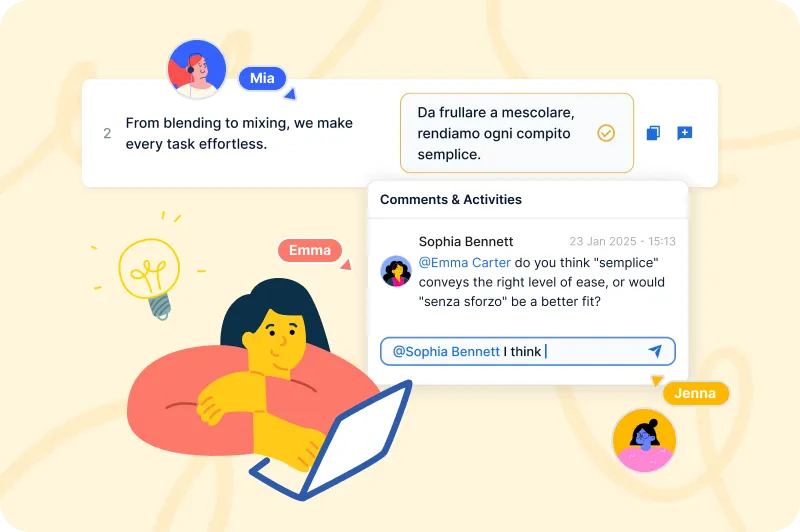
Dein Übersetzerteam arbeitet in Echtzeit zusammen
- Lade deine Übersetzer:innen ein, direkt im Webeditor zu arbeiten.
- Mehrere Teammitglieder können gleichzeitig an ein und derselben Datei mitwirken. So musst du deine Übersetzerteams nicht ständig per E-Mail koordinieren und warten, bis sie fertig sind.
- Du siehst den Fortschritt für jede Sprache an einem Ort.
Deine IDML-Datei wird im Handumdrehen aktualisiert
- Wenn du eine Datei überarbeitest, fordert Redokun dein Team auf, nur die geänderten Sätze zu übersetzen.
- Alles andere bleibt gleich – für 10, 20 oder sogar 30 Sprachen.
- Das gespeicherte Glossar sorgt dafür, dass deine Terminologie über Projekte hinweg einheitlich bleibt.

Redokun – die Übersetzung von InDesign-Dateien war noch nie so einfach


%20(1).png)

Zwei Möglichkeiten, direkt loszulegen. Du entscheidest, welche am besten passt.
Kein Abo. Denk dran: Die 30 Tage laufen direkt ab dem Kauf.
Für ein Projekt mit echtem Abgabetermin. Perfekt, wenn du nur ein paar Mal im Jahr übersetzt.
Für Teams, die jeden Monat in mehreren Sprachen und Dokumenttypen übersetzen.
Jederzeit mehr Plätze hinzufügen
Für Teams, die große Mengen für viele Märkte übersetzen oder Redokun mit ihren eigenen Systemen verbinden.
Jederzeit mehr Plätze hinzufügen
14 Tage kostenlos.
Teste das CORE-Abo mit einer kostenlosen Probeversion – 20.000 exportierbare Wörter, keine Kreditkartenangabe erforderlich.
Kein Abo. Denk dran: Die 30 Tage laufen direkt ab dem Kauf.
Für ein Projekt mit echtem Abgabetermin. Perfekt, wenn du nur ein paar Mal im Jahr übersetzt.
Für Teams, die jeden Monat in mehreren Sprachen und Dokumenttypen übersetzen.
Jederzeit mehr Plätze hinzufügen
Für Teams, die große Mengen für viele Märkte übersetzen oder Redokun mit ihren eigenen Systemen verbinden.
Jederzeit mehr Plätze hinzufügen
14 Tage kostenlos.
Teste das Basic-Abo mit einer kostenlosen Probeversion – 20.000 exportierbare Wörter, keine Kreditkartenangabe erforderlich.
Häufig gestellte Fragen


Das Layout bleibt gleich: Schriftart, Stil, Format und Design. Redokun extrahiert den Text aus deiner InDesign-Datei, ermöglicht deinen Übersetzer:innen die Bearbeitung im Webeditor und erstellt die übersetzte Datei beim Export im InDesign-Format. Das Ergebnis ist eine InDesign-Datei, die du direkt verwenden kannst, ohne sie manuell neu zu formatieren. Dasselbe gilt für Word, PowerPoint und alle anderen unterstützten Formate.
Wenn dein Team mehrere InDesign-Dateien erstellt, fragt es sich wahrscheinlich, wie es die Dateien für die Übersetzung vorbereiten kann. Teile diese Tipps und Tricks also gerne mit deinem Designteam.
DeepL übersetzt Text. Redokun übersetzt Dateien und stellt dir die Übersetzung im Originalformat zur Verfügung. In DeepL musst du den Text eingeben, bekommst dann die Übersetzung und verbringst Stunden damit, die Ergebnisse in deine InDesign- oder Word-Datei einzugeben.
In Redokun lädst du die Datei hoch, erstellst Übersetzungsentwürfe mit DeepL, ChatGPT oder Google Translate in Redokuns Webeditor und lässt dein Übersetzerteam alles online überprüfen. Nach dem Export erhältst du dann eine fertige Datei mit intaktem Layout, die du direkt abschicken kannst.
Redokun sorgt auch dafür, dass die Terminologie über Projekte hinweg einheitlich bleibt, verwendet genehmigte Übersetzungen automatisch wieder und bietet dir einen vollständigen Überblick über den Projektfortschritt. All das kann dir ein reines maschinelles Übersetzungstool nicht bieten.
Klar! Die kostenlose Testphase von Redokun ist die perfekte Gelegenheit, um zu verstehen, was effiziente Übersetzungen ausmacht – ganz ohne Kreditkartenangabe.
Die kostenlose Testphase basiert auf unserem CORE-Abo und bietet dir 14 Tage lang Zugriff auf deinen Workspace.
Du kannst eine Datei mit bis zu 100 MB und 20 000 Wörtern hochladen.
Wir unterstützten verschiedene Dateiformate, darunter InDesign (.idml), Microsoft Office (Word, Excel, PowerPoint), HTML, SRT, JSON, XLIFF 1.2 und mehr. Eine vollständige Liste aller unterstützten Dateiformate findest du hier.
Wenn du während der Testphase merkst, dass dir Redokun gefällt, und du dein Übersetzungsprojekt gern fertigstellen möchtest, kannst du einfach eines unserer Abos abschließen und auch nach Ablauf der 14 Tage weiter übersetzen.
Der Project Pass eignet sich für einmalige oder gelegentliche Übersetzungsprojekte. Du hast so die Möglichkeit, den Übersetzungsworkflow von Redokun 30 Tage lang zu nutzen, und profitierst von einem nutzungsabhängigen Bezahlmodell.
Die Redokun-Abos (Teil des Workspace-Abos) eignen sich eher für Teams, die ständig oder immer wieder Übersetzungen und einen skalierbaren Übersetzungsworkflow benötigen. Sie beinhalten Features wie Translation Memorys, die KI-Optimierung, die Aktivitätenverfolgung und langfristigen Zugriff zum Workspace. Wenn du ein Dokument nur einmal übersetzen musst und die Inhalte nicht langfristig wiederverwendest, kannst du dein Projekt dank des Project Pass fertigstellen, ohne dich zu einem Abo zu verpflichten.