
Sauvegarde et réutilise tes traductions précédentes - en un seul clic

Upload your IDML file, translate the text in your browser, and then download a finished document with every font, style, and layout still in place.
Built for manufacturing marketing teams who translate brochures, product catalogues, technical guides and more. 100+ languages available.
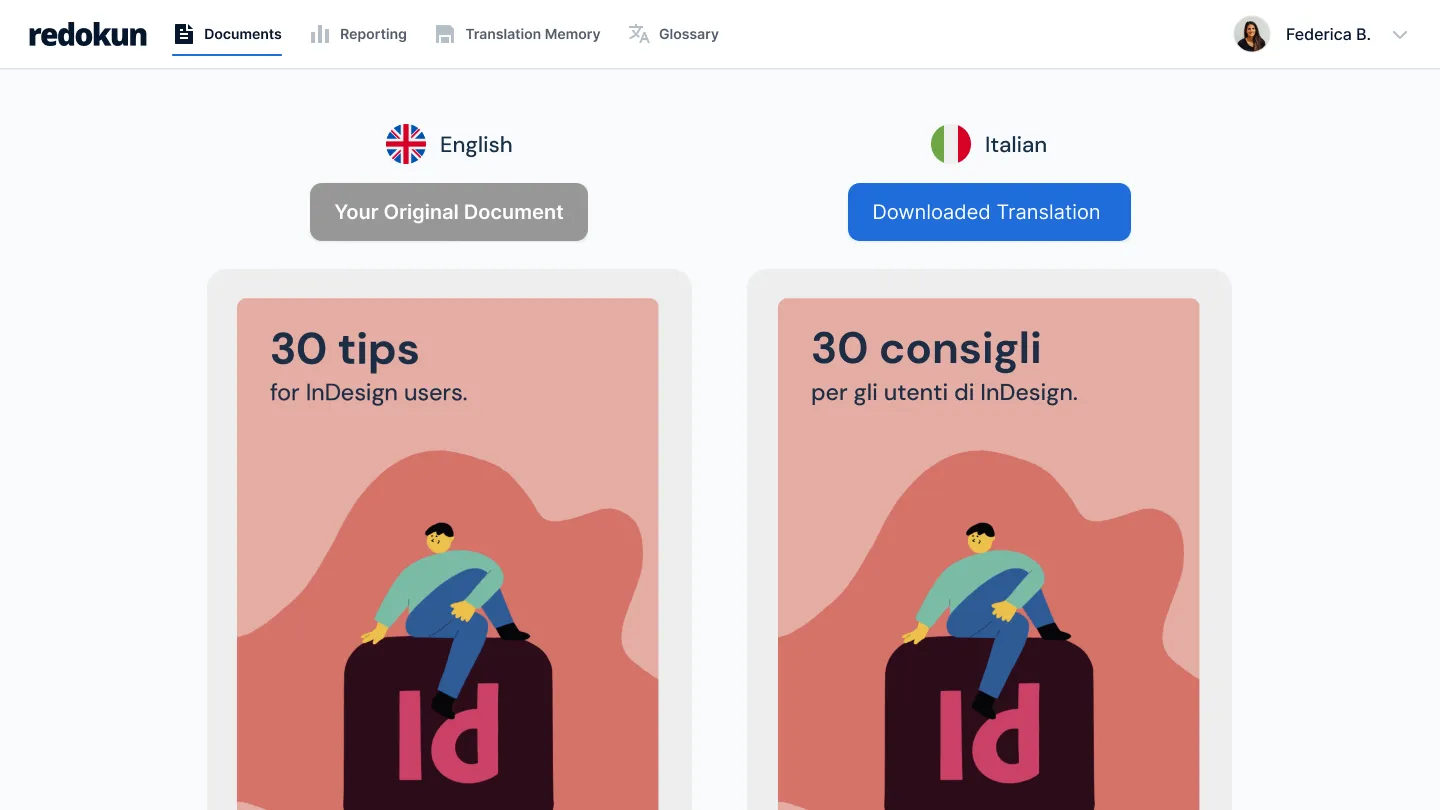


Translating InDesign files manually sucks

Pulling every line of text out by hand, sending it off, then designers need to rebuild the whole layout once the translation comes back.

Each pass adds days, sometimes weeks, before your manuals, brochures, and guides are ready for another market.

And every manual copy-paste is one more place for a typo to slip in.
Comment ça fonctionne


Créer une base de données de traductions approuvées
- Upload your InDesign file and Redokun pullsout the text for you.
- No pasting text back in. No rebuilding pages by hand.
- When the translation is done, you download a new InDesign file with the same fonts, styles, and layout already in place.

Utiliser les mêmes traductions quelle que soit la personne qui traduit
- Invite your translators straight into the Web Editor.
- Several people can work on the same file at once, so you stop emailing documents around and waiting for one person to finish before the next can start.
- You watch each language’s progress in one place.
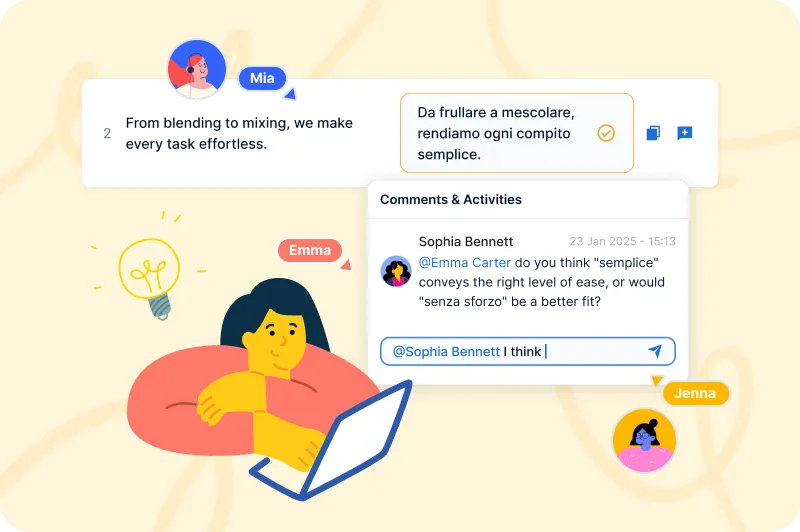
Assurer la précision de la traduction et la cohérence à travers tous les documents
- When you update a document, Redokun only asks your translators for the sentences that changed.
- Everything already translated stays put, across all 10, 20, or 30 languages.
- A saved glossary keeps your wording consistent from one project to the next.

Translating InDesign files with Redokun couldn’t be easier - see for yourself


Two ways to get started right now, depending on your needs.
Pas d'abonnement. Les 30 jours commencent à la date de ton achat.
Pour un projet avec une vraie date limite. Parfait si tu traduis seulement quelques fois par an.
Pour les équipes qui traduisent tous les mois dans plusieurs langues et types de documents.
Ajoute des places quand tu veux
Pour les équipes qui traduisent en gros volume pour plein de marchés, ou qui connectent Redokun à leurs propres systèmes.
Ajoute des places quand tu veux
Gratuit pendant 14 jours.
Teste l’abonnement Basic gratuitement pendant 14 jours, avec 20 000 mots exportables et sans carte bancaire.
Pas d'abonnement. Les 30 jours commencent à la date de ton achat.
Pour un projet avec une vraie date limite. Parfait si tu traduis seulement quelques fois par an.
Pour les équipes qui traduisent tous les mois dans plusieurs langues et types de documents.
Ajoute des places quand tu veux
Pour les équipes qui traduisent en gros volume pour plein de marchés, ou qui connectent Redokun à leurs propres systèmes.
Ajoute des places quand tu veux
Gratuit pendant 14 jours.
Teste l’abonnement Basic gratuitement pendant 14 jours, avec 20 000 mots exportables et sans carte bancaire.
FAQs


Oui, il est possible d'importer tes mémoires de traduction existantes dans Redokun. Découvre cet article pour savoir comment les importer. Consulte notre page tarifs pour savoir combien de mémoires de traduction peuvent être importées avec ton abonnement. Si tu as besoin d'aide pour importer tes mémoires de traduction, prends contact avec notre service client.
Elles peuvent sembler similaires, mais sont très différentes.
La traduction automatique implique l'utilisation d'ordinateurs pour traduire une langue (la source) vers une autre langue (la cible) sans intervention humaine. Ces ordinateurs sont programmés pour effectuer des traductions à l'aide d'algorithmes complexes, de réseaux neuronaux ou d'un mélange des deux. Vous avez peut-être entendu parler de Google Translate ou de DeepL.
La mémoire de traduction est une base de données bilingue qui contient des termes, des expressions, des phrases et des paragraphes précédemment traduits et approuvés par ton équipe. Les mémoires de traduction sont propres à ton organisation.Avec Redokun, tu peux bénéficier des deux outils en utilisant la fonction de pré-traduction. Découvres-en davantage sur la traduction automatique et les fonctionnalités de pré-traduction afin de tirer le meilleur parti de Redokun dès le premier jour.
Redokun generates a draft translation instantly using DeepL, ChatGPT, or Google Translate across as many languages as you need, at the same time. We currently support 100+ languages. Your translators then review and finalise directly in the web editor, so they're editing a draft rather than translating from scratch. This typically cuts the time your translators spend on each project significantly. We always recommend having a human review AI-generated translations before publishing.
Yes! Redokun supports the file formats manufacturing marketing teams work with every day:
Upload your original file directly and start translating immediately, with no preparation work required.
Your exported file comes back in exactly the same format, with design and layout intact.
File types currently supported:
Adobe InDesign: .idml
Adobe Illustrator: .ai , .eps , .svg
Microsoft Word: .docx
Microsoft PowerPoint: .pptx
Microsoft Excel: .xlsx
HTML5: .html
Subtitles: .srt
Plain Text: .txt
XLIFF 1.2: .xliff , .xlf
XML: .xml
JSON: .json
DeepL translates text. Redokun translates documents, and gives you back a finished file in exactly the same format as the original. With DeepL alone, you copy text in, get translated text out, and spend hours reformatting the result back into your InDesign or Word file.
With Redokun, you upload the file, generate the draft translation using DeepL, ChatGPT, or Google Translate within Redokun’s Web Editor, let your translators review it online, and export a finished, layout-preserved document ready to send.
Redokun also adds consistent terminology across every project, reuses approved translations automatically, and gives you full visibility into project progress — none of which a standalone translation engine provides.
Yes! Redokun is built around your existing translation relationships, not against them. Invite any translator by email and they can create an account and start working immediately at no extra cost per seat on most plans.
If you work with agencies or vendors who prefer their own tools, Redokun supports that too. You can export content in standard translation file formats and reimport the finished work.
Everyone works from the same project, whether they're in-house, freelance, or external.
The Project Pass is designed for one-time or occasional translation projects. It gives you access to Redokun’s core translation workflow for 30 days, with a simple pay-as-you-go pricing model.
Redokun’s subscription plans are better suited for teams with ongoing or recurring translation needs, wanting to build a scalable translation workflow. They include advanced features such as translation memory, AI fine-tuning, activity tracking, and long-term workspace access.
If you only need to translate a document once or don’t require long-term asset reuse, the Project Pass lets you complete your project quickly without committing to a subscription.
Redokun’s free trial is a great way to experience how quickly you can complete your translation projects. It doesn’t require a credit card.
The free trial is based on our Basic plan and gives you access for 14 days.
You can upload a file of up to 100MB, containing up to 20,000 words.
We support various file types, including InDesign (.idml), Microsoft Office (Word, Excel, PowerPoint), HTML, SRT, JSON, XLIFF 1.2, and more.
Once you start translating your test file and see how it works, if you’d like to continue and complete your translation project, you can simply purchase one of our plans to keep translating.