Automate the handoffs, keep the review.
Send content to Redokun from your CMS, PIM or workflow tool and get approved translations back, without uploading or downloading a file by hand. Same translation memory, glossary and reviewers as every other file.
Same pipeline
API content goes through the same steps as your files.
A file sent through the API is treated exactly like one uploaded by hand: past translations first, AI drafts that follow your glossary, your reviewers last.
Same translation memory
Same glossary and pre-translation
Same human review and approval
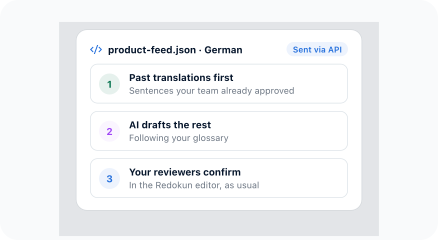
A product feed moves through translation memory, AI drafting and team review.
How it works
From file in to translation out.
Upload a file, create the document with its target languages and translators, and launch pre-translation. When your reviewers confirm a language, generate the translated file and download it.
Languages and translators set in the same request
Batch calls for up to 20 documents at once
Track long tasks with an operation ID
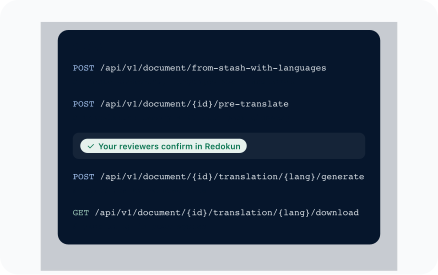
Illustrative upload, pre-translate, generate and download requests, with reviewer approval.
Your stack
Plug Redokun into the tools you already automate.
Your developers, or a workflow in n8n, Zapier or Make, can call the API from your CMS, PIM or ticketing tool. The formats you already export work as they are.
Works with any tool that can make HTTP requests
JSON, XLIFF, HTML and XML supported
Authenticate with an API key
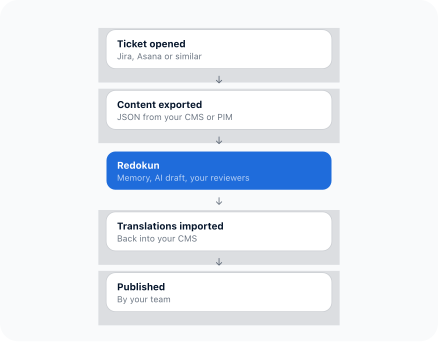
An example connection from a ticket to a content export, Redokun and the publishing system.
Your review
Automation moves the files. People approve the words.
A translation can only be generated once its language is confirmed in Redokun. Your reviewers work in the editor as usual, and your scripts only pick up what they approved.
Only confirmed languages are downloaded
Reviewers keep working in the Redokun editor
Change translation status in bulk when you need to
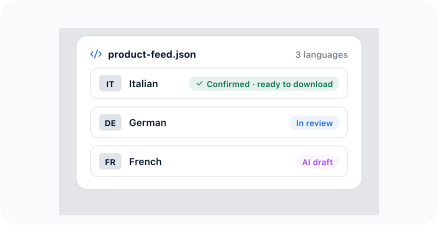
Italian is confirmed, German is in review and French is an AI draft.
Built with the API
What teams connect to Redokun.
These aren’t one-click apps. Your developer, or a no-code workflow, connects each tool to Redokun through the API. Every translation still goes through your memory, glossary and reviewers.
Your tool
Your code or n8n · Zapier · Make
Redokun API

HubSpot
Send landing pages, emails and blog posts to Redokun, then bring the approved languages back into HubSpot.
HubSpot API + Redokun API
Learn more

Any CMS
If your CMS can export and import JSON, HTML or XML, Redokun can translate it: headless, custom-built or legacy.
Export → translate → import
Learn more

Batch IDML
Drop a folder of InDesign files, create one document per file with its languages, and download every translated IDML when it’s approved.
A script or an n8n workflow
Learn more

Asana
Start a translation when a task moves to “Ready to translate” and complete the task when every language is confirmed.
Asana rules or webhooks
Learn more

Jira
Open a translation from a ticket and update the ticket as each language is approved.
Jira automation + Redokun API
Learn more
Microsoft 365
Pick up Word, PowerPoint and Excel files from SharePoint, OneDrive or Teams and save the translated versions right next to them.
Microsoft Graph, Power Automate or your code
Learn more
Google Drive
Pick up Office files, or Google Docs exported as .docx, from a shared folder and save the translated versions back to Drive.
Drive API + Redokun API
Learn more


n8n, Zapier, Make
Build any of these without code: HTTP steps to upload a file, pre-translate it and download the result.
No code
Learn more
Claude
Let Claude send content to Redokun and fetch the approved translation in a workflow you build on the API.
Learn more

Vimeo
Export your video captions as SRT or VTT, translate them with your memory and glossary, and upload them back as new caption tracks.
Vimeo API + Redokun API
Get in touch
Amara
Send subtitle files from your Amara team to Redokun and bring every approved language back as a new subtitle track.
Amara API + Redokun API
Get in touch
Prefer a ready-made connection? WordPress works out of the box, more are on the way.
See all integrations
“[...] Uploading the files to Redokun is much faster. It takes about 1/10 of the time compared to having to do it manually through creating and sending email files.”
Kenni Andersen, Graphics Team Lead, Rockfon
Read the Rockfon story →
Why it matters
No more copy and paste between systems.

Fewer manual handoffs
Content moves between your systems and Redokun without anyone uploading or downloading files.

Same quality bar
Every automated file uses your translation memory, glossary and reviewers.

Scales with your content
Batch calls handle many documents and languages at once.
FAQ
Questions about the Redokun API
How do we get access?
Book a call or email [email protected] and we switch it on for your account and share the documentation.
What can we do with the API today?
Upload files, create documents with their target languages and translators, launch pre-translation, change translation status, and generate and download translated files, for one document or many at once.
Do translations skip human review?
No. Content sent through the API goes through the same review as any upload, and a language can only be downloaded once it’s confirmed.
Does it work with n8n, Zapier or Make?
Yes, through their HTTP request steps. There are no dedicated Redokun apps for them.
Which file formats can we send?
The same formats as the web app, including JSON, XLIFF, HTML and XML.
How do we know when a file is ready?
Long tasks, like generating a translation, return an operation ID. Check its status to know when the file is ready to download.
How is this different from a machine translation API?
A machine translation API returns raw AI output. Redokun’s API sends your content through your translation memory, glossary and reviewers, and returns translations your team approved.
Ready to go global, faster?
Bring your content, your team and your translators into one place.