Your WordPress site, your approved words.
Translate your WordPress pages and posts with the same translation memory, glossary and reviewers as your campaign files. Book a call and we switch it on for your account.
How it works
Three steps, zero spreadsheets.

1. Connect your site
Install the Redokun Translator plugin next to WPML and paste its connection key in Redokun. No exports, no copy-paste.

2. Translate in Redokun
Pick the pages and posts to translate. Past translations are filled in first, AI drafts the rest following your glossary, and your reviewers confirm.

3. Send back as drafts
Approved translations go back to WordPress through WPML as drafts, so you decide when each page goes live.
One process
One process for files and web pages.
Your WordPress pages go through the same steps as your documents: past translations first, AI for new text, your reviewers last.
Same translation memory
Same glossary
Same reviewers
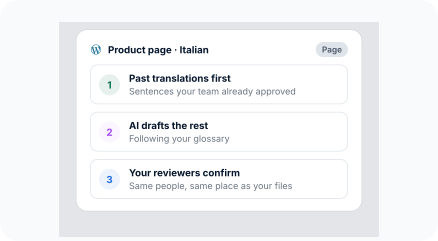
A WordPress product page progresses from approved wording to an AI draft and review.
Connect
Connect your WordPress site.
Install the Redokun Translator plugin, paste its connection key in Redokun, and your pages and posts are ready to translate.
Pages and posts
Translations sent back through WPML
Disconnect any time, from either side
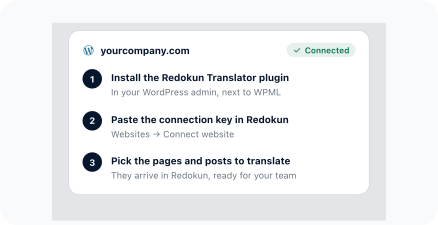
WordPress connection steps with the plugin, connection key and page picker.
Reuse
Stop translating the same sentence twice.
Product names and safety notes appear in your catalogue and on your site. Sentences your team already approved are filled in when the same sentence appears again, and AI drafts the rest with Pre-translate.
Catalogue sentences reused online
Pre-translate fills new text
Reviewers focus on what’s new
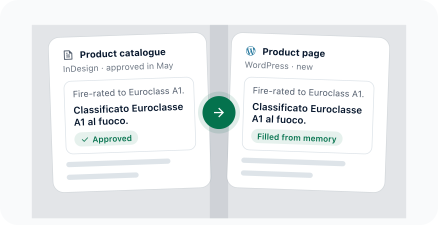
An approved catalogue sentence is reused in the WordPress version of a product page.
Back to WordPress
Translations come back as drafts. You publish.
When your reviewers approve a language, the page goes back to WordPress as a WPML draft. Nothing goes live until someone on your team presses Publish.
Each language arrives as a draft
Nothing is published automatically
Your reviewers approve the text in Redokun first
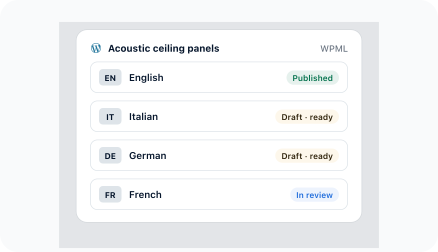
The WordPress draft list shows published, ready and in-review languages.
Your site stays in sync, even when it changes
Edit a paragraph in WordPress and only that paragraph comes back for translation. Everything already approved stays untouched.
1 click
to publish approved languages
Only new text
is ever re-translated
Every language
shares one glossary and memory
“[...] Uploading the files to Redokun is much faster. It takes about 1/10 of the time compared to having to do it manually through creating and sending email files.”
Kenni Andersen, Graphics Team Lead, Rockfon
Read the Rockfon story →
Why it matters
Same words on paper and online.

Less work with every update
Every sentence your team approves, in a file or on a page, is saved and ready the next time it appears.

One review process
Your reviewers approve files and pages in the same place.

Every language in one view
Progress for documents and your site, together.
FAQ
Questions about WordPress translation
How do we get started?
Book a call and we activate website translation for your account. It’s included in the Basic and Premium plans.
What do we need on our WordPress site?
A site served over HTTPS, the WPML plugins and admin access to install the Redokun Translator plugin.
What can we translate?
Pages and posts. You choose which ones to send to Redokun.
Are translated pages published automatically?
No. Translated pages go back to your site as drafts, so you decide when to publish.
Can we disconnect the site?
Yes, from WordPress or from Redokun. Either way ends the connection.
How is this different from pasting our pages into ChatGPT or Claude?
Both can draft a translation of the text you paste in. In Redokun, AI is one part of a bigger system: sentences your team already approved are filled in, AI drafts the rest following your glossary, your reviewers confirm each page, and translations go back to WordPress as drafts.
Our site isn’t on WordPress. Can we still use Redokun?
On Webflow, Storyblok, Shopify or another tool? Book a call or email [email protected] and tell us how your site is set up. In the meantime, you can translate your files and documents in Redokun today.
Ready to go global, faster?
Bring your content, your team and your translators into one place.