Excel in. Excel out.
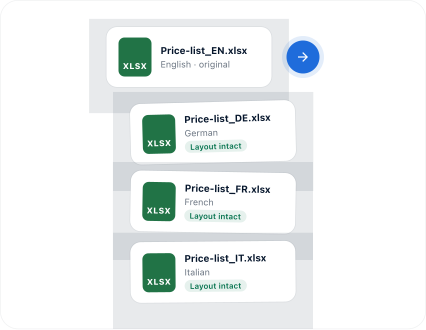
Upload a spreadsheet, translate it online with your team, and download a new Excel file in each language with the layout intact.





Spreadsheets shouldn't travel by email.
Product data, price lists and labels live in Excel, and every market needs them in its language.

“We copy cells into emails and back.”
Each translator gets a copy, and someone merges the answers.

“Nobody knows which language is done.”
Progress lives in long email threads.

“Repeated rows are translated again.”
Labels that appear on every row are translated every time.
Redokun takes the text cells out and gives you the same sheet back.
Fast when it can be. Reviewed when it must be.
You choose for each file and language. Both start from the same glossary and translation memory, so product names match your other materials.
AI drafts in minutes
AI translates with your glossary, your past translations and your tone of voice. Confirm the draft yourself and download it the same day, no waiting for translators.
- Internal lists
- Price lists
- Quick updates to existing sheets
- Product data for the website
Checked by people who know the market
Send the same draft to a native translator, your agency or a local colleague. They correct and approve it in a simple online editor.
- Product data for a launch
- Your most important markets
- Labels and packaging text
- Legal and technical claims
Every approved correction is saved in your translation memory, so the next AI draft starts from it. The more you review, the better the fast mode gets.
Upload. Translate. Download the same sheet.
1. Upload your spreadsheet
Upload your Excel file. Redokun extracts the text into neat segments for you.
2. Translate online with your team
Invite translators by email and follow every language in one place, without long email threads.
3. Download the same sheet
Download the translated Excel file with your original layout intact.
Less emailing, less merging, more languages out.
The same sheet, in every language
Download each language as an Excel file with the layout intact.
Translate in the browser
Translators work online, with nothing to install.
Only the changes get translated
Upload a revised file and only new or edited text needs translating.
Repeated labels, translated once
Approved translations are reused across rows and files.
AI can translate a column. Redokun keeps every sheet in one place, with the same words for the whole team.
A chat returns text you have to paste back cell by cell. A spreadsheet in several languages needs the file, and the same terms as your other materials.
The file, not just the words
Each language comes back as an Excel file, layout intact.
Same words, whoever translates
A chat remembers one person's conversation. Redokun keeps your glossary and approved translations for the whole team, in every language, month after month.
Every language in one place
Follow the progress of each language in one list, instead of email threads.
Nothing to build or maintain
A homemade AI tool needs someone to build it, fix it and keep it running. Redokun works today, and keeping it working is our job.
Carlisle Fluid Technologies went from three weeks to minutes.
“Before, it would take about three weeks for a turnaround for translations. Every time something had to get done or revised, it was three weeks. Now, we are doing it in minutes.”
Questions about translating Excel
Will the layout stay the same?
Yes. Redokun puts the translations back into your spreadsheet and you download it in the same format, layout intact.
Do translators need software or training?
No. Translators are invited by email, create a free account and work in the browser, in Redokun's online editor. Nothing to install.
How do we track progress?
The Document List shows the progress of each language for every file, and managers get a weekly digest email of ongoing tasks.
Can we reuse product names and labels?
Yes. Approved translations are saved in the translation memory, and product names in the glossary apply to every file.
What happens when the document changes?
Upload the new version: Redokun finds what changed, and only new or edited sentences need translating and reviewing. Everything already approved carries over.
How do we start?
Start the free trial: 14 days, 40,000 exportable words, no credit card. Upload a real file and see it come back in another language with the layout intact.
Ready to go global, faster?
Bring your content, your team and your translators into one place.