
A web-based editor, made for collaborative translation


A simple yet powerful translation interface - accessible no matter where your translators and proofreaders are
Scaling your document translation efforts could be incredibly labor-intensive, time-consuming, and costly. You need an easy tool that allows your translators and proofreaders to collaborate and get translations done quickly without sacrificing quality and consistency.
Redokun's Web Editor can be a game-changer for your translators to deliver high-quality translations without pain or hassle.


How it works
Never start a translation project from scratch
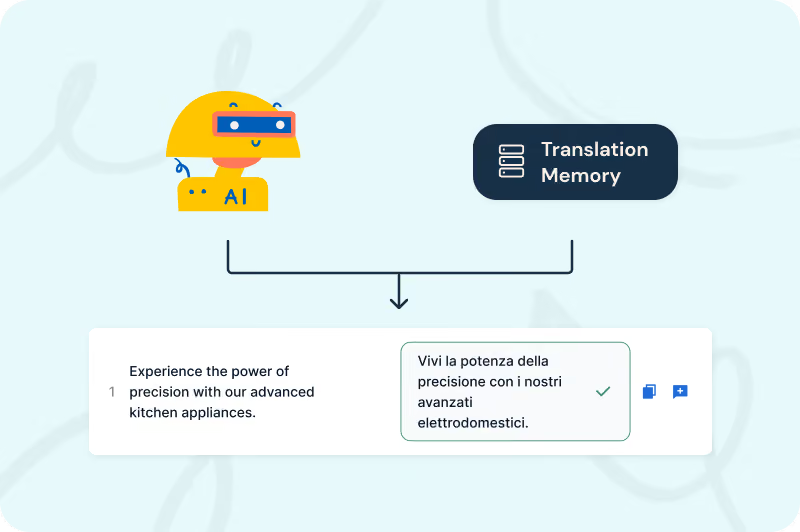
Sometimes, your translators may struggle to start from a blank sheet. Lift the weight off their shoulders by allowing them to use the AI Translation and previously approved translations to generate a draft quickly. This way, they only need to review the suggested translations rather than starting from zero.
Making edits to AI Translation suggestions are easy, and all changes are automatically saved.
Help translators keep translations accurate and consistent
With Redokun’s Glossary, translators always know which terms to use. They can also edit glossary entries directly from the Web Editor when needed.
Company-specific terminology is automatically highlighted, so translators can quickly validate key terms without switching tools.
Combined with your approved translation memories, this ensures consistent language across all your documents.

Let your translators collaborate in the same place they translate
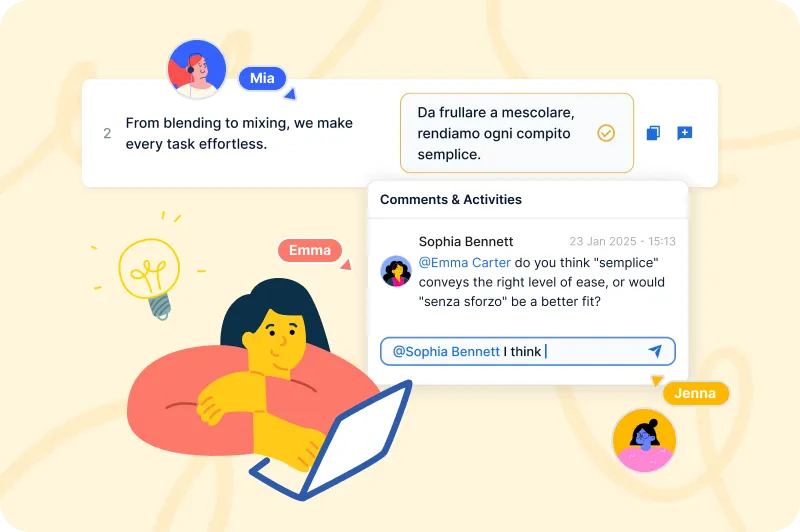
With the Web Editor, multiple users can work simultaneously and communicate directly in context — so questions, feedback, and decisions never get lost. Translators can share instructions, comment on specific segments, and mention teammates without leaving the editor.
👉 Learn more about Redokun’s collaboration tools
Voice of the customer

We are saving between 60 to 70% of our time now because the whole process of getting the file ready doesn’t take much. And then from that, uploading the files to Redokun is much faster. It takes about 1/10 of the time compared to having to do it manually through creating and sending email files.”


Learn more about Translate Online

Frequently asked questions


No, there is no need to download software to use Redokun as Redokun is web based. Simply sign up, create an account, and start using Redokun by uploading your first document. You can invite your translators either directly after uploading your document or later from the Documents page. Redokun will notify your translators via email to create an account to get started with the translation or proofreading work.
No, Redokun’s Web Editor is very simple and intuitive to use. Most customers don’t require custom onboarding sessions and get started with their first translation project in a matter of a few minutes. However, if you work with a large team and want to ensure they are all trained to use Redokun, you can contact our Customer Success Manager and schedule an onboarding session.
Redokun ensures your data is protected with encrypted communication (TLS) during transfer and secure storage in ISO 27001 and SOC-compliant data centers. This guarantees your translations remain private and safe at all times.
Yes! We offer a 14-day free trial to test Redokun for yourself. Visit our website and click “Free Trial” here to create an account and upload your test file. We offer 10,000 words as part of your free trial.