Here are 50 of the best InDesign newsletter templates I could find, grouped by the kind of organization they were made for. Three of them are free. The rest are paid or subscription downloads from Adobe Stock, Envato Elements and Creative Market.
Free picks come first, then business, church, kindergarten, daycare, monthly and creative layouts. Open the product page and read the license before you download anything for a client.
Quick heads-up: some links in this list are affiliate links, which means we may earn a small commission if you make a purchase — it won't cost you anything extra.
Feel free to jump to the section that suits you best:
- Free Newsletter Templates
- Business Newsletter Templates
- Church Newsletter Templates
- Kindergarten Newsletter
- Daycare Newsletter Templates
- Monthly Newsletter Template
- Creative newsletter templates
- Search for more Newsletter Templates
No time to scroll? Use this search bar to find the styles you prefer:
Free Newsletter Templates
1. Clean Newsletter Layout

Keep your audience interested with the help of this free newsletter template. It has a basic layout with yellow accents that add a dose of originality.
2. International Women's Day Newsletter and Flyer Layouts

This minimalist, nearly black and white bundle is composed of a newsletter template and a flyer created for the International Women's Day.
3. The Colorful Newsletter

Engage your customers and communicate with them in a fun way with the help of this creative tool. Fun looking and colorful yet refreshing and appealing.
Business Newsletter Templates
4. Business Newsletter Layout with Blue Accents

Keep your potential customers and readers up to date with the help of this perfectly structured newsletter template. Besides the flawless organization, this 11-page InDesign newsletter template is unique because of the creative color palette.
5. The Unique Choice of Colors

Eight pages in total with a striking choice of color - red and dark grey accents. Shake things up by choosing an original business newsletter template such as this one.
6.All of the Red Details

Choose this business newsletter template and you are choosing something extraordinary. The interesting layout and the red details create an impressive visual appearance.
7. Newsletter Layout with Yellow Accents

Contemporary and professional much like other business newsletter templates. However, the vivid colors and versatile pages (eight in total) make it truly unique.
8. Black and Yellow Details

A newsletter made up of twelve flawlessly created pages with black and yellow details. Clean and modern, this template combines a contemporary look with a timeless layout.
9. The Sophisticated Layout

Elegant and user-friendly layout with basic colors and well-organized pages. This creative tool will allow you to successfully reach out to both your company and your community.
10. The Teal Accents

One of the many business InDesign newsletter templates with an exceptional and easy-to-customize layout. However, its teal accents make it stand out.
11. The Striking Details

Standing out from the crowd has never been easier especially if you choose this multipurpose business newsletter template. The pages are filled with striking orange details, and the versatile elements are visually stunning.
12. Red Newsletter Layout

Choose this bold newsletter template and offer a refreshing experience to your customers. Get your readers to take notice of your successes, important updates, and information.
13. The Effortless Design

Connect with your audience in a simple and casual way with the help of this newsletter template with extraordinary design.
14. The Picture-Rich Newsletter Design

Telling your story and informing your readers through pictures will come with ease if you choose to use this newsletter template.
15. Newsletter Layout with Yellow and Blue Accents

Elegant and chic at the same time! This newsletter template will raise brand awareness for your company, and therefore it makes your business grow!
16. The Basic Corporate Newsletter

Professional appearance combined with black and white elements. Simple yet visually appealing. The perfect choice for every corporation that wants to stick to the basics.
17. Newsletter Layout with Green Accents

Eight pages in total with green accents and creative geometric elements. Get to the point with the help of this business newsletter template.
18. Newsletter Layout with Turquoise Accents

A corporate newsletter template packed with all the assets to make your company shine. Tell your story and highlight everything that matters most.
19. The Creative Green Details

Although corporate and serious, this business newsletter template has a refreshing design because of the vivid green details. Choose this if you're looking for something different.
20. Newsletter Booklet Layout

Connect with your audience, customers, and potential clients with this unique newsletter template. Unlike the many business newsletter templates, this one has a more creative layout and choice of colors.
21. Newsletter with Red Accents

Twelve pages that are easy to customize, and a beautiful design with red accents. This newsletter template will allow you to connect with your audience on a completely new level – a higher one!
22. Soft Business Newsletter Template

Not too bright nor too vivid, this template is instead soothing. Its colors and user-friendly layout will feel like a dream. Furthermore, like many other business newsletter templates, it is perfect for updating your clients about important corporate news.
23. The Sophisticated Choice

Classy and elegant, yet chic and modern. This newsletter template is a bold and sophisticated choice.
24. Classic Business Newsletter with Blue Accents
A classical, timeless business newsletter: a two-tone Newsletter masthead over a full-width city photo, then straightforward multi-column pages held together by blue accent panels. It runs 11 A4 pages in CMYK and you edit it in InDesign. The photos you see in the preview aren't included in the download, so bring your own.
25. Eight-page Simplicity

Choosing this newsletter template equals choosing something that is able to withstand the test of time. Eight pages in total plus a cover page, all have a polished appearance and blue details.
26. All of the Business-Related Images

This business newsletter template is a winning choice not only because of the original structure filled with creative blue accents and all sorts of super practical bullet elements, but also because this template comes with many business-related images.
27. The Straightforward Design

A smart and practical layout combined with bold headlines, creative typography, and basic color palette. Don't make a mistake by underestimating this InDesign newsletter template; sometimes less is more.
28. The Blue Background

The uniqueness of this InDesign newsletter template lies in the unusual choice of background. Unlike the others that have a white background, the deep blue background shade will definitely draw attention.
Church Newsletter Templates
29. Newsletter Layout with Tan Accents

The subtle color combination and the interestingly organized pages make this newsletter template church-suitable.
30. Blue Gradient Accents

Multi-page and multi-purpose church newsletter templates such as this one are the key to reaching out to the local community. Blue gradient accents with simple yet striking visual appearance.
31. Multipurpose Graceful Newsletter Template

Looking for something refined and timeless? If so, spark the curiosity and keep your readers updated with the help of this attractive church newsletter template.
32. Newsletter with Mint Green and Blue Accents

Simple yet tasteful, this one, among the other church newsletter templates, can be easily-edited in order to fit every church's needs.
33. Simplicity Over Everything

Modest-looking, this template is not too crowded nor too complicated in its design. In addition, its basic colors and customizable layout make it very user-friendly. In short, it's everything you could ever wish for in a newsletter template.
Kindergarten Newsletter
34. Newsletter Layout with Blue and Green Accents

Refreshing and soothing at the same time, this kindergarten newsletter template can be easily customized and used to fit any kindergarten's needs.
35. Kindergarten Newsletter
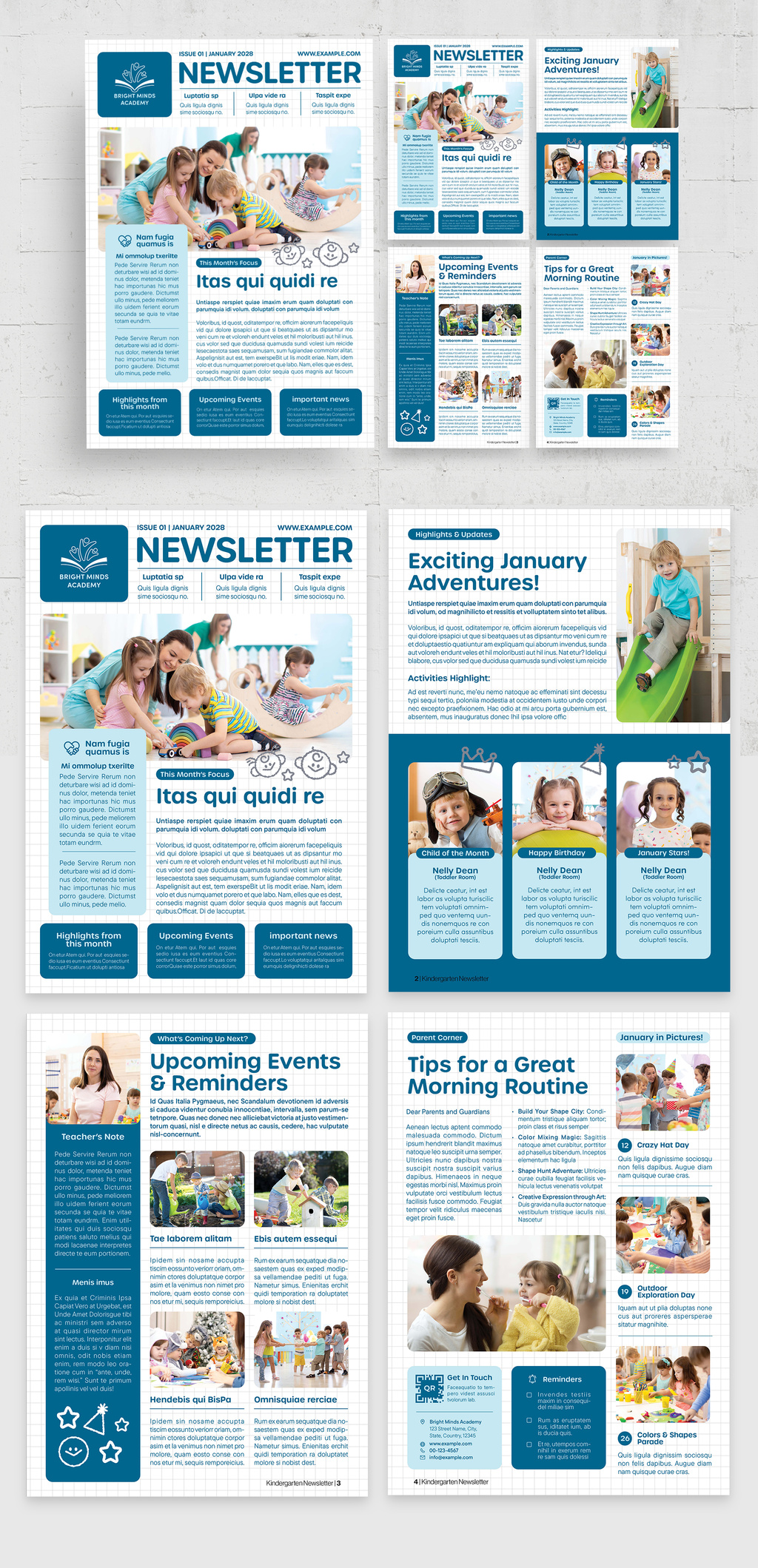
This one is built for a kindergarten's monthly update: a big Newsletter masthead, soft blue panels on a gentle grid background, and ready-made blocks for This Month's Focus, Upcoming Events and Reminders, a Teacher's Note, Child of the Month and a January in Pictures gallery. Four A4 pages in CMYK that you edit in InDesign. The photos in the preview aren't included in the download.
36. Clean Minimal Layout

What makes this more attractive than other InDesign newsletter templates, is its simplicity and minimalism. It stays consistent all throughout the customizable four pages.
37. Teal and White Newsletter

Sixteen pages of stylishness and originality, teal details and white background. This kindergarten newsletter is suitable for every professional business that wants to have a memorable impact on the local community.
38. The Subtle Yellow Hues

Keep the parents, the local community, and the potential customers updated with the help of this professional kindergarten newsletter template. Engaging layout with neutral colors and four pages of overall simplicity.
Daycare Newsletter Templates
39. Newsletter Layout with Blue and Red Accents

This daycare newsletter template comes with a striking choice of colors and creative structure that can be easily modified in order to fit your needs.
40. The Graceful Details

Build your daycare's brand awareness and take it to another level with this super elegant yet modern daycare newsletter template with green and gold details.
41. The Monochromatic Newsletter Template

The unique cover page seen on this daycare newsletter template will capture your reader's attention and keep them engaged. Monochromatic color palette with flawless structure.
42. The Elegant Layout

Keeping your readers and potential customers updated has never been easier. Offer a refreshing and extraordinary experience with the help of this four-page daycare newsletter template with a stunning layout.
43. The Modern Choice

This daycare newsletter template is unique because of the attractive choice of colors – black and yellow. This smart move will allow you to put an accent on headlines and pieces of information that matter most to you and your company.
Monthly Newsletter Template
44. Business Newsletter Layout with Blue and Brown Accents

Celebrating your wins and explaining your important news monthly will become an easy task thanks to this monthly newsletter template. Blue and Brown Accents together with a well-organized structure.
45. Newsletter Layout with Yellow Accent

Unlike a simple and brief one-page newsletter template which sometimes isn't enough, this monthly newsletter template will do the job perfectly. The yellow details make the overall design unique and visually appealing.
Creative newsletter templates
46. The Basic Travel Newsletter

Telling each and every single one of your travel stories has never been simpler. This travel newsletter template with blue accents has an exceptional four-page design.
47. Magazine Layout with Pale Yellow Accents

Thirty pages of pure creativity and originality suitable for every professional individual and company related to versatile industries and niches.
48. Fashion Newsletter

In our list of InDesign newsletter templates we couldn't forget the fashionistas! This is suitable for every fashion-related company searching for a way to reach out to the potential customers and audience.
49. Magazine Layout with Green Accents

This template is definitely not a classical newsletter template but it is indeed a striking and effective one.
50. Magazine Layout with Pink Accents

Versatile elements, forty creative pages, and pink accents! This out of all the InDesign newsletter templates is sure to make a difference!
Search for more newsletter templates
These 50 are hand-picked, but they are not everything. Use the search below to look across the wider InDesign template library, which helps when you need a different page count, a different fold, or something closer to your brand colors:
Neighboring lists worth a look: InDesign magazine templates, brochure templates and newspaper templates.
How do you pick the right newsletter template?
Start from the section that matches your organization, then judge the layout by how much you actually have to say. The list splits seven ways: 3 free templates, 25 business layouts, 5 for churches, 5 for kindergartens, 5 for daycares, 2 monthly formats and 5 creative, magazine-style designs.
Four things are worth checking before you commit to one:
- Page count. Four pages is one folded sheet. Twelve pages is a stitched booklet with a different price at the printer. Pick the length you can fill without padding.
- The grid, not the cover. A cover is easy to restyle later. What you cannot fix is a layout built around one big photo when you need room for a calendar, a table of figures or six short articles.
- The license. Most of these picks sit on Adobe Stock, the rest on Envato Elements and Creative Market. Terms differ by marketplace and sometimes by item, so read the product page before the work starts - especially when the newsletter is for a client.
- The file format. INDD or IDML decides whether the template opens on your machine at all. More on that below.
None of the section names match your case? The church picks (29-33) suit anything with short articles and a back panel for the next event or the donation ask. The business picks (4-28) cover the quieter, text-heavy end, which is where a clinic newsletter or a firm's client update belongs.
How do you open and edit one of these templates?
Download the file, open it in InDesign, and replace the placeholder content instead of rebuilding the layout. Five steps, in practice:
- Open the INDD file. If your InDesign is older than the version that made it, look for an IDML file in the download instead - IDML opens in InDesign CS4 and later.
- Swap in your own copy, and edit the paragraph styles rather than individual text frames, so every heading changes at once.
- Change the colors through the Swatches panel. Edit a swatch once and every object using it follows.
- Replace the placeholder photos with your own, then check their resolution and color mode.
- If the newsletter runs past eight pages, set up an automatic table of contents early rather than late.
Two file-type notes that save an afternoon. An INDD file only opens in the InDesign version that created it, or a newer one, while IDML is the backwards-compatible format. To go back further than CS4, InDesignSkills explains the two-step down-save. And a file that arrives as INDT is a template proper: it asks for a new filename when you save, so your original survives the first edit.
Never opened InDesign before? Our InDesign tutorial starts from zero, and these InDesign tips are worth keeping open in a second tab.
What size should a printed newsletter be?
Two formats cover most printed newsletters, and both give you four panels: front cover, two interior pages, back cover.
- 11 × 17 in, folded to 8.5 × 11 in - the full-size newsletter. Printkeg lists it as a four-page full-size booklet and names monthly newsletters among its uses.
- 8.5 × 11 in, folded to 5.5 × 8.5 in - the compact half fold, which Printkeg lists for four-page booklets and newsletters. It runs on a smaller sheet, so ask your printer what that does to your postage.
Both are stocked formats at commercial printers, so a local shop will recognize the spec without a long conversation. Check the product page for the template's page size and match it to the format you plan to print before you buy. Set the bleed at the start rather than after the first proof, and confirm the exact amount with whoever is printing it.
Conclusion
Fifty layouts, one decision: pick the one whose grid matches how much you actually have to say. If the styles are fighting you an hour in, switch template rather than repair it. Starting from a template is the whole point.
I hope one of these saves you a weekend.