I've spent hours digging through Adobe Stock, Envato Elements, Envato Market and Creative Market for InDesign catalog templates that are actually easy to customize. These 50 are the ones that made the cut.
I opened every one of them before it went on the list, and grouped them by what you sell: travel, clothing, general product, furniture and interiors, creative, minimalist, and one free pick.
Quick heads-up: some links in this list are affiliate links, which means we may earn a small commission if you make a purchase — it won't cost you anything extra.
No time to scroll? Use this search bar to find the catalog styles you prefer:
InDesign Catalog Templates – the complete list
I've split the list into sections, so use the menu below to jump to the InDesign catalog templates that suit your business.
- Travel Catalog Templates
- Clothing Catalog Templates
- Product Catalog Design Templates
- Furniture and Interior Design Catalog Templates
- Creative and Unique InDesign Catalog Templates
- Minimalist Catalog Templates
- Free Catalog Templates
- Search for more templates
Travel Catalog Templates
1. Travel Guide Layout with Blue and Orange accents

Twenty-one pages filled with creatively laid out paragraphs accented in blue and orange. This catalog varies in structure in a way that allows you to effectively deliver your message, explain your services, promote brand awareness, and put your company on the map!
2. Travel the world

Promote your business and get your message across in a big way by choosing this catalog template. A marvelous front page, red details, countless spots for picture placement: a catalog that radiates creativity. This template is everything you need!
Clothing Catalog Templates
3. Tasteful yet Creative

Do you have a clothing store? Do you work in the fashion industry? Or are you starting a clothing line? This template is as carefully chosen for you as a good outfit! It is designed in such a way that will allow you to present various collections, the separate clothing pieces, the available colors, and the materials. The creative layout includes a lot of space for photos, the font is classic, and the overall look is clean.
4. Edgy black and white product catalog layout

Chic and stylish, edgy and modern! One of the best InDesign catalog templates! Sixteen fully editable pages to fit all your needs. Some pages are designed to add structure to the catalog (for example: a single page explaining your winter collection, or a best seller) and some are products-only. However, the background on every single page is white while the typography and the details are in black. Killer combination, right?
5. Girly Pink Accents

This template might not shine for creativity, but it surely shines bright pink! It is a multipurpose catalog which can be modified and customized. The bright-pink accents that characterize it make it young and fashionable. It has a total of sixteen pages which have an easy-to-read and clear layout.
6. Sportswear Catalog template

Unlike the classic, traditional clothing templates we've mentioned so far, this one is a sportswear catalog. The well-designed front page is very eye-catching, while the inside of this template, all twenty-eight pages, is created in a way that showcases many sports-related products.
7. Fashion Catalog

Not too girly nor too bright colored, this fashion product catalog has forty well-designed and elegant pages. The font is classic, most of the details are in black and white, and the pictures can be seamlessly incorporated.
8. Minimalist look book with clean lines

Showcase the clothing pieces you've chosen with the help of this minimalist yet graceful product catalog template. There is not too much color to it nor too many decorative elements, but this is exactly what makes it compelling and timeless.
9. Urban Product Catalog

Attractive yet casual, organized and neat! This template has a refreshing and minimalist appearance which will allow your clothing pieces to truly dominate. It's one of the best in our list of InDesign catalog templates.
Product Catalog Design Templates
10. Edgy and Modern Product catalog template

Creative combination of white background and red details make this template an edgy and modern one. All of the pages are quite compelling and stylish with a clean overall look. This InDesign catalog template will make it easy for you to display your most appealing products while explaining their characteristics in the small charts placed around the products (such as sizing, materials, weight and height).
11. Supermarket Sales InDesign Catalog Template

Not a single supermarket can function without such a catalog. It is basic and plain yet very practical. The overall design has no unique characteristics but it does its job properly. Twelve pages in total with four color options will allow each and every store to present their products on sale. You can't refuse a sweet deal like this one!
12. Detailed Product InDesign Catalog Template

If you are searching for the template which will allow you to not only showcase, but also explain the products you are selling, then this template is it! The front page and the overall design, are both simple and easy to read, but the greatest advantage lies within the carefully-structured inside pages. This template will allow you to explain your wide range of products in a detailed manner that really brings out your business.
13. Product Catalog Layout with Red Accents

The power given by the color palette on this catalog is what makes this template stand out from the crowd. Powerful and dominant, black and red! Few other combinations are as successful as this one. Carefully intertwined, this “power couple” make the overall design bold, edgy, and captivating.
14. Effortless Product Catalog

This product catalog template is all about uncomplicated design, clever layout, basic color palette, and adaptable boxes. The front page will allow your logo and slogan to be highlighted and the two tiny paragraphs will allow insight into the catalog (sales products, regular collections, seasonal deals, etc.)
15. The technical kind of catalog template

This template is a more technical one. It offers a detail-oriented way to relay the product information. More specifically, this template has small charts which can be modified and adjusted. Instead of writing long paragraphs, consider organizing the information this way. It will be much more user-friendly, and efficient. Furthermore, the yellow details on top and bottom add a dose of creativity, design-wise.
16. Well-organized paragraphs

This template has the perfect balance between structure and text which might come in handy when you have too much information to present and explain. Break it down with this catalog, which has a place for a picture, one for a chart, and one for a description. Deliver exceptional quality to your customers by choosing this template with a clean overall look.
17. The modern product catalog template

Instead of sticking with the traditional InDesign catalog templates and their classic look, dare to choose something different. Something stylish and contemporary. This template has a refreshing look, casual feel, and tasteful design.
18. All about elegance

Choose this product catalog template and you are choosing something exceptional. It doesn’t have much in the way of text and descriptions; instead, the photos let your clothing pieces speak for themselves. This template is visually appealing and has quite the impact.
19. Product Catalog Layout with Blue Accents
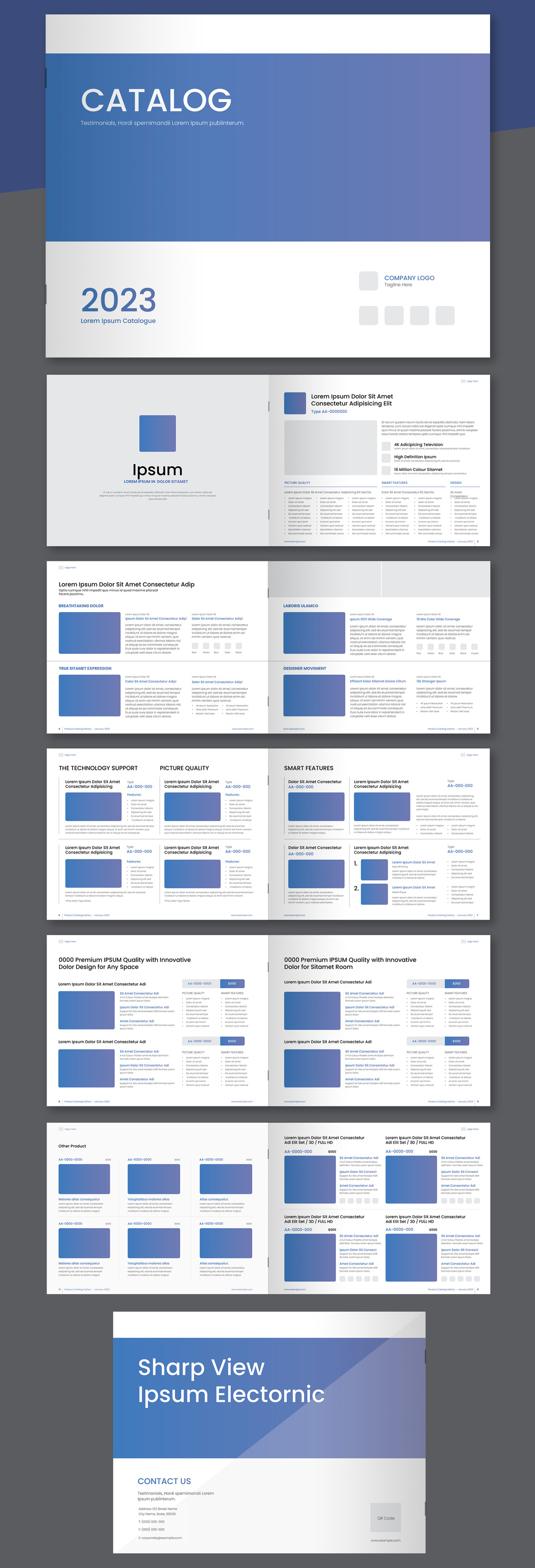
Seeking something basic yet well-designed? This one keeps the pages white and uncluttered and lets blue gradient accents do all the talking. Each spread has room for a couple of large product shots with a short description next to each one, a tidy feature list, and a small blue box for the price. It's 12 landscape US Letter pages in CMYK, and you add your own text and images.
20. Vivid Blue Details

This product catalog template has an effective and well-structured design which will allow you to present all the relevant information. The front page is simple, while the inside pages offer everything you need to place your products: picture, description, and chart. You can fit as little as two or as many as nine products per page. This catalog template is versatile yet overall traditional.
21. Edgy and high-class product catalog

If you are looking for something more modern and stylish, then this template is the one for you. The framed elements add a dose of creativity, while the perfectly organized paragraphs will do a fair job of explaining the products themselves.
22. Red and Black Combination

Choose to express your business's core values, and raise brand awareness with this extraordinary product catalog template. Thirty pages of powerful and distinctive colors and design will make the entire “showcase your products” journey a piece of cake!
23. Clean Appeal and Simplicity over everything

Are you searching for a simple way to showcase and explain the wide range of products you are selling? If you are seeking simplicity, this template is just the right one for you and your business. The cover page is a rather basic one, the pages are versatile and will allow you to present your products in a clean and straightforward way.
24. Car Parts Product Catalog

This template is suitable for businesses related to the automotive industry and car parts in general. It has several different layout types and tables including ones with larger descriptions, which will allow you to get into more detail. It is a well-balanced and comprehensive template.
25. All about details

Suitable for manufacturers or sellers, this template is the best when it comes to details. Consider choosing this type of product catalog template especially if your products need a detailed explanation. Aside from adding a picture, you will be able to adjust and use the table elements and present the information in a well-organized way. Overall the colors are simple, the headlines are useful, and the design effortless.
Furniture and Interior Design Catalog Templates
26. The sophisticated product catalog template

Showcase your products in a professional and appealing way to your potential customers! Elegant and compelling, this template, which is composed of fourteen pages, has it all! The layout is thoughtfully designed with plenty of place for photos as well as description paragraphs.
27. Catalog Layout with Black and White Accents

Display the items you are selling in a professional and refined way with this modern catalog. The strength of its layout lies within the simple elegance given by the black and white combination of pages. It really stands out in our list of InDesign catalog templates.
28. Interior Design catalog layout with brown accent

Nothing screams originality, class, and timelessness such as the combination of brown and white, and this template owns it! The brown details are subtle, the font is simple yet effective, and the overall design is neat. Some pages will allow you to showcase multiple products while others will allow you to explain more about your latest and best-seller collections.
29. Delicate Yellow Accents

This product catalog template will amaze you with the sophistication it radiates with. All of the pages have the perfect balance between black and white, picture and text. In addition, the yellow hues here and there make the overall design unpredictable and delicate.
30. Modern and casual

Although I've chosen to place this product catalog template in this furniture section, I must mention, this template is fully customizable and can be altered to fit versatile needs such as fashion, architecture, presentation of products, etc. The template itself has an interesting structure and its design focuses mainly on the product photos. What adds a dose of creativity is the Italic typography on every single page.
31. The uncluttered design

Nothing is as successful as showcasing your products in a simple way. This uncluttered black and white design is elegant, modern, and will be effective. Let this product catalog be a perfect representation of how you are as a business. Serious, straightforward, and stylish!
32. The interior design minimalist paradise

This creative Carré template will be perfect when you want to keep things simple and refined. Its look is sophisticated, the colors are toned down and neutral, the font is big and bold, and the overall appeal is a rather luxurious one.
33. Shades of Blue

Fall in love with this professional, clean, and interesting multipurpose product brochure template. Although the background of this template is mostly white and basic, the details in different shades of blue are what make this template truly unique and creative.
34. The list-like catalog template

Big, bold, and framed headlines! This catalog is made up of twenty eight pages that include creative lists. Extremely well organized, its detailed lists (with pictures, descriptions, and pricing for your products) will allow you to explain everything the potential buyers should know.
35. Lightning Catalog template

Professional, fresh, and clean! This template has a white background and a minimalist layout for photos. The font is a rather subtle and delicate one, and the overall feel and look is luxurious and timeless.
36. Magazine-like Interior Catalog

Reach out to your customers in a friendly and welcoming way by choosing this template. The soothing colors, the delicate font, the descriptive paragraphs, all give it a magazine-like, easy vibe. Wait no more to create a meaningful bond with your customers.
Creative and Unique
37. Pop Style Layout

Colorful and fun! Artistic and unique! One look at this product catalog template and I was won over! This template has a pop style layout and a fun feel to it. The colors are incredibly interesting and the overall layout will allow you to present the valuable information in an engaging way that will grab your customer's attention.
38. Portfolio Layout with neutral elements

The strength of this template lies within its layout. Though unusual, it is an extremely effective look. The page numbers are large and eye-catching; the colors are subtle; the picture placement is dynamic; and the text is brief but striking: all the makings of a great catalog template.
39. Yellow Accents

Searching for something creative and vivid? This template has a killer combination of colors: stunning yellow, black, and white. The perfectly structured pages, and the exceptionally modern overall design, complete its overall look.
40. Minimal Yet Creative

Fans of simple, clean lines, look no further! This template meets all your minimalist needs and more. The complementary colors and high-quality pictures are the proverbial cherry on top in this minimal yet creative template.
Minimalist with clean lines
41. Simplicity

This catalog's design radiates elegance and simplicity! The front and back pages have subtle colors and typography. The inside of this product catalog template keeps its promise of elegance as well. It has a basic white background, frameless pictures in different sizes, and short paragraphs which allow the accent to be put on the pictures.
42. Orange Hues

Are you searching for a product catalog template with an effortless yet stylish design? If so this template with white background and orange hues is the one for you. The design of the pages is adjustable and will allow you to display all the information in a well-organized manner. The orange hues give its signature “pop of color”.
43. Pale colors effortlessness

White background in combination with the interesting font and the subtle pale colors make this template tasteful and charming. This product catalog template is adjustable and can be the perfect fit for versatile occasions and different businesses.
44. Neutral Elegance

Sticking with neutral and natural color palette is definitely a smart move. It is timeless, and it is effortless. In total, this product catalog template has thirty-two pages and all of them have strong yet minimalist font, clean lines, toned-down colors, and attractive overall design.
45. Bold Typographic Style

The uniqueness and elegance of this template lies within the bold typographic style, and the bold overall design. The front page and some pages inside are completely black with white writings while the other pages are kept simple and clean with a minimalist font.
46. The ultimate clean design

Are you looking for the most straightforward way to present your products to your customers? Well, this product catalog template will satisfy your needs. It has a basic white background, plain font, nothing complicated, nothing fancy. Get your message across in a subtle and simple way and highlight the content of the pictures instead of focusing on attention-grabbing design.
47. Minimal and Professional

Spark your customer's curiosity with this elegant and sophisticated product catalog template. A clean and unified overall look, white and blue combination of colors, versatile pages in terms of structure, and a total of thirty-two pages. Sounds amazing right?
48. Black and White elegance

Yes, its design is black and white, but depending on the pictures you will choose, you can turn this template into a colorful one too. However, the design itself is minimalist and timeless so consider choosing such photographs too.
49. Dive deep in the world of yellow

Don’t be afraid to experiment a bit and try out this product catalog template with white background and interesting yellow details. Yes, it is a bit unusual but it is equally bold and dominant. The yellow colored elements will allow you to put the accent on the things you want, products you want to showcase, and text you want to emphasize.
Free Catalog Templates
50. Timeless Beauty

Are you searching for a product catalog template which will never go out of style? Something which will be popular in ten years just as it is today? This square catalog perfectly fits that description. Its format is simple yet stylish, the front page is well-designed, and the entire catalog has an uncluttered and neatly organized feel.
Search for more templates
If you didn't find a template that you like, we have an additional list of thousands of high quality InDesign templates. You can search through them using this form:
Which of these 50 templates should you pick?
Start from the section that matches what you sell, not from the prettiest cover. The list leans towards general product catalogs: 16 templates sit in Product Catalog Design Templates and 11 in Furniture and Interior Design, against 9 minimalist layouts, 7 for clothing, 4 creative ones, 2 for travel and 1 free pick. If you sell physical goods you have plenty to work with. If you're putting together a fashion drop, look at the minimalist section as well as the clothing one, because several of those layouts are image-led enough to go either way.
Then check two things on the template's own page before you spend anything. First, how many pages it holds and whether the spreads repeat in a way that suits your range, since a twelve-page layout won't stretch comfortably over a few hundred products. Second, which file formats are in the download. That second one catches people out far more often than it should.
And if you'd rather build the thing from scratch than adapt someone else's grid, we have a walkthrough on how to make a catalog.
INDT, INDD, IDML: what's actually in the download
Most of these downloads hand you more than one file, and the extension decides whether your copy of InDesign can open it at all.
| Format | What it is | Why it matters |
|---|---|---|
| INDT | An InDesign template. Opening it creates a new untitled document rather than opening the file itself. | Your master layout can't be overwritten by accident. |
| INDD | The standard InDesign document you edit and save. | It opens only in the InDesign version that created it, or a newer one. |
| IDML | An XML interchange format Adobe introduced in CS4. Underneath it's a zip archive of XML files. | It opens in InDesign CS4 and later, so it gets you out of a version mismatch. |
So if a template ships only an INDD saved in a newer InDesign than yours, it simply won't open. An IDML copy is the way around that, and it's the same file a translation tool can read later on.
Before you send the catalog to print
Ask your printer for their specifications first. That one email prevents most of what follows.
- Bleed. 0.125 in (3 mm) is the usual starting point for anything that runs off the trimmed edge, though plenty of shops ask for more. Confirm it rather than assuming, and switch on crop marks and document bleed settings when you export.
- Image resolution. The famous 300 PPI number isn't a law of nature. It comes from the rule that image resolution should be roughly twice the halftone screen ruling, and commercial offset usually screens at around 150 lines per inch. Two useful things follow that the bare rule hides: going above 300 buys you nothing on press, and uncoated stock or newsprint is generally happy at 200 to 250. Enlarging a small photo never puts detail back, so check the effective resolution in the Links panel after you scale anything.
- PDF preset. PDF/X-1a flattens transparency and restricts you to CMYK and spot colors, which is exactly why most print shops still ask for it. PDF/X-4 keeps live transparency and color management, and is the better file for complex artwork. If nobody tells you which they want, X-1a is the safe default.
Going digital instead of offset changes some of this. Our comparison of offset and digital printing covers where the two part ways.
Filling a long catalog without retyping everything
If your products already live in a spreadsheet, InDesign's Data Merge can pour them into a repeating layout for you. It reads comma, tab or semicolon delimited text, so export a CSV first: it won't take an XLSX straight out of Excel. Your column headers become the merge fields you place in the layout, and a header that starts with @ tells InDesign the column holds an image path, which is how each record gets its own product shot. It works beautifully when every product follows the same structure, and it fights you when they don't. Our guide to Data Merge in InDesign has the full walkthrough.
Catalog, line sheet, or lookbook?
People use the three words interchangeably, and they're three different documents. A catalog shows the range with photography, descriptions and a bit of brand context. A line sheet is the plain wholesale document a retail buyer orders from: SKUs, colorways, wholesale prices, minimums, terms, and not much else. A lookbook is there to set a mood. Template 8 in the clothing section is a lookbook, for instance, which makes it lovely for a collection story and the wrong choice for a long price list.
If the catalog has to go out in more than one language
Catalogs break in translation more often than other documents, and the reason is structural: a catalog is built out of very short strings. Product names, spec cells, price captions, size labels. The expansion table IBM published and W3C reproduces puts English strings of up to 10 characters at 200 to 300% of their original length once translated into European languages, while text over 70 characters averages around 130%. Your tidy two-line product name comes back as four lines, and the grid you liked so much stops working.
Two practical things, then. Leave slack in the text frames of whichever template you choose instead of fitting the English copy exactly. And keep the IDML, because it's XML underneath, and that's what makes it the file translation tools can read. The whole process is in how to translate an InDesign file.
Frequently asked questions
How many of these catalog templates are free?
One. The Free Catalog Templates section at the bottom of the list holds a single entry, an Adobe Stock item, and the other 49 are paid templates from the same four marketplaces: Adobe Stock, Envato Elements, Envato Market and Creative Market. Marketplaces do move items between free and paid, so check the price on the template's own page before you plan around it, and use the search box above if you need more free options than this list gives you.
Can I use one of these templates for a client's catalog?
Usually, but the licenses you'll meet in this list aren't all the same, and the mix matters: 20 of these templates come from Adobe Stock, 15 from Envato Market, 14 from Envato Elements and 1 from Creative Market. An Envato Elements download is licensed per project: it covers one end product, and you register a new license to reuse the same template somewhere else. Envato Market sells each item on its own instead, with a Regular license when your end product isn't sold to your own customers and an Extended one when it is. Adobe Stock's standard license covers using the asset inside your own work, but not selling an end product whose value is the asset itself, such as a template or merchandise. The single Creative Market item states its terms on its own page. All of these change, so read the current Envato Elements license and Adobe Stock license, plus the license box on whichever item page you buy from, before you ship anything commercial. This is a summary, not legal advice.
None of the seven sections fits what I sell. Where do I look next?
Use the search box further up this page. It reaches a much bigger pool of InDesign templates than the 50 here, and searching by the look you want ("minimal", "grid", "price list") usually works better than searching by industry. It's also the quickest route if what you actually need is a line sheet or a lookbook rather than a catalog.
Conclusion
The perfect InDesign catalog template makes your products more irresistible to buyers. And who knew you can put it together so easily with these 50 highly customizable templates.
I hope you've found one that suits your branding and preferences on this list. Don't forget to bookmark this page for future projects too!
Looking for even more templates? Be sure to visit our InDesign templates section where you'll find hundreds of versatile and creative templates for every need.