I went through the free-download sites and the big template marketplaces and pulled together the 100 InDesign resume layouts I would actually send to a recruiter. The free ones come first, then simple, minimalistic, and modern styles.
No time to scroll? Use the search bar below to filter by style, or jump straight to the section you want.
Quick heads-up: some links in this list are affiliate links, which means we may earn a small commission if you make a purchase — it won't cost you anything extra.
Overview:
- Free InDesign Resume Templates
- Simple InDesign Resume Templates
- Minimalistic InDesign Resume Templates
- Modern InDesign Resume Templates
- Search for more resume templates (28.000+)
Free InDesign Resume Templates
1. The effortless chic

The artistic font combined with an intriguing color palette create the effortlessly chic appearance of this resume template. Don't be afraid to show your “true colors” by choosing this template.
2. Colorblock Resume and Cover Letter Set

This simple yet graceful resume template has two available versions: a light one and a dark one. Both of them will do the job just perfectly especially if you want to get your personal message across in a subtle yet effective way.
3. Minimal Resume

Clean lines, user-friendly feel to it, and a traditional design. This InDesign resume template will get your personal message across in a professional and straightforward way.
4. Linear Resume Layout

Showcase your talent and work experience in a refined and professional way. This InDesign resume template has a structure which is easy to follow, a straightforward overall look, and a basic color palette.
5. The Detailed Resume Layout

Wait no more to tell your story with this sophisticated InDesign resume template. Multiple pages with clever structure and infographics which will allow you to showcase your skills and your level of expertise.
6. Modern and Clean Resume Layout

Are you searching for the ultimate elegance and compelling simplicity? If so, this resume template is the one for you. The split into two practical columns will allow you to present both your education and work experience.
7. The Creative Resume

Skip the whole “basic thing” resume and choose this one instead! It is detailed and professional yet fun and engaging.
8. Bordered Resume and Cover Letter Layout

Chic and polished, effortless and uncluttered. The design and the structure seen in this InDesign resume template is everything you need if you are here to find a tasteful and timeless resume.
9. The Infographic kind of Resume

Do you consider yourself a practical person? If the answer is yes, then this template will do you and your work-related experience justice. Numerous info-graphics which describe your skills, hobbies, and knowledge; all conveyed through minimal design and creative logos. Your story will be clear at first glance!
10. Modern Resume and Cover Letter Layout

Showcase your education, experience, and level of expertise with the help of this modern resume and cover letter. The layout will allow you to present all the vital information in a rather uncomplicated way, yet it is modern enough to grab the attention of anyone who reads it.
11. All the shades of grey

This template has a dose of modern sophistication and originality because of the black side element. In general, with the help of this template, you can tell your story in a fairly simple and understandable way.
12. The Bold Resume

If you are searching for something which will make you stand out from the crowd, then this InDesign resume template is the one for you. The boldness of this template lies within the top and bottom details which are quite distinctive.
13. Flat Elegant CV template

Elegant and subtle colors in combination with stylish structure make this resume template “hard to resist”. It is suitable for every experienced professional who wants to showcase their knowledge, skills, and work experience in an elegant and appealing way.
14. Basic Resume and Cover Letter Layout

Have you ever heard of the saying, less is more? Well, that's what this InDesign resume template is all about. The simple colors in combination with the basic overall structure give it its exceptional clean appearance.
15. Simplicity over everything

Are you searching for the kind of resume which will make it easier for you to showcase all of your previous experiences both work-related and educational? If so, then this resume template is just perfect. One page of pure coherency and uncluttered design will allow you just this.
16. Typographic Resume Template

Wait no more to get the job of your dreams with this InDesign resume template. In this template there is a spot for everything. Your name and picture, brief description, professional skills, experience, hobbies, and education.
17. Professional Resume

Simple and clean overall look, monochromatic color palette. This InDesign resume template has a professional feel to it.
18. The Tasteful Resume

This InDesign resume template is tasteful, elegant, and user-friendly. Everything you need to tell your story complete of all the details.
19. The organized appearance

Choose this InDesign resume template if you reading this list in search of organization. Two columns separated with a vertical line are perfect to tell your experience, level of expertise, education, and contact information.
20. The Timeless CV template

If there is one thing that never goes out of style, it's definitely an uncluttered and ordinary design, especially when talking about resumes. This one stands out. Simple, timeless, and traditional.
Simple InDesign Resume Templates
21. Italic Typography Dominance

Specific combination of typographic styles in addition to the perfect structure make this template perfect for seizing every job opportunity.
22. The Minimal Resume and Cover Letter Set

Detailed and wonderfully designed, this InDesign resume template is minimal yet very much visually appealing.
23. Two Column Resume

This resume will capture your attention with minimalist style; suitable for professionals who want to achieve that serious overall look and feel. While it is elegant, this template is also perfect for describing all of your personal knowledge and experience.
24. Black and White Resume

A black sidebar combined with the main white page creates a timeless look of outstanding elegance. Let your resume convey your message in an unforgettable way!
25. Black and White Resume with Grey Header Elements

This resume doesn’t have much creativity to it but it will most likely fulfill its purpose: presenting your vital work-related information in an easy and understandable way.
26. Pink and Purple Border

Seeking something feminine, colorful, and a bit artistic? Yes? This template is just the right one for you. With a simple overall layout and a pink and purple border, this template will capture your attention and everyone else's.
27. Subtle Standout

Take the stage by highlighting your best feats with this simple resume. You can't go wrong with the right amount of grays and beige on a plain white background. Download this template and simply edit the contents with your details!
28. The Clean Resume

The clean lines in this resume will definitely get your attention and everybody else's. Explain your story in a coherent, uncluttered, and traditional way. However, make no mistake, you will make quite a first impression with this one.
29. Basic Resume with yellow hues

Basic yet appealing enough, this resume template with two A4 pages and a cover letter will allow you to describe every detail of your life, both professional and personal. Explain your previous work experience, your education, skills and expertise, awards and prizes, hobbies and interests.
30. Pastel Professional

Make the perfect impression with an eye-candy pastel resume. Choose the perfect shade of yellow, blue, pink, or green to complement your professional and creative profile. Just edit the texts in this template, then submit your application!
31. Contemporary Resume

Choose something unique, contemporary, with a different feel to it. Choose this InDesign resume template with its peculiar structure.
32. Light and Right

Have the best profile in the crowd of applications with a resume that has just the right light colors, patterns, and designs. Use this template to highlight your professional background and attributes.
33. Resume Layout with Blue-Grey Sidebar and Accents

Effective yet subtle colors combined with efficient structure. Yes, this InDesign template is as simple as it sounds.
34. Neatly Brown

Organize your professional details in a biodata or resume with neat brown accents. Personalize the template by editing the texts, image, and icons to best present your career objectives, skills, and experiences.
35. Resume Layout with Blue and Golden Header

The search for a timeless and visually appealing resume with complementing colors can come to an end. This resume has a blue and gold header and footer which makes it unique and stylish.
36. Posh in Peach

Posh up in in a professional manner using a simple yet captivating resume. This template highlights your key details in peach accents on white pages with a wide border space that altogether create a fresh profile.
37. Grey Dominance

Are you looking for a subtle palette of colors which will allow your information to stand out? Luckily, your search is over and this template is “the winner”. With a creative side element, a simple typographic style, and a refreshing layout, this InDesign resume template will make your wishes come true.
38. Minimalist Resume

To simply put it: one of my favorite of the list. A clean, minimalist and basic design. Just go for it.
39. Resume with Unique Layout

The uniqueness of this resume lies within its creative structure. Your photo and personal information are left out of the framed element in which all of your experience and knowledge are visually presented with creative info-graphics.
40. Mono Main

Keep the colors down to make your application stand out using this simple resume template. It comes with character styles and icons that you can choose from to highlight your main professional details neatly.
41. Frames and Boldness

Bold lines, black section frames, and simple color palette. This template has simplicity written all over it.
42. Artistic Touch

As you will be able to tell, this template is not colorful nor does it have patterns or prints, but its artistic touch comes from the typographic style and the overall clean layout. Elegant, easy to read and to follow.
43. Angular Resume and Cover Letter Layout

Choose this resume and wait no more to tell your life's story in a way that's easy to understand and memorable!
44. Dose of Dynamic

Show your dynamic career background and skills in a simple but visual resume. Personalize this template by choosing from a variety of character styles, icons, titles, patterns, and colors to make your application stand out.
45. Resume and Cover Letter with Blue and Gray Accents

Refreshing and bright looking, this resume is definitely among the most vivid ones. The chosen colors on this InDesign resume template will definitely capture your attention in the best possible way.
46. Linear Elegance

A one-page resume, a cover letter, and a business card come together in this bundle of elegance. Explain your education and experience in a coherent and casual way while maintaining your professionalism.
47. Modern Resume Layout Kit

A line in the middle divides this InDesign resume template into two equal semi paragraphs which create this modern overall layout.
Minimalistic InDesign Resume Templates
48. Loyal Minimalist

Leave them wanting to know more about you by efficiently organizing your professional details in a minimalist resume. With this template, you can edit the texts, icons, colors, and move around the elements to achieve a clean and informative biodata.
49. Resume Layout with Tan Accents

Make a fantastic first impression when applying for your dream job with the help of this extraordinary InDesign resume template. The introduction is creative, the colors are soft and subtle, and the elements are quite versatile.
50. Deeply Dapper

Dapper up your application using this resume template with deep blue accents. Simply adjust the elements and edit the contents with your professional information, then it's ready for printing!
51. Resume with Turquoise Border

Fall in love with the spectacular turquoise border and headlines of this template. These colorful elements together with the name written in an artistic font are what make this template entertaining and unique.
52. The Minimal Marker

Wow everyone with your rich career profile in a minamalist resume. With light blue accents, this template has icons and elements that place the focus on your key attributes. Just edit the contents and print!
53. Exclusive Resume and Cover Letter Layout

Applying for an exclusive role in a company? If so, choosing this template will get you a step closer to it. It's simple yet effective and it has all the makings of a great resume.
54. Beige Boost

Boost your chances up the career ladder with a minimalist biodata. This template has neat character styles and beige accents, giving off a clean and professional appeal. Make it your own by simply edting the contents!
55. The Subtle Resume

I've chosen to name this resume subtle because of the colors used, the typographic style, and the overall structure to it. The headlines are also very soft and kind of delicate. The entire appearance of this InDesign resume template is definitely graceful.
56. Stylish Scribbler

Get your dream job in style using this playful yet minimal resume template. It has patterns and scibbles that add a touch of fun to your professional profile on white and navy blue pages. Personalize it with your own information and send your application!
57. Resume Layout with Teal Accents

Several different sections, creative overall layout and interesting choice of colors. This InDesign resume template has everything you wish for.
58. Photographic Pop

Be one step ahead from the rest by giving your resume an eye-catching pop. Use this minimalist template to present your professional information with captivating patterns and photograph. And feel free to move around the elements to your liking!
59. The Creative Photo Placeholder

What makes this InDesign resume template artistic and unconventional is the creative photo placeholder, and the clever intro itself. It's fun and unique, attractive in its own way.
60. Green Gravity

Pull in everyone's attention with your professional attributes on a minimalist resume. The green accents of this black and white template give key points and statistics the spotlight in your profile. All you have to do is add your details.
61. Illustrated Resume

Artistic and definitely a resume which will make you stand out from the crowd. Apply for your dream job and get it with the help of this one-of-a-kind InDesign resume template.
62. Minimalist Gradience

Turn your career goals into reality by starting with a minimalist, head-turning resume. This template has gradient green to blue backgrounds and elements that will set your profile presentation apart. Download and edit it with your details!
63. Effortless Design

One look at this template and you will know true effortlessness. It is basic yet it lacks nothing. All the different elements function together flawlessly.
64. Superb Curves

Ace your application using a resume with bold curves. This template features your best profile straightforwardly in black and white pages with minamal yellow highilights. You can edit the texts, image, icons, and character styles to make it yours.
65. Cartoonish Resume

The mixture of fun typographic styles seen all throughout this template and the particular header, create this original InDesign resume template with a cartoonish feel to it.
66. Resume and Cover Letter Layout with Dark Blue Sidebar
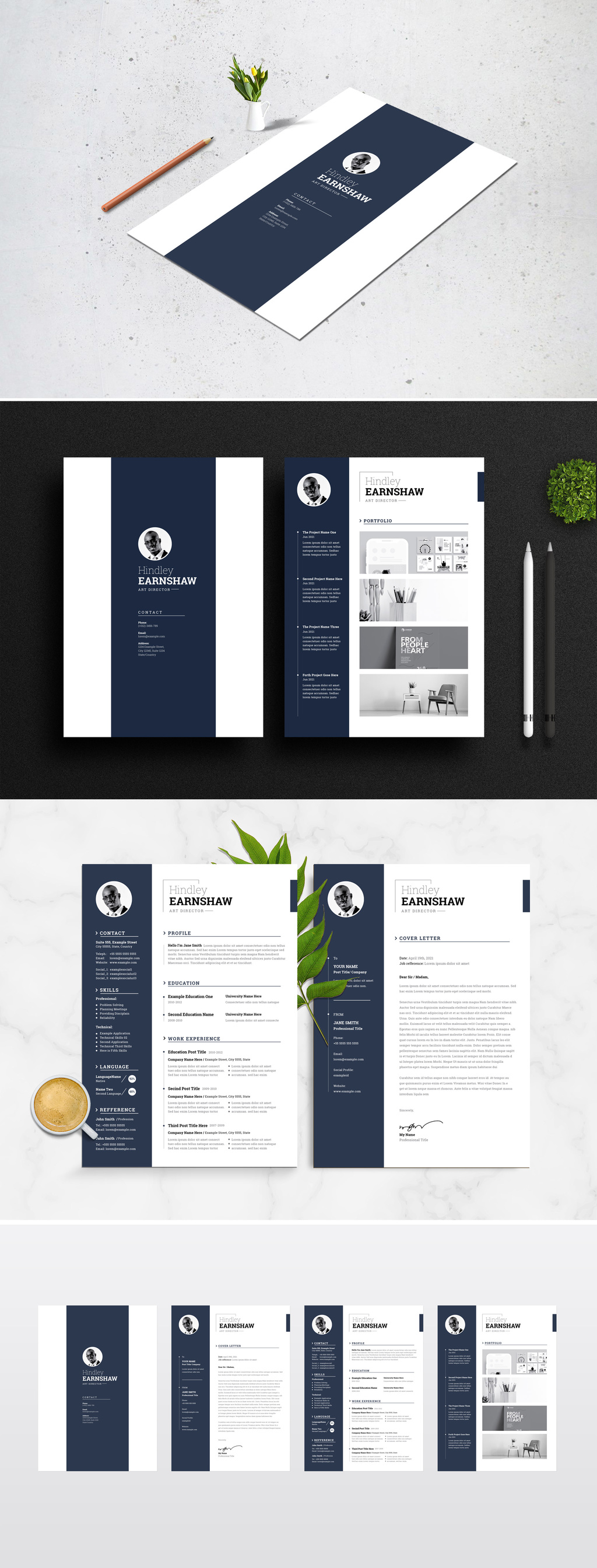
A dark navy sidebar runs down every page, holding a circular photo, contact details, skills, and languages in white type while the rest of the page stays clean and white. The set covers a resume, a cover letter, and a portfolio page, so your whole application keeps one look.
67. Classic Resume

This resume hasn't got many specific elements to it and without a doubt, I can place it in the classic templates section. The name is written in large and bold letters, the structure is simple and so are the colors.
68. The Snatcher

Snatch your reader's interest using a straightforward, minimalist resume. Yellow green, gray, and black are the colors that make information pop in this template. Add your professional details and send your application!
69. Black and White Elegance

Get your dream job by choosing this InDesign resume template. It is black and white but the chosen typographic style is out of this world. It adds elegance, which, combined with the effective structure, make this template literally flawless.
70. Brave Contrast

Brave your dream job by applying with a minimalist resume in black and beige. The contrast between the colors of this template will make your profile a head-turner. Download it, edit, and print!
71. The Professional Bundle

If you are in need of a professional bundle composed of CV, cover letter, and a portfolio, your needs have just been met. In the header you can place your basic information which will be on every single page, while the “body” of your resume will contain all the other important information.
72. Pink Profiler

Stylize your resume with pink highlights using this minimalist template. It has a light colored header and elegant character styles that will boost your application's appeal. Fill it with your details and get ready to print!
73. Tan Resume Layout with Dark Blue Tab

Tell your life's story in an impressive and clear way with the help of this interesting resume. The dominant colors here are subtle grey and dark blue while the overall style is mainly casual and engaging.
Modern InDesign Resume Templates
74. Modern Mood

Heighten your application's appeal using a clean, modern resume. This template features straight-to-the-point elemens in black, white, and gray. Just edit the texts and add your best image to perfect your profile.
75. Black and white Resume and Cover Letter Layout

This black and white bundle composed of three different pages will allow you to visually present all the needed information without too much clutter or complications.
76. Orange Leap

Take a leap towards your career goal by beginning with a modern resume template. Its orange highlights direct readers to the key information in your profile, making it easy to follow. Download and edit it freely!
77. Resume and Cover Letter Set with Teal Sidebar Element

If you are not such a big fan of basic yin/yang color combinations, maybe you should consider choosing this template with distinctive teal elements.
78. The Editorial

Put your professional attributes on display and get ahead of the application game. Use this modern resume template with teal and white pages to make your profile top-notch.
79. Resume Layout Set with Grey Header and Footer

Charming and simple, this template has a classical feel to it and the grey header and footer add a subtle dose of elegance.
80. Yellow Pious

Write down your profile, objectives, and skills on a yellow resume with pious icons and designs. Personalize this template by edting the texts, image, and style elements, then you're ready to submit your application!
81. Grey Header in combination with Blue Accents

Bold and strong design together with specific colors is what characterizes this InDesign resume template. Make quite the first impression with this one.
82. Resume Layout with Red Accents
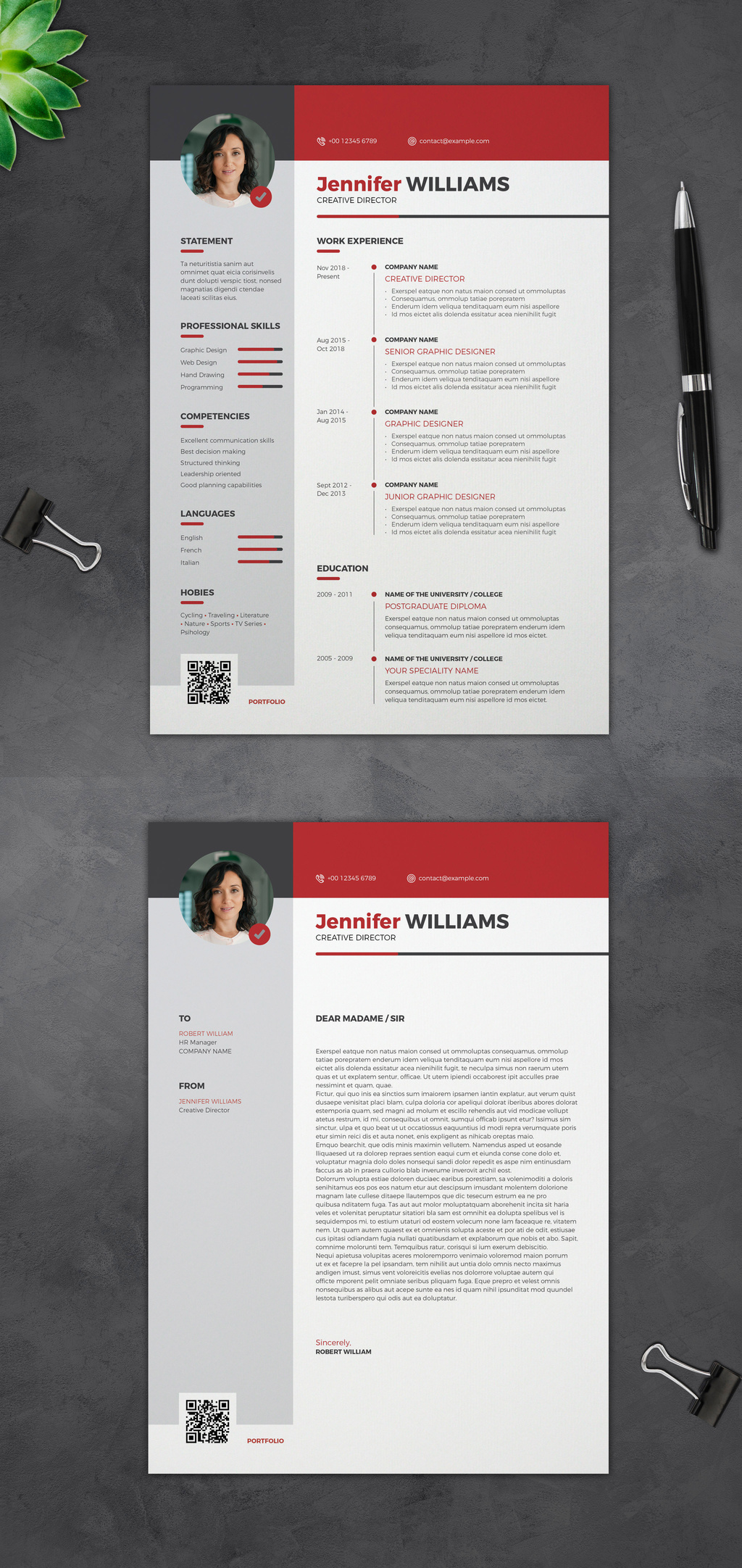
Bold red header bands and red skill bars pull the eye across a light grey sidebar, with a circular photo and a QR code at the foot of each page. The resume and its matching cover letter share the same layout, so your application arrives in one consistent style.
83. Orange Accents

Suitable for artists and professionals who have the freedom and the chance to experiment a bit and show their true colors through their resume. This template in particular has a black border and orange accents which are fancy and original.
84. Lavender Character

Liven up your resume using lavender accents and iconic designs. With this modern template, you can personalize your profile from serif character styles to subtle fills that result in a well-organized presentation of your career attributes.
85. A Blend of Elements

A combination of versatile elements make this InDesign resume template interesting to read. Starting from the name element all the way to the clearly divided sections, engaging info-graphics, and soft hues of color, choosing this template will be the best thing you can do.
86. The Binder

Step up your career game with a modern resume that accentuates your profile with dark tones of blue, green, red, or orange. Use this template to build your business, professional, or personal profile.
87. Grey Dominance

Casual yet visually appealing, this InDesign resume template has a dominant grey palette and a friendly feel to it.
88. In The Details

Capture your reader's interest using a straightforward resume that puts focus on your personal and professional details. With plain white and gray pages, this template is sure to bolden your name.
89. Resume Layout with Light Blue and Grey Accents

The original combination of colors gives this resume an attractive visual appearance which is absolutely a must-have when applying for a job. Besides the blue and grey color palette, this InDesign resume template has a well-organized structure and innovative layout.
90. Edges and Peaches

Bring out your edge through a modern resume that gives a refreshing appeal with its peach accents. Edit this template to your liking by playing with the character styles, colors, icons, and more.
91. Bold Resume Template

Don't be afraid to choose this template with a strong and bold design. The header of this InDesign resume template has a dominant black color while the remaining part of it is white. Two equal sections left and right divided up into multiple paragraphs with different purposes will allow you to tell your story.
92. Sky High

Use light blue to make your career dreams come true with this modern template. Its border-heavy pages will make reading your profile cool to the eyes. Just personalize the contents and get to printing!
93. Resume Layout with Grey and Orange Accents

Grey border lines together with orange details. These two colors together make a killer combination. This template will get your professional message across and strategically draw attention to all the needed information.
94. Resume Layout with Table Elements

This template is the pinnacle of structure and organization. It has a table element in which you can put all of the relevant information.
95. The Bright One

Top the applicant list with a comprehensive, modern resume. This template will boldly highlight your profile with bright yellow fills and thin lines that direct readers' eyes to important information.
96. Functional Flair

Leave a functional impression on your readers with a modern resume. Get to bring out your flair in a straightforward manner with this white and gray template, accentuated by green elements. Edit the contents and submit!
97. Point Black

Point your readers' eyes to your key attributes in this powder pink resume template. Highlighted in black, the titles and important texts in your profile will surely heighten the appeal of your application.
98. Honey Highlights

Hold everyone's interest with a neat and modern resume. With this easy-to-follow icons and lines, this template highlights your profile with honey yellow accents. Customize the elements and print the pages!
99. Blue and Yellow Resume Layout Template
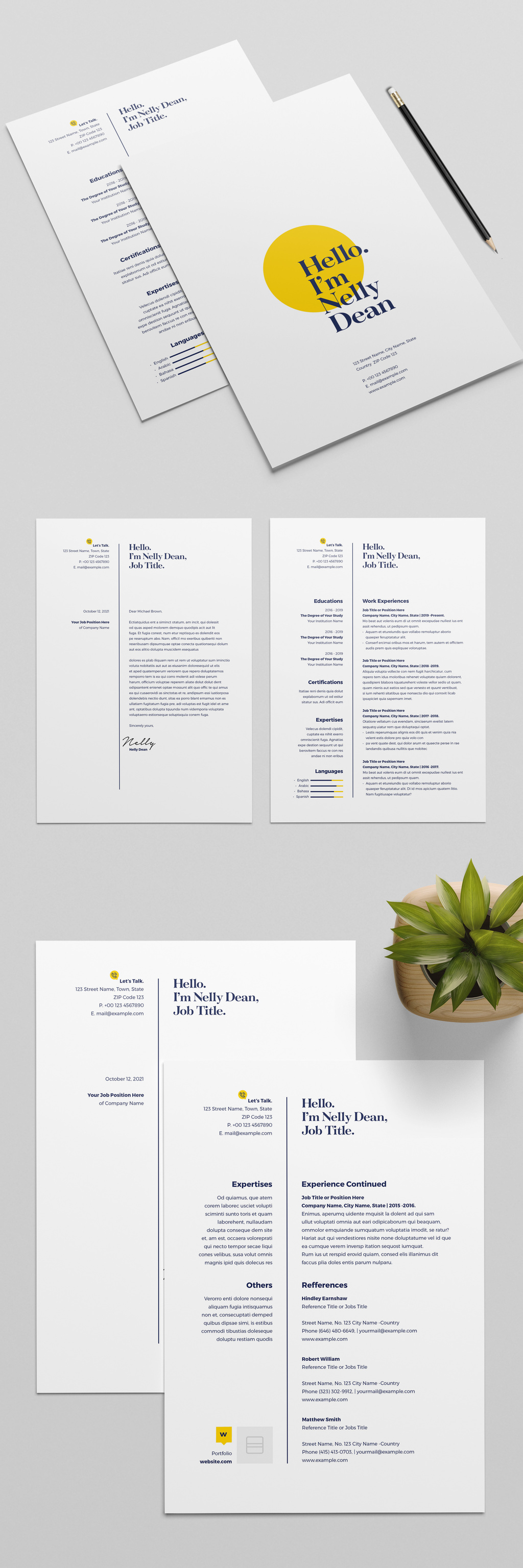
A big yellow circle sits behind a navy serif "Hello. I'm..." headline on the cover page, and that same navy-and-yellow pairing runs through the resume, the cover letter, and the references page: a small yellow contact badge, thin navy dividing rules, and navy language bars tipped in yellow. It comes with two design options set up for A4 and US Letter in CMYK.
100. The Showstopper

Steal the show with a boldly black resume, accentuated with yellow texts, patterns, and icons. Play with the elements that come in one with this template. Edit the contents and get set for your application!
Search for more templates
I hand-picked everything in this list, but if none of it fits, use the form below to browse a much larger library of InDesign templates.
Which template should you download?
Pick the layout that puts your most relevant experience in the top third of the first page. Style comes second. The free section above has 20 templates, and the marketplace sections add 27 simple, 26 minimalistic, and 27 modern layouts.
Once you have a shortlist, open the source page and check four things before you download:
- File format. An IDML file next to the INDD is the safer bet. IDML is made for exchange between versions, so it still opens if the designer used a newer InDesign than you do.
- Fonts. Most of these designs lean on one or two specific typefaces. See whether they are included, free to download, or something you have to buy on top.
- Price and license. Free and paid status changes without notice, and so do the terms. Trust the source page, not this list.
- Reading order. If the job portal parses your file automatically, keep a plain single-column version next to the designed one. Sidebars, icons, and charts confuse parsers.
When the edit is done, export a text-based PDF and try to select the text in it. If you cannot select it, the recruiter's software probably cannot read it either.
One more thing: marketplaces retire templates all the time. If a link here lands on a missing-page error, use the search bar above to find the closest match.
Frequently asked questions
Can an InDesign resume work with an applicant tracking system?
It can, but the design matters. Use selectable text, familiar headings, and a clear reading order. Keep a simple one-column version when a job portal relies on automated parsing.
Should an InDesign resume template include IDML?
IDML is useful when the template was made in a newer InDesign version. An INDD file is native to InDesign, while IDML is intended for exchange between versions.
How should you export an InDesign resume?
Export a text-based PDF from InDesign and check that you can select and copy the text. Avoid printing to PDF, which can flatten content.
Can you edit an INDD resume without InDesign?
Third-party tools can sometimes open or convert INDD or IDML files, but layout, fonts, and styles may change.
Before you send it out
Go for the template that looks like the job you want, not the one that looks best in a preview. A design role can carry a bold layout. A finance role usually cannot.
If you want to customize the file properly, our guides to InDesign paragraph styles and page numbering in InDesign cover the parts where people get stuck. And if a portfolio is next on your list, we also collected InDesign architecture portfolio templates.