In this list you'll find 50 free and paid InDesign templates for photobooks, handpicked and grouped by style. The first three are free, and the rest are marketplace downloads from Adobe Stock and Envato Elements.
Each one has a preview, so you can judge the layout before you click through. Have a scroll, or skip ahead to the style you already have in mind.
Quick heads-up: some links in this list are affiliate links, which means we may earn a small commission if you make a purchase — it won't cost you anything extra.
Jump straight to the section you want:
- Free Photobook Templates
- Modern Photobook Templates
- Minimalist Photobook Templates
- Simple Photobook Templates
No time to go through all 50? Use this search bar to hunt for a specific photobook style:
Free Photobook Templates
1. Throwback Tale

Tell a throwback tale through a rustic black and white photobook. This free template has a variety of image layout styles that you can adjust to fit your theme. And the text descriptions are also yours to personalize.
2. Artistic Clutter

Put together an artistic display of photographs using this minimalist template. The unaligned characters and objects make for a stylistic clutter that you can play around with to improve your overall photobook.
3. The Undertone Lookbook

Impress anyone who looks at your photographs by compiling them in a modern lookbook with pale background colors. This template has plain pages of green, gray, orange, and yellow undertones that create an aesthetic ensemble.
Modern Photobook Templates
4. Portrait Press

Take your viewers' eyes to a portrait fest with a modern magazine-style photobook. This template puts your photos in focus with large image boxes on every page, accentuated with brown and orange.
5. Dimmed Sophistication

Style your photographs with modern sophistication using this classy template. The pages have either a black or white background with gray accents. Just add your own texts and images, and it's done!
6. Strokes And Splash

Turn all eyes to your photographs with an aesthetic lookbook. Every page of this template frames images with brush strokes, enhanced by a splash of colors. Make it your own today!
7. White And Tan Album
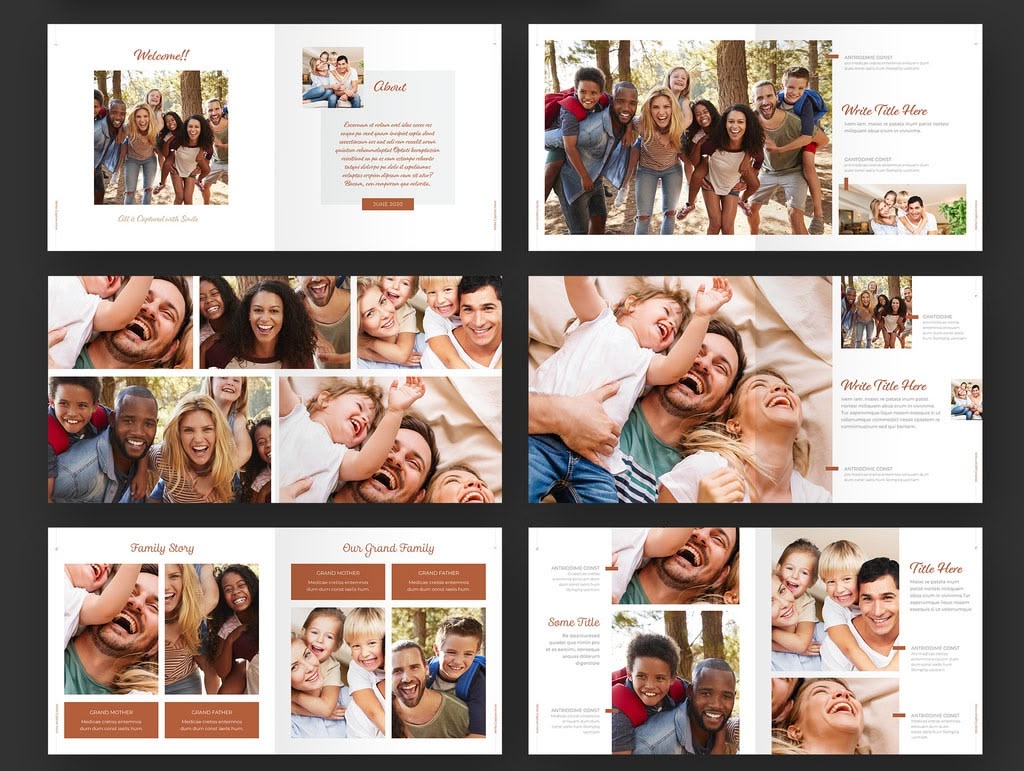
A warm family album that keeps every page bright and simple. White landscape spreads carry tan and terracotta blocks, script headings and small caption slots, so a run of family or holiday shots reads as one story. You get 26 US Letter pages of ready-made photo grids in InDesign - bring your own pictures, because the photos in the preview are not included in the download.
8. Powder Blush

Beautify your collection of photographs with a touch of blush. This template has creative layouts of texts and images on every flip, glistened with powder pink accents that give off subtle sophistication.
9. Placid Pink

Feature your best shots in a modern photobook with placid pages. This template has a brochure-style layout of texts and images with light pink accents and bold black characters, creating a pleasing display.
10. Lowkey Cosmopolitan

Flaunt your cosmopolitan photographs without going overboard on design. Use this modern photobook template with a plain white base and light accents of minimalist hues for a lowkey urbanite look.
11. Saturated Spots

Make your mark in photography with a modern template enhanced by colors of nature. This template frames your images in circles with accents of brown and orange in high saturation, resulting in a warm lookbook.
12. Metropolitan Wander

Give your viewers a visual adventure as they look at your shots in a blue and yellow photobook. With cursive character styles and wild object designs, the pages of this template gives off metropolitan vibes.
13. The Collager

Share the shots you're proud of in a simple photobook with wisely laid out pages. This template is sure to help you convey your concepts as visualized by your photographs. Simply edit the texts and images with your own!
14. The Black Pitch

Bring together your boldest snaps in a perfectly black photobook. Lay out your photographs on black backgrounds, and let your texts float in bright fonts. Use this template to make your best pitch!
15. Sweet Pinky

Pose a sweet presentation of your photographs on pink pages with cute art elements using this photobook template. Simply add your images and texts to the spaces, then move around the objects as you like.
16. Autobiographic

Show off your persona in portraits using this fashionable photobook template. Add your images to the spaces and just edit the text descriptions to convey your visuals' message.
17. Life And Lemons

Flash life into your photo collection with a bright and lively photobook. Here's a template that doesn't shy away from lemons as each page is livened up by yellow, orange, and red accents.
18. Dark Allure

Set your photographs in the dark to turn up their allure using this monochrome template with yellow accents. Just place your images and texts on the spaces, and feel free to move around the objects before printing.
19. Orange Element

Attract everyone with your best elements in photos by putting them together in a modern photobook. Edit this template with orange highlights by adding your images and texts to the pages. Then, it's ready for printing!
Minimalist Photobook Templates
20. Peach Perfect

Pitch your photographs and concepts through a visual presentation. With this landscape photobook template, you get a variety of page layouts with peach highlights that you can customize.
21. Zero Chroma

Reveal your talent in photography with a classic black and white photobook. You can't go wrong with this clean and organized template, which you only have to edit with your own images and texts.
22. The Museum

Create your own museum of photographs on classy white pages with black accents using this vertical photobook template. With bold serif texts, your collection will be one for the books.
23. Teal Tease

Display your camera tricks through a magazine-style photobook. With this template, you get minimalist pages with teal accents that's cleanly organized on white and light gray backgrounds.
24. Pink Exhibit

Flip through the best life moments in an elegant modern photobook. With pastel pink accents, the pages in this template is fully editable. Play with the layers to match your motif!
25. Red Letters
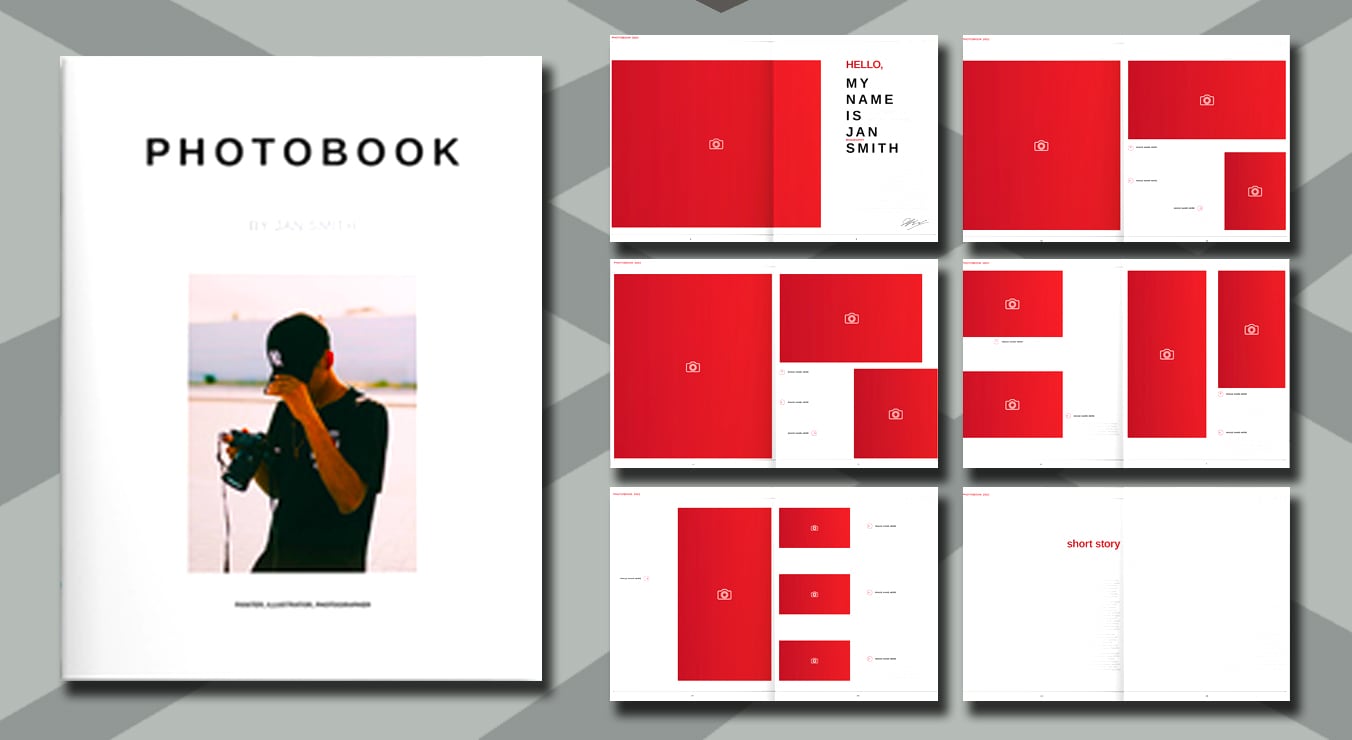
Compile your exceptional shots in a minimalist, striking photobook. This brochure-style vertical template provides you with neatly organized image boxes and wide spaces for texts, highlighted in red.
26. The Trojan

Show your trojan-strong photographs in a minimalist black and white photobook with green accents. This landscape template has a variety of classy character styles and image layouts that you can fully edit to reflect your personal style.
27. Doodle Dude

Get your doodle art out as you showcase your best shots in this minimalist square photobook. Every beige page is dolled up with doodle elements like dots and scribbles, adding flavor to your visuals.
28. Floral Gleam

Let your shots bloom to their fullest potential in a well-organized, minimalist photobook. Use this template with pastel pink, blue, beige, and gray accents to display your camera works.
29. Classic lips

Leave your viewers wanting more as they flip through your classic, minimalist photobook. Fill this fully editable landscape template with your best photographs and tell the world what makes each one remarkable!
30. The Hotspot

Flaunt your favorite shots in a modern minimalist portrait photobook. This easy-to-edit template frames your photographs in neatly-organized circles on white pages. And the character styles are also yours to decide!
31. Clouds And Waves

Crush the photobook game with a blue-accentuated landscape template. This highlights important titles and elements in bright blue to make sure your viewers capture the essence of your shots.
32. Scribble Squares

Put some fun into your photograph display using this doodle-styled square photobook template. Every page is decorated with scribbles and dots and accentuated with light blue and beige, resulting in a cool, minimalist layout.
33. Tidal Blues

Strut your photography talent through an eye-pleasing minimalist photobook. Personalize this brochure-style portrait template with blue accents and make a tidal impression on everyone who sees your works!
34. Model Material

Match your models' angst with an exquisite minimalist photobook layout. With this magazine-style template, you get large image holders with grid elements, plus orange and gray accents that enhance the quality of every page.
Simple Photobook Templates
35. Collage Countdown

Countdown to your greatest photographs in this simple and neatly organized photobook. This template features wide-space images and straight-to-the point texts, along with number highlights that make flipping engaging.
36. Miss Magazine

Strike a magazine-style photobook pose using this simple, white template. The image boxes and text descriptions are smartly laid out, so all you got to do is add your work and it's ready for printing!
37. Vivid Blocks

Feature your favorite camera shots in prim blocks with this plain and simple photobook template. It features collage and single-image pages, both with text-efficient layouts to best convey your visual messages.
38. Nostalgia

Let your viewers live the moments you captured through a nostalgia-inducing photobook. This simple template features an old film, grainy look with yellow text that hits home with every flip.
39. White Pristine

Lay out your photographs in a pristine portrait photobook. With this simple template, you get neat image placeholders on text-light pages. Just add your photos and edit the descriptions.
40. Bare B&W

Bare your visual messages on black and white pages using this simple photobook template. The image blockings and minimalist text placements, plus the dark gray accents, will surely improve the appeal of your photographs.
41. Square City

Awe everyone with your beautiful photographs, arranged in a simple square photobook. Add your images and texts to this fully editable template, and take the city with its beauty!
42. Gray Snaps

Share your memorable snaps in a simple photobook template with gray and sepia accents. Using this neat layout, you can feature your photographs in collage pages with easy-to-read texts.
43. Simple Fickle

Create a varied display of your wondrous photographs using this simple photobook template. It fashionably lays out your images and texts on clean white pages, which you can edit and adjust to your preference.
44. Strips And Serif

Beautify your photographs through an elegant ensemble using this simple portrait template. The pages are accentuated with black strips and serif characters to enhance your photobook's look.
45. The Pacific

Peak in the photography field with a calm collection of your greatest shots using this simple photobook template. It displays your images at their maximum with enough white spaces to balance the overall organization.
46. Flawless Plains

Strut your award-winning shots in a flawless photobook. This simple portrait template will allow you to neatly collage and highlight your images with serif and cursive text styles. Simply add your photographs, titles, and descriptions to the pages!
47. The Great Squares

Square up to greatness by laying out your awesome images in a simply stunning photobook. You get dapper black and white pages with code-style texts when you edit this square template for your personal use!
48. Page Turner

Gain the appreciation your photographs deserve through a simple yet jarring photobook. The black-accentuated white pages and minimalist character styles of this landscape template is sure to make your output a page turner.
49. The Corporate

Impress your viewers with your professional photographs through a simple ensemble of your shots. Personalize the images and texts of this corporate-style photobook template for a multitude of uses!
50. Black Wrack

Wrack the black and white photography game with this simple, regal photobook template. It features an array of image box styles and empty white spaces that allow for genuine focus on your photographs.
How do you pick the right photobook template?
Start with the photos you already have, not with the prettiest cover. Count the images you actually want to print, check whether they're mostly portrait or landscape, then pick a template whose page rhythm matches. A layout built around one big image per spread will fight you if you're trying to fit 200 holiday snaps.
Two things are worth a look on the product page before you commit. First, the file format: an INDD file wants the InDesign version it was made in or newer, while IDML is the friendlier option if your InDesign is a few releases behind. Second, the licence: of the 50 templates above, 31 link to Adobe Stock, 18 to Envato Elements, and one to Gumroad, and each marketplace words its terms differently - that matters most when the book is for a client or you plan to sell it.
One more thing before you resize a single page: ask your print shop for their specification. Photobook printers each have their own trim sizes, bleed, and page-count rules, and starting from their numbers is far easier than reflowing a finished book.
Frequently asked questions
How many of these photobook templates are free?
Three, and they sit at the very top of the list under Free Photobook Templates. The other 47 are marketplace downloads: 16 modern, 15 minimalist, and 16 simple layouts.
Which software do I need to open them?
Adobe InDesign. Each product page lists the files included in the download, so check there for INDD or IDML before you buy - IDML is the one to look for if you're not on the latest version.
What if the template I want isn't there any more?
Marketplaces retire and re-index templates, so a link can occasionally land somewhere other than the design you expected. The search bar at the top of this post is the quickest way to find a close match, and our roundup of the best InDesign templates points to more sources.
Conclusion
You made it - that's all 50. We tried to keep the list varied, so whichever style you came for, loud and colourful or quiet and mostly white space, there should be something here that fits.
Shortlist two or three, drop your own photos in at final size, and keep the one that needs the least wrestling.
If you are looking into other templates as well - make sure you head to our InDesign templates page.
All the best,
Stefano