Cerchi il CAT giusto? La verità è che il "migliore" dipende tutto da chi lo sta cercando. Un traduttore freelance, un project manager di un FORNITORE DI SERVIZI LINGUISTICI e un responsabile marketing che traduce cataloghi senza un team di localizzazione stanno tutti facendo la stessa ricerca, ma nessuno di loro ha bisogno dello stesso strumento.
Abbiamo confrontato 22 strumenti chiave presenti oggi sul mercato: cosa fanno, chi li usa davvero, i prezzi attuali e cosa dicono le recensioni dopo la prova gratuita. La maggior parte delle soluzioni qui sono pensate per traduttori professionisti e team di localizzazione. Se non è il tuo caso — se gestisci file InDesign, brochure e schede tecniche su più mercati senza un reparto di traduzione dedicato — la sezione su Redokun qui sotto è pensata proprio per te, e la nostra guida alla traduzione assistita dal computer ti dà una panoramica completa.
 |
|
| Descrizione: |
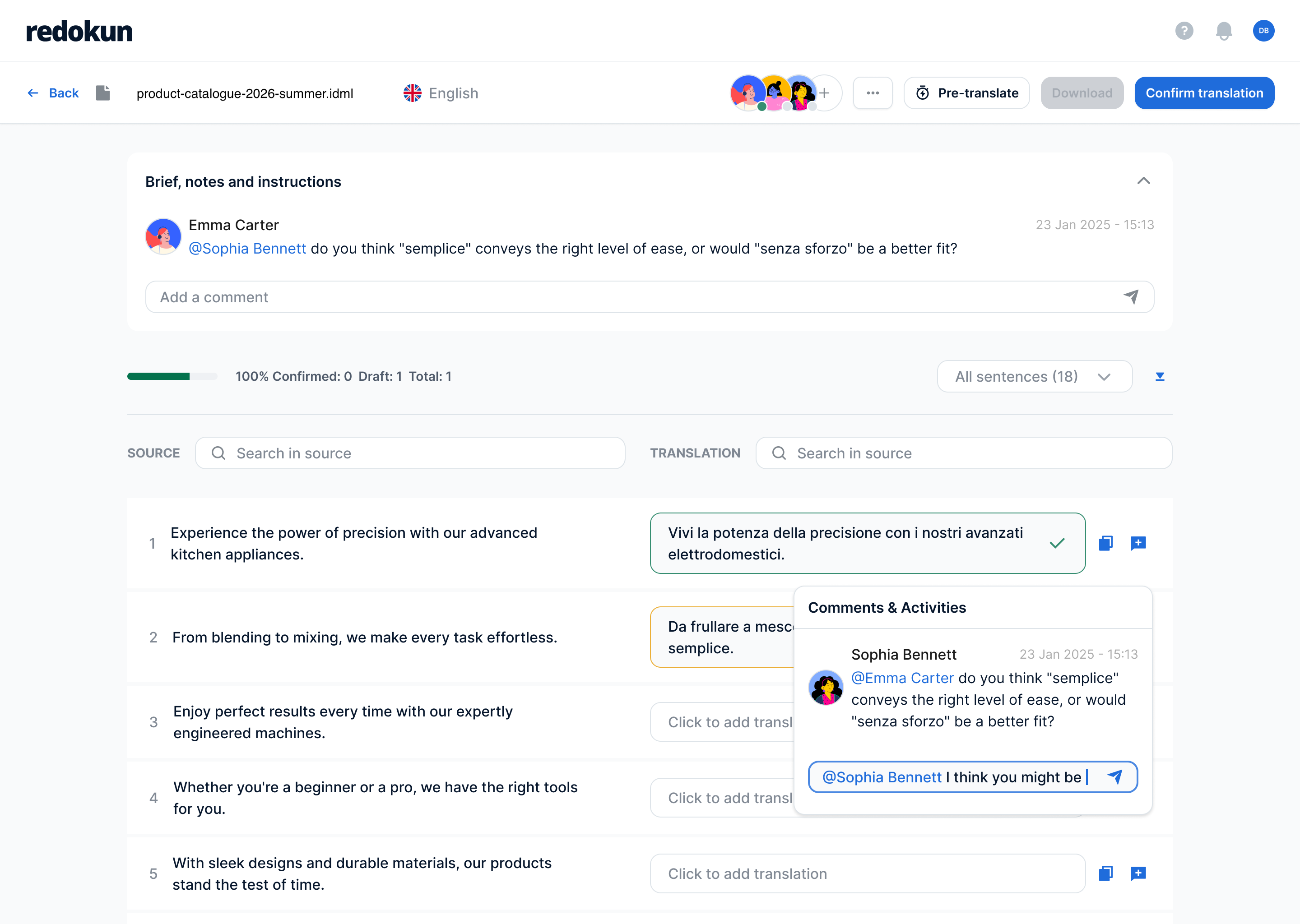
Una piattaforma di gestione della traduzione basata su cloud, pensata per i team marketing ed export di aziende manifatturiere di medie dimensioni che traducono cataloghi, schede tecniche e brochure in più lingue, senza un team di localizzazione dedicato. |
| Tipo: |
Sistema di gestione della traduzione (TMS), CAT |
| Adatto per: |
Documenti — InDesign, Word, PowerPoint, Excel, XLIFF, JSON, SRT e altro |
| Chi lo usa: |
Responsabili marketing e redattori tecnici del settore manifatturiero, agenzie di grafica, editori, creatori di contenuti e-learning |
| Cloud o Desktop: |
Cloud |
| Punti di forza: |
- Facilissimo da usare, serve pochissima formazione
- Organizza e gestisci i file dei tuoi progetti con le cartelle, proprio come su Google Drive
- Supporta direttamente file InDesign, Word, PowerPoint, Excel, JSON, HTML, XLIFF (11 formati compatibili), che vengono restituiti nel loro formato originale
- Revisioni rapide: quando un documento cambia, basta ritradurre solo il testo nuovo o modificato, non tutto il file da capo
- Memoria di traduzione e Glossario condiviso mantengono la terminologia coerente per tutti i traduttori di un progetto
- Traduzione con l'IA disponibile con DeepL, Google Translate o ChatGPT
|
| Prezzi: |
Project Pass per un singolo progetto, senza abbonamento, oppure i Piani di abbonamento per esigenze di traduzione continuative. Dai un'occhiata alla nostra guida completa alla traduzione assistita dal computer senza team di localizzazione. |
| Cosa dicono le recensioni: |
- Gli utenti adorano quanto sia intuitivo e facile da usare il software con i collaboratori, oltre al team di supporto sempre reattivo.
- Pur essendo nato per la traduzione di file InDesign, lo strumento ha ampliato le sue funzionalità anche ai documenti Microsoft Office e ad altri formati.
Leggi tutte le recensioni su G2 | Capterra
🎥 Guarda una demo di Redokun su YouTube
|
 |
Torna all'inizio della lista!
 |
|
| Descrizione: |
Una piattaforma di localizzazione/traduzione basata su cloud e alimentata dall'IA che combina un CAT, gestione della traduzione e un marketplace con oltre 500.000 linguisti freelance, pensata per aziende e fornitori di servizi linguistici che hanno bisogno di traduzione, creazione e QA dei contenuti end-to-end. |
| Tipo: |
Sistema di gestione della traduzione (TMS) cloud / CAT con marketplace |
| Adatto per: |
Documenti, contenuti marketing e web, file strutturati, flussi di lavoro multilingue continuativi |
| Chi lo usa: |
Team marketing/team di localizzazione, fornitori di servizi linguistici, traduttori interni, traduttori freelance (tramite marketplace) |
| Cloud o Desktop: |
Solo cloud |
| Punti di forza: |
- Marketplace integrato per freelance (oltre 500.000 linguisti)
- I match della memoria di traduzione sono illimitati su tutti i piani a pagamento
- Modello di utilizzo basato su "Smartwords" invece del classico prezzo fisso per accesso
- Utenti illimitati su tutti i piani a pagamento
- Riconosciuto come Leader nelle griglie autunnali 2026 di G2 per traduzione assistita dal computer e localizzazione
|
| Prezzi: |
Si parte da 1.200$/anno con Adapt, passando per Accelerate (24.000$/anno) e Anticipate (60.000$/anno) fino a un livello Autonomous personalizzato, vedi i prezzi attuali |
| Prova gratuita: |
Prova gratuita di 15 giorni, incluso accesso API |
| Cosa dicono le recensioni: |
- Molto apprezzato per la facilità d'uso, il flusso di lavoro centralizzato (traduzione + PM + pagamenti in un unico posto) e il supporto efficace. Lamentele comuni: ritardi nei pagamenti ai freelance (riportati oltre 60 giorni), qualità della traduzione con l'IA non sempre costante, salti di prezzo tra i vari piani.
Leggi tutte le recensioni su G2 (4,6/5, 167 recensioni) | Capterra (4,5/5, 140 recensioni)
🎥 Guarda una demo di Smartcat su YouTube
|
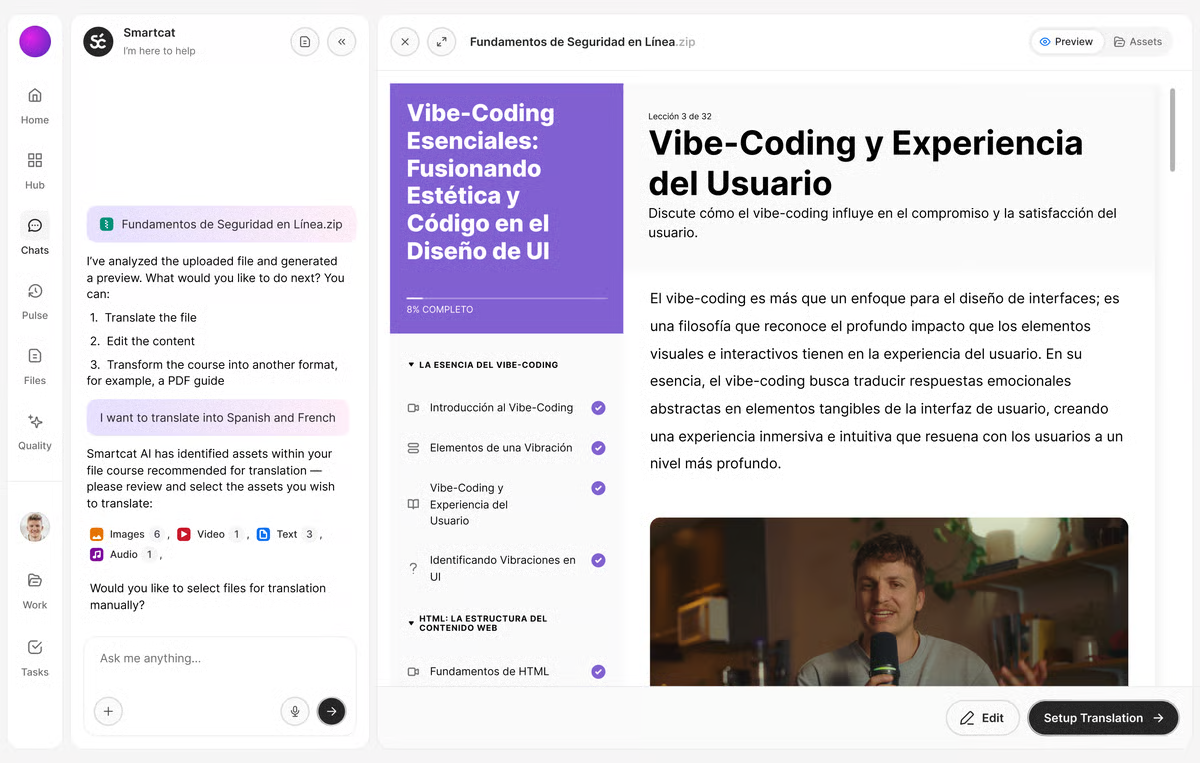 Immagine ottenuta da G2
|
Torna all'inizio della lista!
 |
|
| Descrizione: |
Un CAT tool desktop e cloud creato da RWS (prima chiamato "SDL Trados Studio" prima che RWS eliminasse "SDL" dopo la fusione del 2020), ampiamente usato da traduttori professionisti, fornitori di servizi linguistici e team di localizzazione aziendali come software di produttività per la traduzione standard del settore. |
| Tipo: |
CAT tool e software di produttività per la traduzione (editor desktop + cloud) |
| Adatto per: |
Documenti (Word, PDF, PowerPoint e altro), file strutturati e tecnici, progetti di traduzione professionale |
| Chi lo usa: |
Traduttori freelance, fornitori di servizi linguistici, team di localizzazione aziendali |
| Cloud o Desktop: |
Entrambi — app desktop solo per Windows più editor basati su browser, incluso Trados Go |
| Punti di forza: |
- Ultima versione "Trados Studio 2026", con funzionalità IA tramite l'add-on integrato "Language Weaver Pro"
- Ampiamente descritto come lo standard del settore richiesto da molte agenzie
- Collaborazione in tempo reale, revisione IA e valutazione della qualità nei piani Team/Business
- Disponibile come abbonamento annuale e, su alcuni piani business, licenza perpetua
- Il piano Enterprise include 26 modelli di flusso di lavoro e flussi di lavoro completamente personalizzabili
|
| Prezzi: |
Da £24/mese (Trados Go) fino a £34–408/mese o /anno per i piani freelance, Team, Business ed Enterprise, vedi prezzi attuali |
| Prova gratuita: |
14 giorni sui piani freelance; disponibile anche su Pro, Team e Business |
| Cosa dicono le recensioni: |
- Apprezzato per la memoria di traduzione, la ricchezza di funzionalità, la revisione a livello di segmento e lo status di standard del settore. Criticato per il costo elevato, problemi di prestazioni/crash su file grandi, interfaccia affollata/datata e limitazione solo Windows.
Leggi tutte le recensioni su G2 (elencato come “Trados”, 4,0/5, 154 recensioni) | Capterra (4,3/5, 88 recensioni)
🎥 Guarda una demo di Trados Studio su YouTube
|
 Immagine ottenuta da ALL PC World
|
Torna all'inizio della lista!
 |
|
| Descrizione: |
Un CAT tool desktop/cloud di memoQ (Kilgray) — il prodotto pensato per i traduttori individuali all'interno della più ampia suite memoQ TMS — usato per traduzione, revisione e gestione della terminologia/memoria di traduzione. |
| Tipo: |
CAT tool (licenza individuale desktop + web, parte della piattaforma più ampia memoQ TMS) |
| Adatto per: |
Documenti, file strutturati e tecnici, progetti di traduzione individuali e per piccoli team |
| Chi lo usa: |
Traduttori freelance e individuali (il prodotto memoQ TMS separato serve fornitori di servizi linguistici e team aziendali) |
| Cloud o Desktop: |
Entrambi — applicazione desktop più editor online basato su web |
| Punti di forza: |
- Licenza solo in abbonamento, senza opzione di licenza perpetua
- Abbonamento mensile o annuale, stesse funzionalità per entrambi
- Supporto 24/7 incluso in ogni piano
- Parte della più ampia linea di prodotti memoQ TMS (Starter, Essential, Professional, Enterprise)
- Le recensioni segnalano una forte stabilità rispetto ad alcuni concorrenti
|
| Prezzi: |
€396/licenza/anno (o €44/licenza/mese), vedi prezzi attuali |
| Prova gratuita: |
Prova di 14 giorni, senza bisogno di inserire dati di pagamento |
| Cosa dicono le recensioni: |
- Apprezzato per il design intuitivo, strumenti TM/terminologia potenti, supporto reattivo e stabilità. Criticato per la curva di apprendimento ripida sulle funzionalità avanzate, una versione web considerata inferiore rispetto all'app desktop, un'interfaccia utente affollata e nessun supporto nativo per Mac.
Leggi tutte le recensioni su G2 (4,5/5, 132 recensioni — per lo più su memoQ in generale, non su questa edizione specifica) | Capterra
🎥 Guarda una recensione di memoQ su YouTube
|
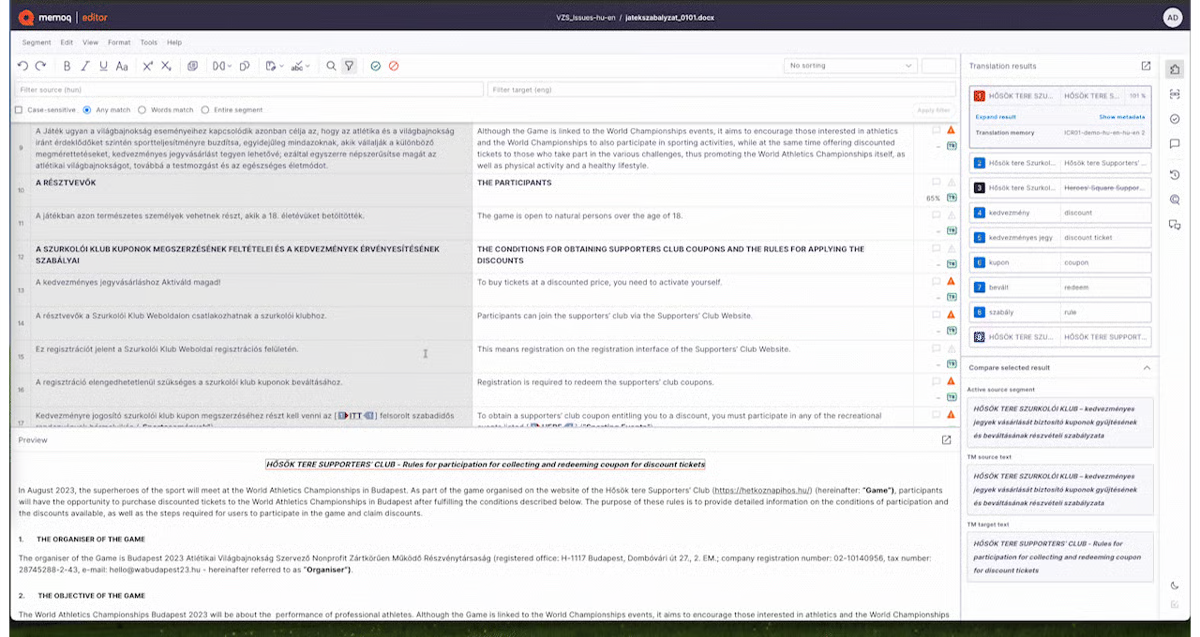 Immagine ottenuta da G2
|
Torna all'inizio della lista!
 |
|
| Descrizione: |
Una piattaforma cloud di localizzazione/gestione della traduzione creata per team di prodotto e ingegneria, che gestisce stringhe UI di software, app e localizzazione di siti web con integrazioni profonde con gli strumenti di sviluppo. |
| Tipo: |
Piattaforma cloud di localizzazione e sistema di gestione della traduzione |
| Adatto per: |
Localizzazione di app, stringhe UI di siti web/software; documenti in misura minore |
| Chi lo usa: |
Product manager, sviluppatori e responsabili della localizzazione in aziende SaaS e tech |
| Cloud o Desktop: |
Solo cloud (piattaforma web, più CLI, API e SDK) |
| Punti di forza: |
- Accessi illimitati per traduttori e revisori, e parole ospitate, su ogni piano a pagamento
- Prezzo basato sulle parole elaborate e sul numero di accessi avanzati (manager/sviluppatore)
- Integrazioni con GitHub, Figma, Jira e altri 14+ strumenti
- Traduzione con l'IA e memoria di traduzione integrate
|
| Prezzi: |
Da $149/mese (Explorer) fino a $1.049/mese (Advanced), oppure un piano Enterprise personalizzato. Fatturazione mensile o annuale. vedi prezzi attuali |
| Prova gratuita: |
14 giorni, nessuna carta di credito richiesta, su tutti i piani |
| Cosa dicono le recensioni: |
- Apprezzato per la facilità d'uso, il supporto reattivo e le integrazioni (GitHub, Figma, Jira). Criticato per la gestione noiosa di chiavi/tag/screenshot, funzionalità di glossario superficiale e livelli di integrazione Figma costosi.
Leggi tutte le recensioni su G2 (4,7/5, 763 recensioni) | Capterra
🎥 Guarda una demo di Lokalise su YouTube
|
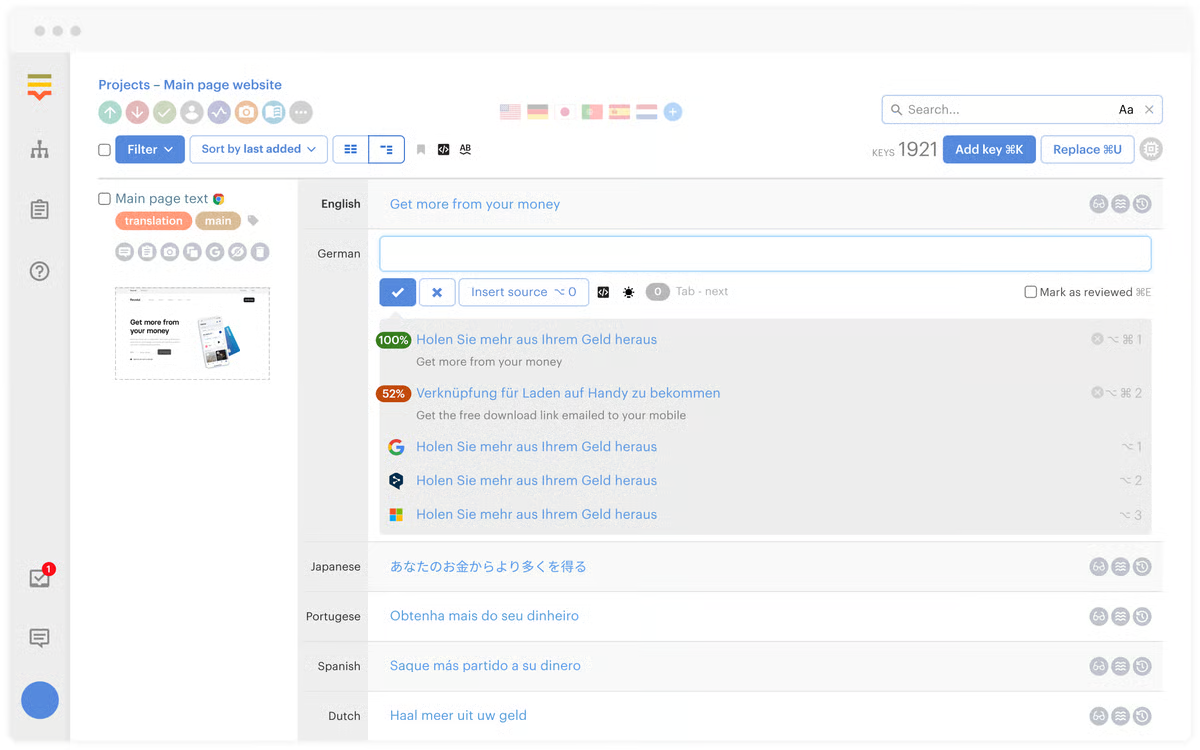 Immagine ottenuta da G2
|
Torna all'inizio della lista!
 |
|
| Descrizione: |
Una piattaforma cloud di gestione della traduzione che combina traduzione con l'IA/traduzione automatica, un portale self-service e servizi di traduzione gestiti, pensata per le aziende che hanno bisogno di localizzazione di documenti/contenuti con revisione opzionale da parte di un linguista professionista. |
| Tipo: |
Sistema di gestione della traduzione cloud e strumento CAT |
| Adatto per: |
Documenti (inclusi PDF), contenuti del widget di localizzazione del sito web, contenuti aziendali che richiedono la revisione del team |
| Chi lo usa: |
Team aziendali e fornitori di servizi linguistici che vogliono un mix di traduzione con l'IA self-service e traduzione professionale esterna |
| Cloud o Desktop: |
Solo cloud |
| Punti di forza: |
- Livello self-service gratuito: 15.000 parole/mese per un utente
- Widget di localizzazione del sito web incluso già dal livello gratuito
- L'IA applica automaticamente la terminologia e lo stile specifici del cliente
- I livelli superiori aggiungono API, integrazioni, SSO e flussi di lavoro IA supervisionati
- Esternalizzazione a pagamento opzionale ai traduttori professionisti di Text United
|
| Prezzi: |
Self-Service FREE €0/mese (15.000 parole, 1 utente); Self-Service TEAM €150/mese (100.000 parole, 10 utenti); OnePlatform €780/mese (500.000 parole, utenti illimitati); OneEnterprise = personalizzato, vedi prezzi attuali |
| Prova gratuita: |
Livello self-service gratuito; prove disponibili anche sui livelli a pagamento |
| Cosa dicono le recensioni: |
- Lodato per il servizio clienti e la qualità della traduzione automatica. Alcuni recensori segnalano lentezza occasionale e prezzi che sembrano alti per i team più piccoli.
Leggi tutte le recensioni su G2 (4,3/5, 58 recensioni) | Capterra (4,7/5, 53 recensioni)
🎥 Guarda una demo di Text United su YouTube
|
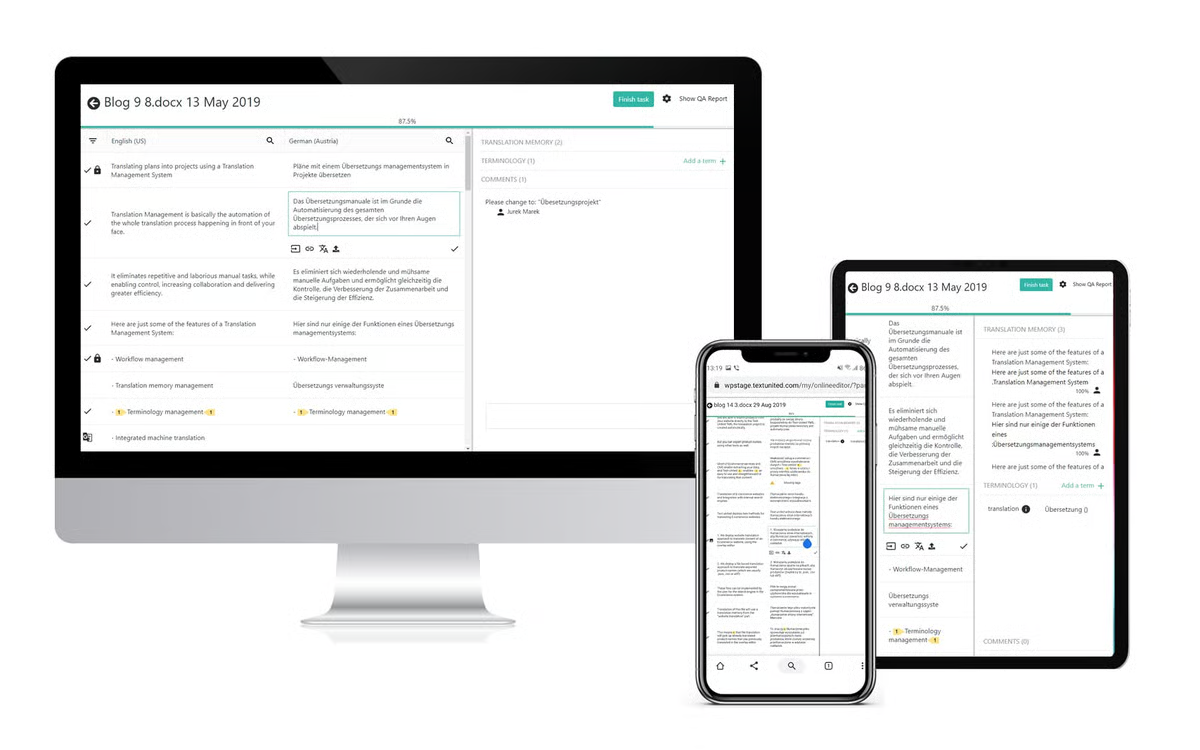 Immagine ottenuta da G2
|
Torna all'inizio della lista!
 |
|
| Descrizione: |
Una piattaforma cloud di gestione della localizzazione/traduzione per team di prodotto e marketing. Acquisita da XTM International a gennaio 2025. |
| Tipo: |
Piattaforma cloud di localizzazione e sistema di gestione della traduzione |
| Adatto per: |
Stringhe software e app, contenuti di siti web, contenuti di marketing, localizzazione guidata dagli sviluppatori |
| Chi lo usa: |
Team di prodotto, team di marketing, sviluppatori e responsabili della localizzazione |
| Cloud o Desktop: |
Solo cloud |
| Punti di forza: |
- Acquisita da XTM International a gennaio 2025; confermata ancora attiva e commercializzata indipendentemente come Transifex
- Progetti e file illimitati, anche già dal livello Starter
- Inclusi pacchetti di parole per la traduzione con l'IA che aumentano in base al livello
- Oltre 46 integrazioni disponibili
|
| Prezzi: |
Starter da $160/mese (mensile) o $135/mese (annuale), 10 collaboratori; Growth da $236/mese (mensile) o $200/mese (annuale), 30 collaboratori, aumenta con il volume di parole; Enterprise+ = personalizzato, 100 collaboratori, vedi prezzi attuali |
| Prova gratuita: |
Gratis per iniziare, nessuna carta di credito richiesta — vedi termini attuali |
| Cosa dicono le recensioni: |
- Lodato per la facilità d'uso, le integrazioni con GitHub/GitLab, la sincronizzazione in tempo reale e la coerenza tra TM/glossario. Criticato per prezzi elevati per i team più piccoli, rallentamenti su file grandi, gestione dei permessi complicata ed esperienza mobile debole.
Leggi tutte le recensioni su G2 (elencato come “XTM Transifex”, 4,2/5, 723 recensioni) | Capterra
🎥 Guarda una demo di Transifex su YouTube
|
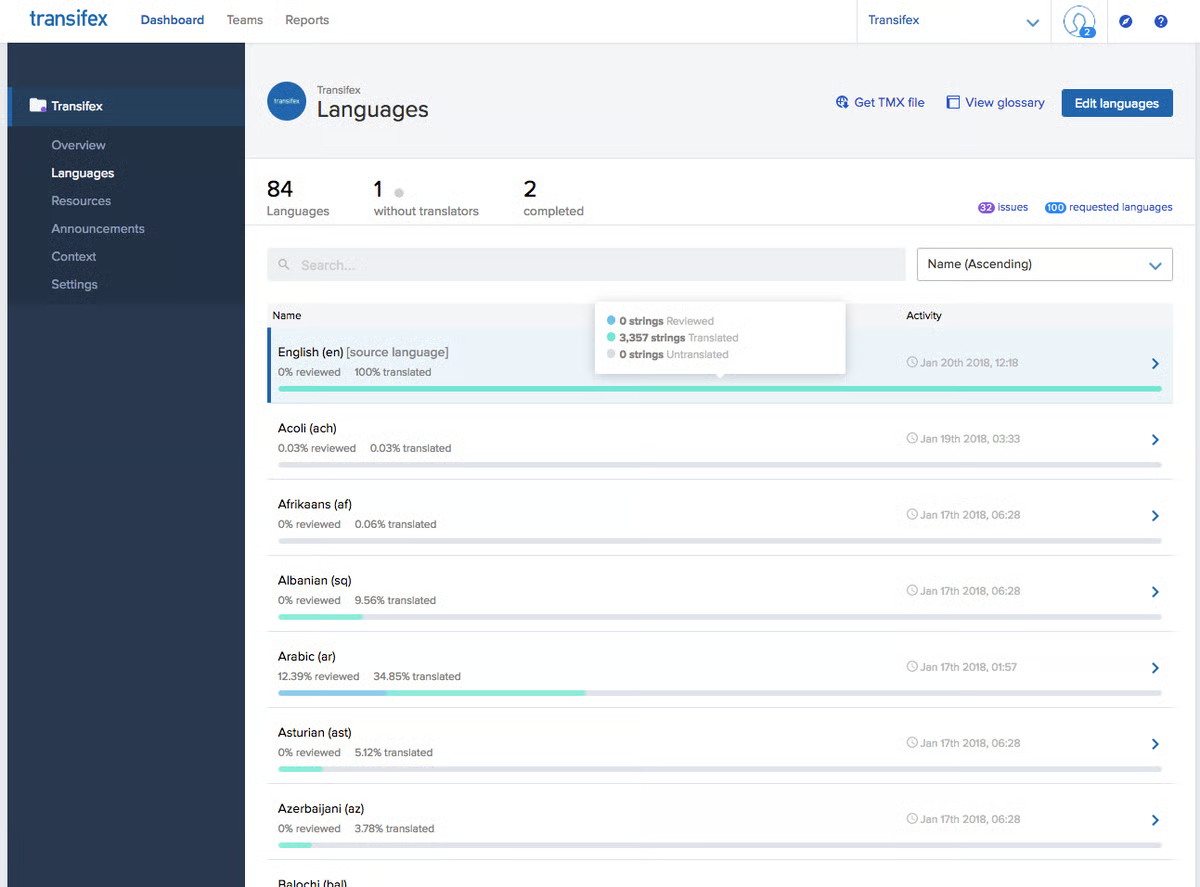 Immagine ottenuta da G2
|
Torna all'inizio della lista!
 |
|
| Descrizione: |
Una piattaforma cloud di gestione della localizzazione per team software/prodotto, che offre traduzione assistita dall'IA, memoria di traduzione e integrazioni con strumenti per sviluppatori per la localizzazione di stringhe di app/siti web. |
| Tipo: |
Piattaforma cloud di localizzazione e sistema di gestione della traduzione |
| Adatto per: |
Localizzazione di app, stringhe UI software, contenuti di siti web |
| Chi lo usa: |
Team di prodotto e ingegneria, responsabili della localizzazione in aziende tech |
| Cloud o Desktop: |
Solo cloud |
| Punti di forza: |
- Prezzi basati su “crediti linguistici” (utilizzo a parole) invece che su tariffe fisse per accesso
- Accessi illimitati inclusi, anche già dal Piano Starter
- Integrazioni con Bitbucket e Azure DevOps dal livello Team in su, oltre a GitHub e GitLab
- Il livello Enterprise offre disponibilità on-premises e SSO/SCIM aziendale
- Fino al 12% di sconto con fatturazione annuale
|
| Prezzi: |
Starter €45/mese (100k crediti, ~15k parole/mese); Team €115/mese (500k crediti, ~75k parole/mese); Pro €345/mese (1M crediti, ~150k parole/mese); Enterprise = personalizzato. USD/GBP disponibili, vedi prezzi attuali |
| Prova gratuita: |
14 giorni, nessuna carta di credito richiesta |
| Cosa dicono le recensioni: |
- Lodato per l'interfaccia intuitiva, il supporto reattivo e le integrazioni con GitHub/GitLab. Criticato per un recente redesign dell'interfaccia visto come più confuso/buggato, ricerca/filtri inadeguati e prezzi considerati costosi per i team più piccoli.
Leggi tutte le recensioni su G2 (4,5/5, 72 recensioni) | Capterra (4,6/5, 78 recensioni)
🎥 Guarda una demo di LingoHub su YouTube
|
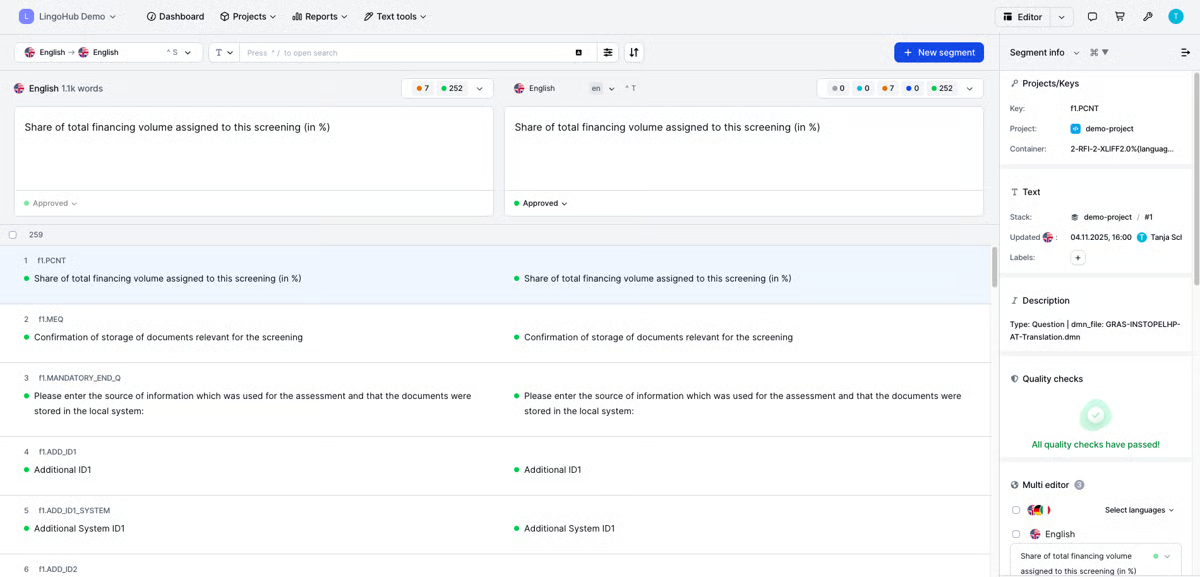 Immagine ottenuta da G2
|
Torna all'inizio della lista!
 |
|
| Descrizione: |
Una piattaforma di gestione della traduzione e localizzazione alimentata dall'IA che combina automazione e revisione umana, per tradurre e gestire contenuti su siti web, app e documenti. |
| Tipo: |
Sistema di gestione della traduzione cloud |
| Adatto per: |
Documenti (Word, Excel, PowerPoint, PDF), siti web, app mobile, stringhe software, file di design, sottotitoli |
| Chi lo usa: |
Team di marketing, team di ingegneria, professionisti della localizzazione e aziende |
| Cloud o Desktop: |
Solo cloud |
| Punti di forza: |
- L'editor del contesto visivo mostra le traduzioni direttamente sulla pagina o sullo schermo
- Memoria di traduzione e gestione del glossario/della terminologia integrate
- Plugin di design per Adobe e Sketch, insieme all'integrazione CI/CD per i team di ingegneria
- Opzione On-Demand, pagamento per documento insieme ai livelli di abbonamento
|
| Prezzi: |
Basic da $200/mese fatturato annualmente (50.000 parole ospitate), Pro da $800/mese fatturato annualmente (300.000 parole ospitate), oppure un livello Enterprise/On Demand personalizzato, vedi i prezzi attuali |
| Prova gratuita: |
Non pubblicizzata sulla pagina dei prezzi; On Demand permette il pagamento a consumo senza impegno |
| Cosa dicono le recensioni: |
- Apprezzato per l'interfaccia intuitiva, strumenti TM/glossario potenti e la funzione di contesto visivo. Criticato per un'interfaccia "datata" che richiede molti click, qualità della traduzione con l'IA non sempre costante, prezzi enterprise più alti o inaspettati.
Leggi tutte le recensioni su G2 (4.4/5, 709 recensioni) | Capterra
🎥 Guarda una demo di Smartling su YouTube
|
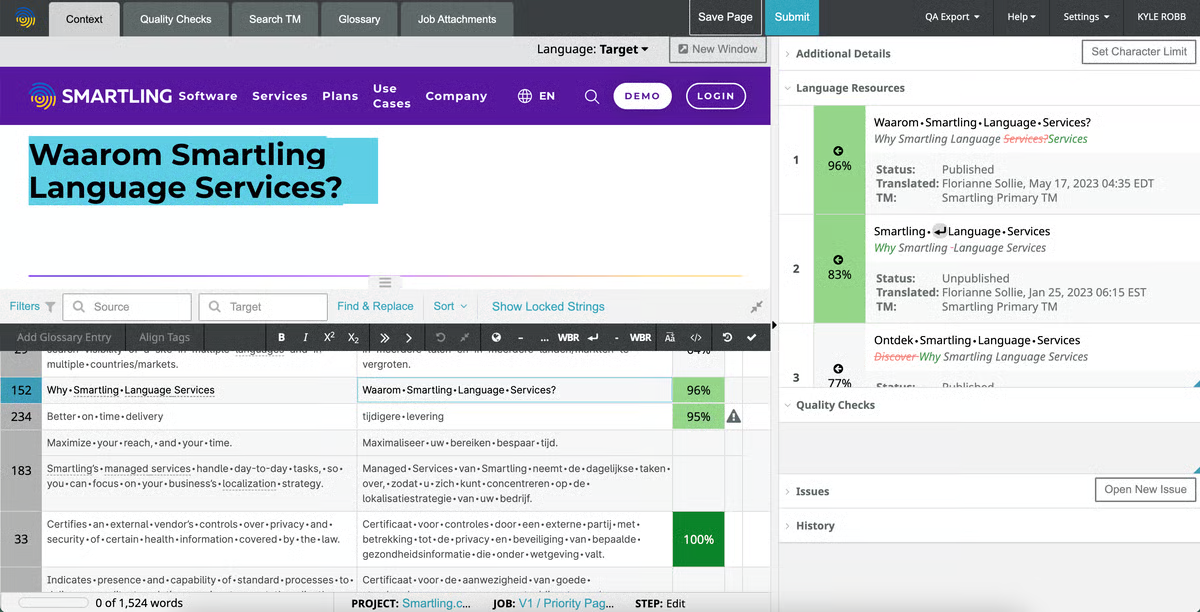 Immagine ottenuta da G2
|
Torna all'inizio della lista!
 |
|
| Descrizione: |
Una piattaforma linguistica/di localizzazione per aziende basata sull'IA, nata dalla fusione tra Memsource e Phrase nel 2023, che offre gestione della traduzione, orchestrazione dell'IA tra motori di traduzione automatica/LLM e localizzazione di contenuti multimediali/software. |
| Tipo: |
Piattaforma di localizzazione e sistema di gestione della traduzione |
| Adatto per: |
Siti web, stringhe di software e app, giochi, video (sottotitoli e doppiaggio), documentazione aziendale |
| Chi lo usa: |
Manager di localizzazione, sviluppatori e marketer nelle aziende |
| Cloud o Desktop: |
Cloud, API-first |
| Punti di forza: |
- L'orchestrazione basata sull'IA indirizza i contenuti tra diversi motori di traduzione automatica e LLM
- Valutazione e punteggio della qualità automatizzati
- Localizzazione multimediale (doppiaggio, sottotitoli) insieme a localizzazione di software e web
- Nata dalla fusione tra Memsource e Phrase nel 2023
|
| Prezzi: |
Piano Team da $1.245/mese fatturato annualmente (20 accessi), piano Software UI/UX da $525/mese fatturato annualmente (15 accessi), oppure livelli Business/Enterprise personalizzati, vedi i prezzi attuali |
| Prova gratuita: |
Prova gratuita di 14 giorni su tutti i piani |
| Cosa dicono le recensioni: |
- Apprezzato per la navigazione intuitiva, flussi di lavoro TM/terminologia efficienti e supporto reattivo. Criticato per l'accuratezza non sempre costante della traduzione con l'IA, prezzi alti/in aumento e lentezza occasionale su file di grandi dimensioni.
Leggi tutte le recensioni su G2 (4.5/5, 1.327 recensioni)
🎥 Guarda una demo di Phrase su YouTube
|
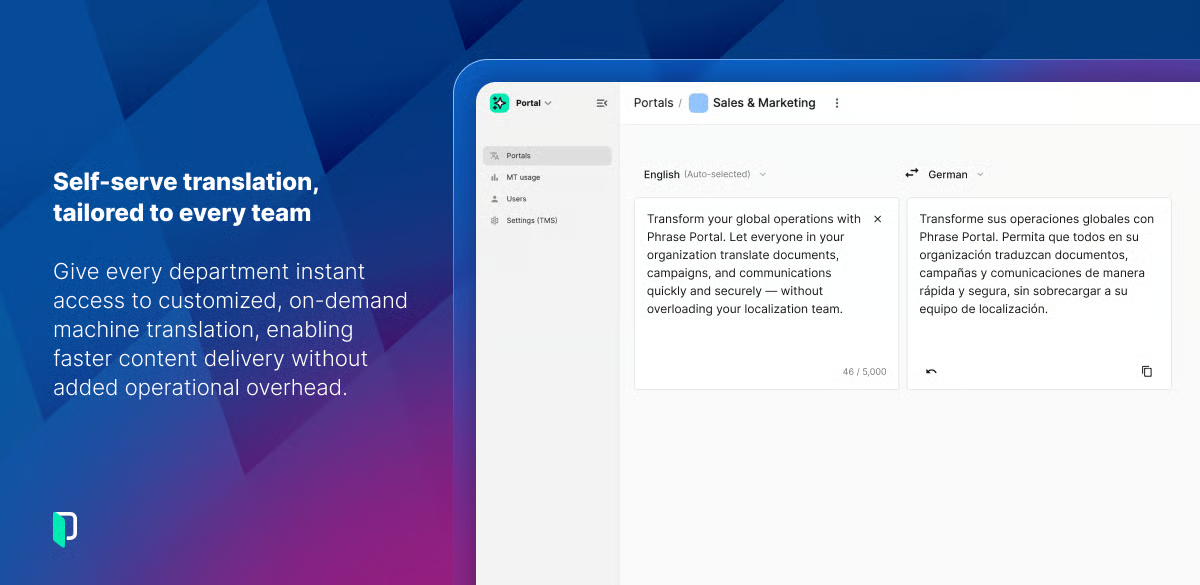 Immagine ottenuta da G2
|
Torna all'inizio della lista!
 |
|
| Descrizione: |
Una piattaforma cloud di localizzazione basata sull'IA per gestire la traduzione di software, siti web, app e giochi, con integrazioni avanzate per gli strumenti degli sviluppatori. |
| Tipo: |
Piattaforma di localizzazione e sistema di gestione della traduzione |
| Adatto per: |
Applicazioni software, app mobili, siti web, videogiochi, materiali di marketing, documentazione tecnica |
| Chi lo usa: |
Team guidati dallo sviluppo, dai piccoli gruppi alle grandi aziende |
| Cloud o Desktop: |
Solo cloud |
| Punti di forza: |
- Integrazioni avanzate con strumenti per sviluppatori per la sincronizzazione automatica dei contenuti (GitHub, GitLab, Bitbucket)
- Assistente IA e possibilità di scegliere tra diversi motori di traduzione automatica
- Livelli gratuiti per progetti Open Source e accademici
- CDN per l'add-on delle traduzioni (gratis fino a 1M di richieste/10GB di trasferimento)
|
| Prezzi: |
I livelli a pagamento variano in base al volume di parole — vedi i prezzi attuali per i dettagli |
| Prova gratuita: |
Piano gratuito disponibile; prova di 14 giorni del piano Team; prova Enterprise di 30 giorni; garanzia soddisfatti o rimborsati di 30 giorni |
| Cosa dicono le recensioni: |
- Apprezzato per la facilità d'uso, le funzionalità di collaborazione/integrazione (soprattutto con GitHub) e la qualità della traduzione. Criticato per un'interfaccia affollata/confusa, curva di apprendimento ripida e prezzi elevati per freelance/piccoli team.
Leggi tutte le recensioni su G2 (4.4/5, 729 recensioni) | Capterra
🎥 Guarda una demo di Crowdin su YouTube
|
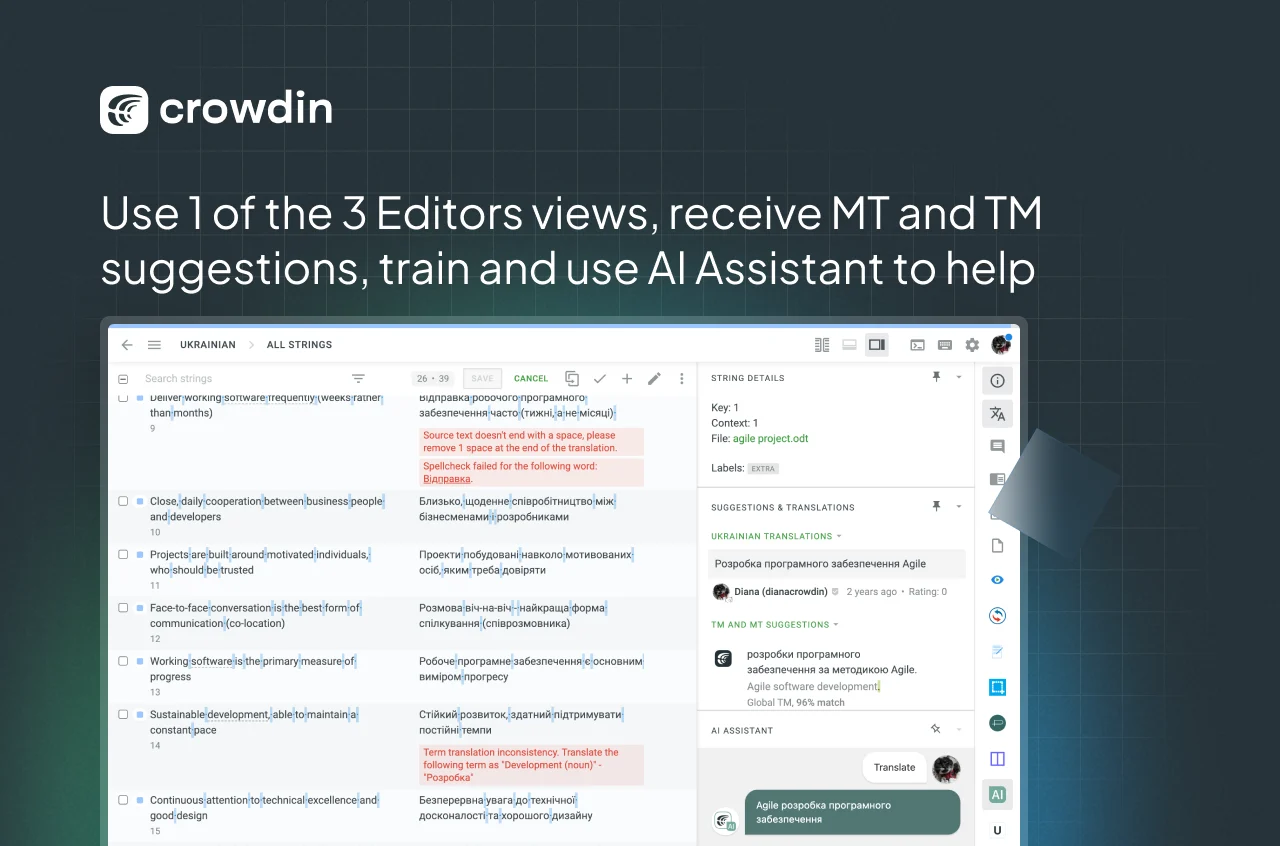 Immagine ottenuta da G2
|
Torna all'inizio della lista!
 |
|
| Descrizione: |
Uno strumento di traduzione siti web e SEO multilingue senza codice che rileva e traduce automaticamente i contenuti tramite IA, con la possibilità di revisione umana. |
| Tipo: |
Strumento di traduzione siti web e SEO multilingue senza codice (non è un CAT tool per documenti generici) |
| Adatto per: |
Solo contenuti del sito web — pagine prodotto, articoli del blog, metadati |
| Chi lo usa: |
Negozi e-commerce, agenzie di marketing e organizzazioni che traducono un sito web invece dei documenti |
| Cloud o Desktop: |
Cloud SaaS, senza bisogno di codice |
| Punti di forza: |
- L'editor visivo mostra le traduzioni contestuali direttamente sul sito live
- Rileva e traduce automaticamente i nuovi contenuti man mano che il sito viene aggiornato
- SEO multilingue integrata, inclusi tag hreflang e URL tradotti
- Accesso a traduttori umani professionisti a partire dal livello Business
- Oltre 70 integrazioni native, tra cui WordPress, Shopify e siti personalizzati
|
| Prezzi: |
Gratis $0/mese (2.000 parole, 1 lingua); Starter $17/mese o $170/anno (10.000 parole, 1 lingua); Business $32/mese o $320/anno (50.000 parole, 3 lingue); Pro $87/mese o $870/anno (200.000 parole, 5 lingue); Advanced $329/mese o $3.290/anno (1.000.000 parole, 10 lingue); Extended $769/mese o $7.690/anno (5.000.000 parole, 20 lingue); Enterprise = personalizzato, vedi i prezzi attuali |
| Prova gratuita: |
Freemium (2.000 parole/1 lingua) più un periodo di prova di 14 giorni dichiarato |
| Cosa dicono le recensioni: |
- Apprezzato per la configurazione veloce, l'editor del contesto visivo e il supporto super reattivo. Criticato per i prezzi che salgono rapidamente con il conteggio delle parole e per la qualità della traduzione automatica che richiede correzioni manuali.
Leggi tutte le recensioni su G2 (4,7/5, 763 recensioni)
🎥 Guarda una demo di Weglot su YouTube
|
 Immagine ottenuta da Weglot
|
Torna all'inizio della lista!
 |
|
| Descrizione: |
Un sistema di gestione della traduzione basato su cloud per localizzare stringhe software, siti web, app e giochi, che combina la traduzione con l'IA e la collaborazione tra persone/team. |
| Tipo: |
Sistema di gestione della traduzione su cloud (strumento di localizzazione basato su stringhe) |
| Adatto per: |
App mobili, siti web, videogiochi, testi di marketing, stringhe software generiche |
| Chi lo usa: |
Team di software e prodotto |
| Cloud o Desktop: |
Solo cloud, ospitato nell'UE |
| Punti di forza: |
- Modello di prezzo basato sulle stringhe (non sulle parole)
- Livello gratuito: 1.000 stringhe, progetti e collaboratori illimitati
- API REST per automatizzare i flussi di localizzazione, più integrazioni con Git
- Gratuito per progetti open source con licenze approvate da OSI
- I collaboratori su progetti di altri non pagano nulla
|
| Prezzi: |
Livello gratuito a $0/mese (1.000 stringhe); i livelli a pagamento crescono in base al volume di stringhe — vedi i prezzi attuali per i dettagli |
| Prova gratuita: |
Prova automatica di 10 giorni, nessuna carta di credito richiesta, più un livello gratuito permanente |
| Cosa dicono le recensioni: |
- Apprezzato per l'interfaccia semplice e intuitiva, l'automazione tramite API REST e le integrazioni con Git. Criticato per la gestione degli utenti/accessi poco fluida, i salti di livello aggressivi e il desiderio di avere viste di traduzione contestuale migliori.
Leggi tutte le recensioni su G2 (4,5/5, 93 recensioni) | Capterra
🎥 Guarda una demo di POEditor su YouTube
|
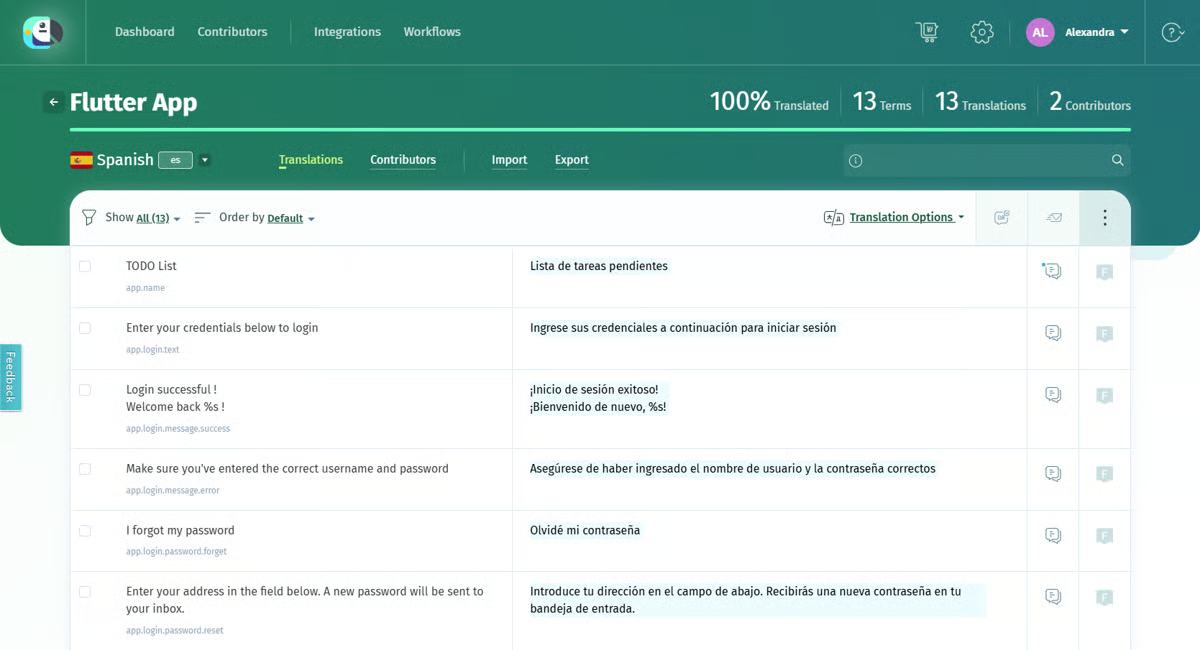 Immagine ottenuta da G2
|
Torna all'inizio della lista!
 |
|
| Descrizione: |
Una piattaforma sicura di gestione della traduzione con l'IA, orientata ai documenti, per organizzazioni (istruzione, sanità, aziende, enti pubblici, fornitori di servizi linguistici) che hanno bisogno di tradurre file in modo controllato e conforme, invece di semplici testi web. |
| Tipo: |
Sistema di gestione della traduzione (focalizzato sui documenti, assistito dall'IA) |
| Adatto per: |
File Word, PDF, Excel, PowerPoint, Google Workspace, documenti scansionati (OCR), sottotitoli, XLIFF, JSON, XML, audio/video (oltre 30 tipi di file) |
| Chi lo usa: |
Organizzazioni di istruzione, sanità, aziende, enti pubblici e fornitori di servizi linguistici che necessitano di traduzioni di documenti controllate e conformi |
| Cloud o Desktop: |
Cloud (web app); è disponibile anche un'app mobile complementare, PairaVoice |
| Punti di forza: |
- Traduzione con l'IA multi-motore (PairaphraseGPT, DeepL, Google, Microsoft), selezionabile per ogni lavoro
- Mantenimento della formattazione nei documenti tradotti
- Sicurezza e controlli di accesso per contenuti sensibili o regolamentati
- Livello Partner Program per fornitori di servizi linguistici che gestiscono lavori per i clienti
- Vista di confronto affiancato tra le lingue
|
| Prezzi: |
Bronze $3.420/anno (1–2 utenti, 600.000 parole/anno, 2 motori di traduzione automatica, Word/Excel/PPT); Silver $5.988/anno (fino a 5 utenti, 12M parole/anno, 5 motori di traduzione automatica incl. ChatGPT/PairaphraseGPT, oltre 30 formati di file); Gold $10.200/anno (fino a 15 utenti, 25M parole/anno, tutte le funzionalità IA); Custom/Enterprise = personalizzato; Partner Program per fornitori di servizi linguistici $7.500/anno (25 accessi), vedi i prezzi attuali |
| Prova gratuita: |
Non specificata nella pagina dei prezzi — chiedi conferma direttamente |
| Cosa dicono le recensioni: |
- Apprezzato per la flessibilità multi-motore, il risparmio di tempo e il supporto reattivo. Criticato per problemi di formattazione (liste corrotte, grassetto/corsivo indesiderati, problemi di layout in PowerPoint/Excel) che richiedono pulizia manuale.
Leggi tutte le recensioni su Capterra (4,3/5, 25 recensioni)
🎥 Guarda una demo di Pairaphrase su YouTube
|
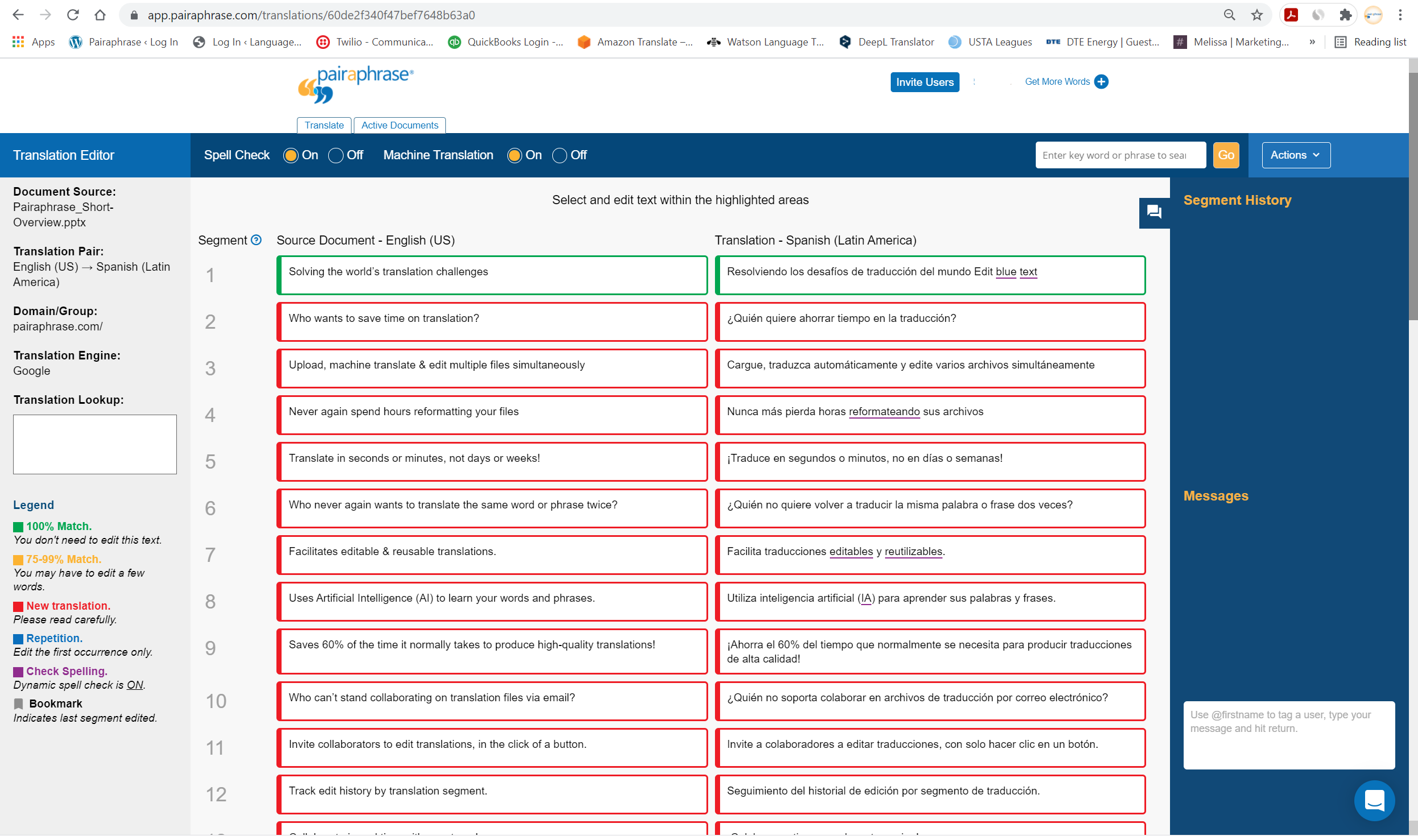 Immagine ottenuta da Capterra
|
Torna all'inizio della lista!
 |
|
| Descrizione: |
La suite di piattaforme di intelligenza linguistica/gestione della traduzione enterprise di TransPerfect, che copre TMS, localizzazione di siti web, stringhe di app e media per grandi brand globali, combinando IA (orchestrazione TowerLLM) e revisione umana gestita. |
| Tipo: |
Sistema di gestione della traduzione enterprise e piattaforma di localizzazione (suite di prodotti) |
| Adatto per: |
Documenti e flusso di lavoro, siti web, stringhe di app e software, contenuti normativi, media e sottotitoli |
| Chi lo usa: |
Grandi aziende — marketer, autori di contenuti e team IT — in e-commerce, finanza, scienze della vita e media |
| Cloud o Desktop: |
Piattaforma enterprise basata su cloud |
| Punti di forza: |
- Suite di prodotti modulare (TMS, Web, Strings, Media e altro) invece di un singolo strumento
- TowerLLM: uno strato IA indipendente dal modello che instrada tra motori di traduzione automatica e LLM
- Sostenuto dalla rete di linguisti umani e fornitori di servizi linguistici di TransPerfect
- Riconosciuto più volte nei report di ricerca sui sistemi di gestione della traduzione di G2
|
| Prezzi: |
Non pubblicato — contatta le vendite per un preventivo |
| Prova gratuita: |
Non disponibile — modello aziendale guidato dalle vendite |
| Cosa dicono le recensioni: |
- Apprezzato per l'interfaccia intuitiva, le ampie integrazioni, la qualità della traduzione e la reattività del supporto. Criticato per i costi elevati o poco chiari ("costi alle stelle"), le prestazioni lente su file di grandi dimensioni e l'implementazione iniziale complessa.
Leggi tutte le recensioni su G2 (4,5/5, 193 recensioni) | Capterra
🎥 Guarda una demo di GlobalLink su YouTube
|
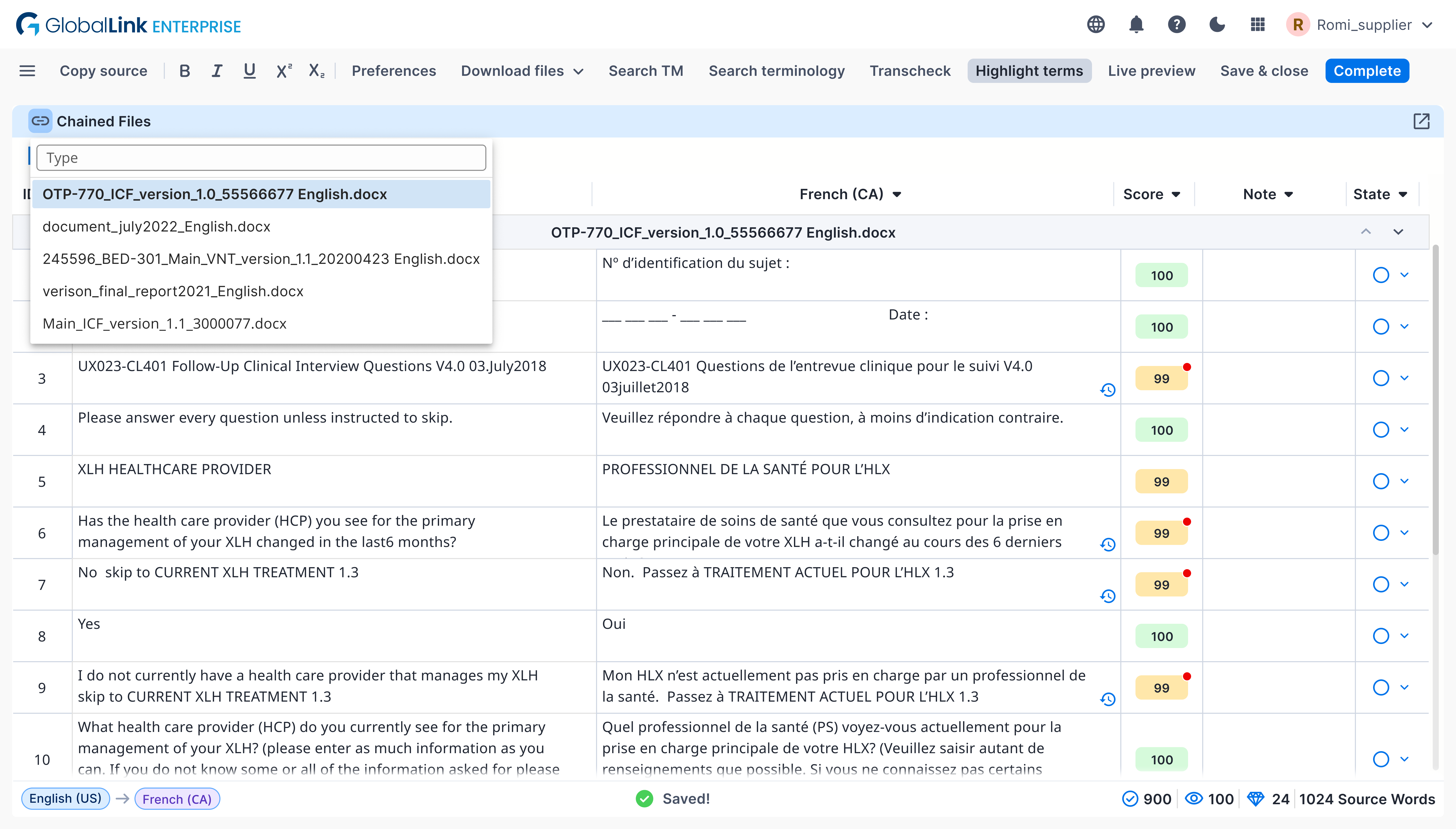 Immagine ottenuta da G2
|
Torna all'inizio della lista!
 |
|
| Descrizione: |
Un sistema di gestione della traduzione (TMS) potenziato dall'IA per team di localizzazione aziendali, parte della più ampia piattaforma XTM (che include anche Transifex per la localizzazione software, Rigi e XTRF per le operazioni dei fornitori di servizi linguistici). |
| Tipo: |
Sistema di gestione della traduzione (Cloud TMS) |
| Adatto per: |
Documenti, siti web, stringhe di software e app, contenuti di marketing |
| Chi lo usa: |
Team di localizzazione e globalizzazione aziendali, grandi marchi e fornitori di servizi linguistici |
| Cloud o Desktop: |
Solo cloud |
| Punti di forza: |
- Oltre 60 connettori e integrazioni predefiniti, più accesso API
- Post-editing potenziato dall'IA e valutazione della qualità della traduzione automatica
- Flussi di lavoro di traduzione personalizzabili e automatizzati con memoria di traduzione e gestione della terminologia
- Famiglia di prodotti modulare (TMS, Platform, XTRF, Rigi, Video Creation Cloud) venduti separatamente o in combinazione
|
| Prezzi: |
Non pubblicato — contatta le vendite o prenota una demo |
| Prova gratuita: |
Non dichiarata — solo demo/consulenza, nessuna prova self-service pubblicizzata |
| Cosa dicono le recensioni: |
- Apprezzato per il forte supporto clienti, strumenti di TM/terminologia e integrazioni. Criticato per un'interfaccia confusa/superata, costi in aumento su larga scala e funzionalità di traduzione automatica/IA considerate meno avanzate di quelle dei concorrenti.
Leggi tutte le recensioni su G2 (4,3/5, 145 recensioni) | Capterra
🎥 Guarda una demo di XTM Cloud su YouTube
|
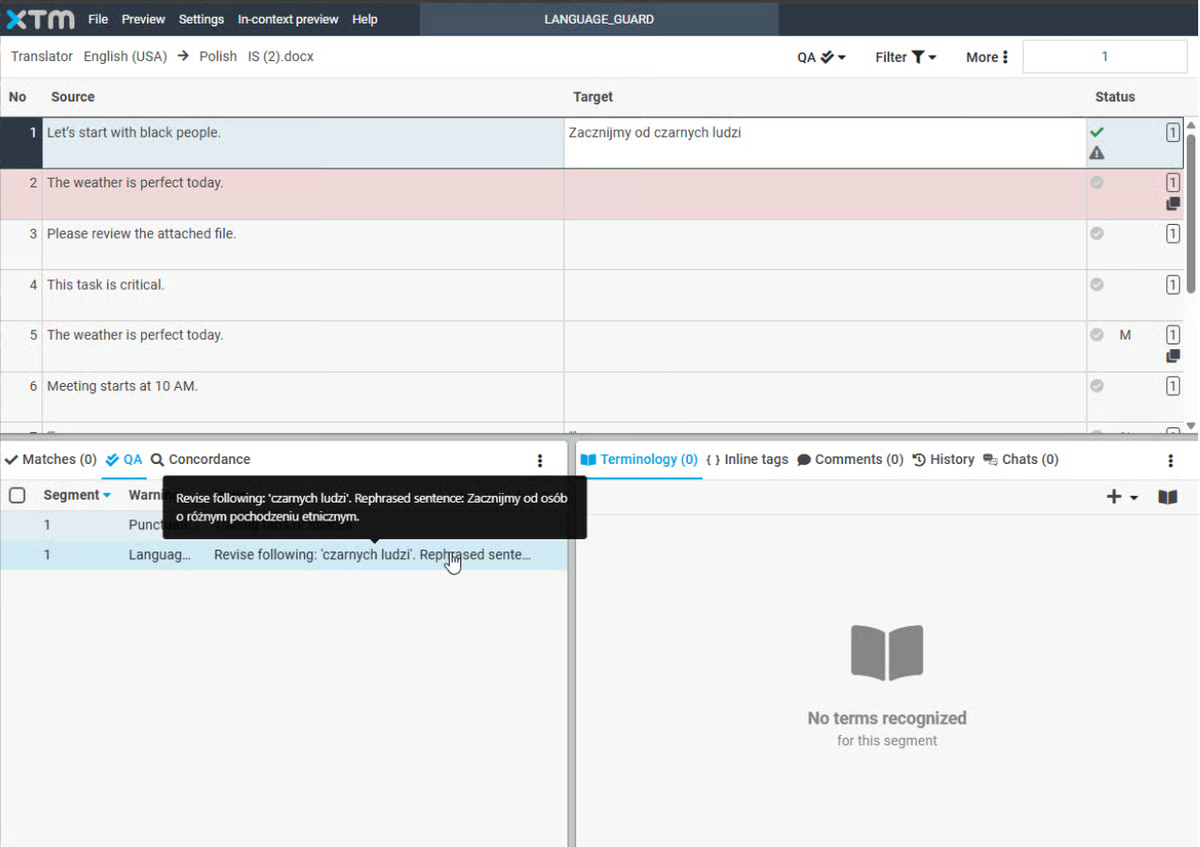 Immagine ottenuta da G2
|
Torna all'inizio della lista!
 |
|
| Descrizione: |
Uno strumento CAT gratuito e open source per traduttori professionisti e volontari, che offre memoria di traduzione, fuzzy matching e supporto al glossario su oltre 30 formati di file. |
| Tipo: |
Strumento CAT (desktop, open source) |
| Adatto per: |
Documenti (Office, HTML, XML e altro), file di stringhe software/app, sottotitoli |
| Chi lo usa: |
Traduttori freelance e volontari, piccoli fornitori di servizi linguistici |
| Cloud o Desktop: |
Desktop (Windows, macOS, Linux — basato su Java) |
| Punti di forza: |
- Completamente gratuito e open source, senza restrizioni su utilizzo, copia o modifica
- Fuzzy matching e sfruttamento della memoria di traduzione
- Funziona nativamente su Windows, macOS e Linux
- Sviluppato attivamente — ultima versione 6.1.1, rilasciata a settembre 2026
|
| Prezzi: |
Gratuito (licenza open source) |
| Prova gratuita: |
N/A — gratuito per sempre |
| Cosa dicono le recensioni: |
- Valutato come gratuito, stabile, affidabile, con ottima TM/fuzzy matching. L'interfaccia viene spesso definita datata rispetto agli strumenti a pagamento, con funzionalità di gestione progetti più deboli.
Leggi tutte le recensioni su G2 (3,7/5, 16 recensioni)
🎥 Guarda una demo di OmegaT su YouTube
|
 Immagine ottenuta da OmegaT
|
Torna all'inizio della lista!
 |
|
| Descrizione: |
Uno strumento CAT desktop ricco di funzionalità per traduttori freelance, che offre integrazione IA/MT, autocompletamento intelligente e compatibilità incrociata con i formati file di altri strumenti CAT. |
| Tipo: |
Strumento CAT (desktop) |
| Adatto per: |
Documenti (Word, Excel, PowerPoint, InDesign, PDF e altro) |
| Chi lo usa: |
Traduttori freelance e professionisti indipendenti |
| Cloud o Desktop: |
Solo desktop (Windows, macOS, Linux); la licenza permette l'uso su 2 computer |
| Punti di forza: |
- Creato da un traduttore, con integrazione IA e traduzione automatica
- Autocompletamento intelligente con inserimento testo con un clic
- Legge e scrive file compatibili con Trados, memoQ e Wordfast
- Uso gratuito senza limiti di tempo disponibile, con limiti di dimensione su memoria di traduzione e glossario
- Collaborazione di team tramite funzionalità server TM
|
| Prezzi: |
Licenza perpetua una tantum €200, oppure abbonamento annuale a €80/anno, vedi prezzi attuali |
| Prova gratuita: |
Freemium — uso gratuito senza limiti di tempo, con limiti di dimensione su memoria di traduzione/glossario; tutte le funzionalità sbloccate con l'acquisto |
| Cosa dicono le recensioni: |
- Non esiste una scheda G2 o Capterra per questo strumento. Su ProZ, i recensori lo descrivono come semplice e stabile, creato da un traduttore che capisce le esigenze dei traduttori, anche se alcuni segnalano difficoltà nell'importare file da altri strumenti CAT.
Leggi le recensioni su ProZ
🎥 Guarda una demo di CafeTran Espresso su YouTube
|
 Immagine ottenuta da CafeTran Espresso
|
Torna all'inizio della lista!
 |
|
| Descrizione: |
Uno strumento CAT gratuito, open source e basato su browser che combina memoria di traduzione e traduzione automatica per massimizzare i tassi di corrispondenza; sviluppato con Translated S.r.l. come partner chiave. |
| Tipo: |
Strumento CAT (basato su browser, open source) |
| Adatto per: |
Documenti caricati per il post-editing assistito da traduzione automatica; supporta anche l'outsourcing tramite il marketplace di Translated |
| Chi lo usa: |
Traduttori freelance, piccole imprese e agenzie, studenti |
| Cloud o Desktop: |
Solo cloud (basato su browser) — nessuna modalità offline |
| Punti di forza: |
- Gratuito e open source (licenza LGPL), con codice su GitHub
- Traduzione automatica integrata con diversi motori e livelli di accuratezza
- Supporto per memoria di traduzione e glossario per aumentare i tassi di corrispondenza
- Funzionalità collaborative/di team per progetti in outsourcing
|
| Prezzi: |
Gratis |
| Prova gratuita: |
N/A — strumento gratuito |
| Cosa dicono le recensioni: |
- Apprezzato per l'interfaccia pulita/minimale e l'accesso gratuito, soprattutto da freelance/studenti. Contro segnalati: richiede una connessione internet (nessuna modalità offline), problemi di memoria/crash, sovra-segmentazione e preoccupazioni sulla privacy per il caricamento esterno dei file dei clienti.
Leggi tutte le recensioni su G2 (4.0/5, 13 recensioni)
🎥 Guarda una demo di Matecat su YouTube
|
 Immagine ottenuta da Wikipedia
|
Torna all'inizio della lista!
 |
|
| Descrizione: |
Uno strumento di memoria di traduzione desktop indipendente dalla piattaforma e standalone per traduttori, fornitori di servizi linguistici e aziende; fa parte della più ampia famiglia Wordfast (Classic, Anywhere, Server). |
| Tipo: |
Strumento CAT (desktop, standalone) |
| Adatto per: |
Documenti in molti formati (Word, Excel, PowerPoint e tipi di file di traduzione specializzati) |
| Chi lo usa: |
Traduttori freelance (soprattutto utenti Mac), fornitori di servizi linguistici, reparti di traduzione aziendali |
| Cloud o Desktop: |
Desktop (Windows 64-bit, macOS, Linux) |
| Punti di forza: |
- Uno dei pochi strumenti CAT con supporto nativo per macOS
- Elaborazione batch su più formati di file
- Funzione Transcheck per il controllo automatico di coerenza e QA
- Il pacchetto "Wordfast Translation Studio" combina le licenze Pro + Classic
- Fascia di prezzo scontata per economie in via di sviluppo
|
| Prezzi: |
Wordfast Pro $480 standard / $240 economie in via di sviluppo; Wordfast Classic $480 standard / $260 economie in via di sviluppo; Wordfast Translation Studio (bundle) $580 standard / $290 economie in via di sviluppo; Wordfast Server = personalizzato. Tutti i prezzi in USD, vedi prezzi attuali |
| Prova gratuita: |
Disponibile tramite il sito Wordfast |
| Cosa dicono le recensioni: |
- Lodato perché più economico di Trados o memoQ, con una curva di apprendimento più semplice e supporto nativo per macOS. Chi recensisce consiglia di provare le offerte Wordfast gratuite entry-level prima di passare alla versione Pro.
Leggi tutte le recensioni su Capterra (4.3/5, 31 recensioni) | G2 (4.0/5, 3 recensioni — campione piccolo)
🎥 Guarda una demo di Wordfast Pro su YouTube
|
 Immagine ottenuta da G2
|
Torna all'inizio della lista!
 |
|
| Descrizione: |
Uno strumento CAT basato su XLIFF e guidato dagli standard, creato da Maxprograms, che supporta oltre 50 formati di file e diverse integrazioni con memorie di traduzione (TM) e motori di traduzione automatica (MT) per traduttori professionisti e fornitori di servizi linguistici. |
| Tipo: |
Strumento CAT (desktop) |
| Adatto per: |
Documenti (Office, InDesign, DITA, HTML, JSON e oltre 50 altri formati) |
| Chi lo usa: |
Traduttori freelance e professionisti indipendenti, piccoli fornitori di servizi linguistici che apprezzano i flussi di lavoro basati su standard aperti |
| Cloud o Desktop: |
Desktop (Windows, macOS; codice sorgente disponibile su GitHub per altre piattaforme) |
| Punti di forza: |
- Costruito attorno a standard aperti (XLIFF, TMX) per evitare la dipendenza dal fornitore
- Supporta oltre 50 formati di file
- Diverse integrazioni di traduzione automatica (DeepL, Google, Azure, ModernMT), più assistenti IA
- Compatibilità dei file con Trados, memoQ e Wordfast Pro
|
| Prezzi: |
Abbonamento annuale, $140, vedi prezzi attuali |
| Prova gratuita: |
Prova gratuita di 30 giorni tramite richiesta di chiave di valutazione |
| Cosa dicono le recensioni: |
- Non esiste una scheda G2 o Capterra per questo strumento. Su ProZ, chi recensisce elogia il supporto multipiattaforma, il basso costo e il supporto degli sviluppatori, anche se i database terminologici non possono essere modificati direttamente nell'app.
Leggi le recensioni su ProZ
🎥 Guarda una demo di Swordfish su YouTube
|
 Immagine ottenuta da Maxprograms
|
Torna all'inizio della lista!
 |
|
| Descrizione: |
Un software di memoria di traduzione e strumento di localizzazione con una lunga storia (oltre 30 anni) di STAR Group (Svizzera), pensato per i reparti di localizzazione aziendali, project manager e fornitori di servizi linguistici che gestiscono progetti multilingue e multi-formato. |
| Tipo: |
CAT tool e piattaforma di localizzazione (desktop, con licenze flessibili che includono anche opzioni SaaS) |
| Adatto per: |
Documenti, localizzazione software, sottotitolazione video |
| Chi lo usa: |
Reparti di localizzazione aziendali, project manager, agenzie di traduzione |
| Cloud o Desktop: |
Entrambe le opzioni — STAR Group offre licenze on-site, floating, a tempo e SaaS |
| Punti di forza: |
- Memoria di traduzione multi-formato e multilingue costruita attorno al contesto invece che al semplice abbinamento frase per frase
- Supporto morfologico in oltre 80 lingue
- Integrazioni con IA e traduzione automatica, inclusi Amazon, DeepL, Google, Microsoft e OpenAI
- Gestione della terminologia integrata tramite TermStar
- Installazione in rete e licenze flessibili (perpetua, abbonamento, floating, SaaS)
|
| Prezzi: |
Non pubblicato da STAR Group — un rivenditore indica la versione “Professional” base a partire da $2.860 per la licenza perpetua, ma la versione e il prezzo esatti di “Professional+” non sono confermati; contatta STAR Group per un preventivo |
| Prova gratuita: |
Licenza di valutazione gratuita per 30 giorni |
| Cosa dicono le recensioni: |
- Non esiste una scheda su G2 o Capterra per questo strumento e non sono state trovate recensioni indipendenti con punteggio.
Guarda la pagina di confronto di ProZ
🎥 Guarda una demo di Transit NXT su YouTube
|
Torna all'inizio della lista!
Domande frequenti
Qual è il CAT tool più usato?
In base al tipo di lavoro, diversi CAT tool si adattano a esigenze diverse. In questa lista abbiamo raccolto alcuni dei CAT tool più popolari e più utilizzati.
Google Translate è un CAT tool?
La risposta breve è no, Google Translate non è un CAT tool ma un fornitore di traduzione automatica. I CAT tool offrono funzionalità avanzate oltre ai suggerimenti di traduzione automatica.
Cosa sono i CAT tool per i traduttori?
I CAT tool per i traduttori sono strumenti che aiutano i traduttori durante la traduzione dei documenti e li aiutano a tradurre più velocemente e in modo più efficiente.
Esistono CAT tool gratuiti?
Sì, ci sono CAT tool gratuiti. Alcuni di questi sono: Across, MateCat e OmegaT.
Alla fine, nessuna ricerca o recensione può sostituire la tua esperienza personale. La maggior parte dei CAT tool può essere provata gratuitamente, quindi approfittane!
Se vuoi saperne di più, ecco una guida dettagliata sui cat tool.
Condividi questo articolo: