Suchst du das richtige CAT-Tool für computerunterstützte Übersetzung? Ganz ehrlich: Was „am besten“ ist, hängt komplett davon ab, wer fragt. Ein:e freiberufliche:r Übersetzer:in, ein:e Sprachdienstleister-Projektmanager:in und ein:e Marketingmanager:in, der oder die Kataloge ohne Lokalisierungsteam übersetzt, suchen alle nach dem passenden Tool – aber sie brauchen garantiert nicht dasselbe.
Wir haben die 22 wichtigsten Tools auf dem Markt verglichen: Was kann jedes einzelne, wer nutzt es wirklich, wie sieht die aktuelle Preisgestaltung aus und was sagen Nutzer:innen nach der Testphase? Die meisten Tools hier sind für professionelle Übersetzer:innen und Lokalisierungsteams gemacht. Wenn das nicht auf dich zutrifft – wenn du InDesign-Dateien, Broschüren und Datenblätter für verschiedene Märkte ohne eigene Übersetzungsabteilung managst – dann ist der Redokun-Abschnitt unten genau für dich geschrieben, und Computerunterstützte Übersetzung gibt dir den kompletten Überblick.
 |
|
| Beschreibung: |
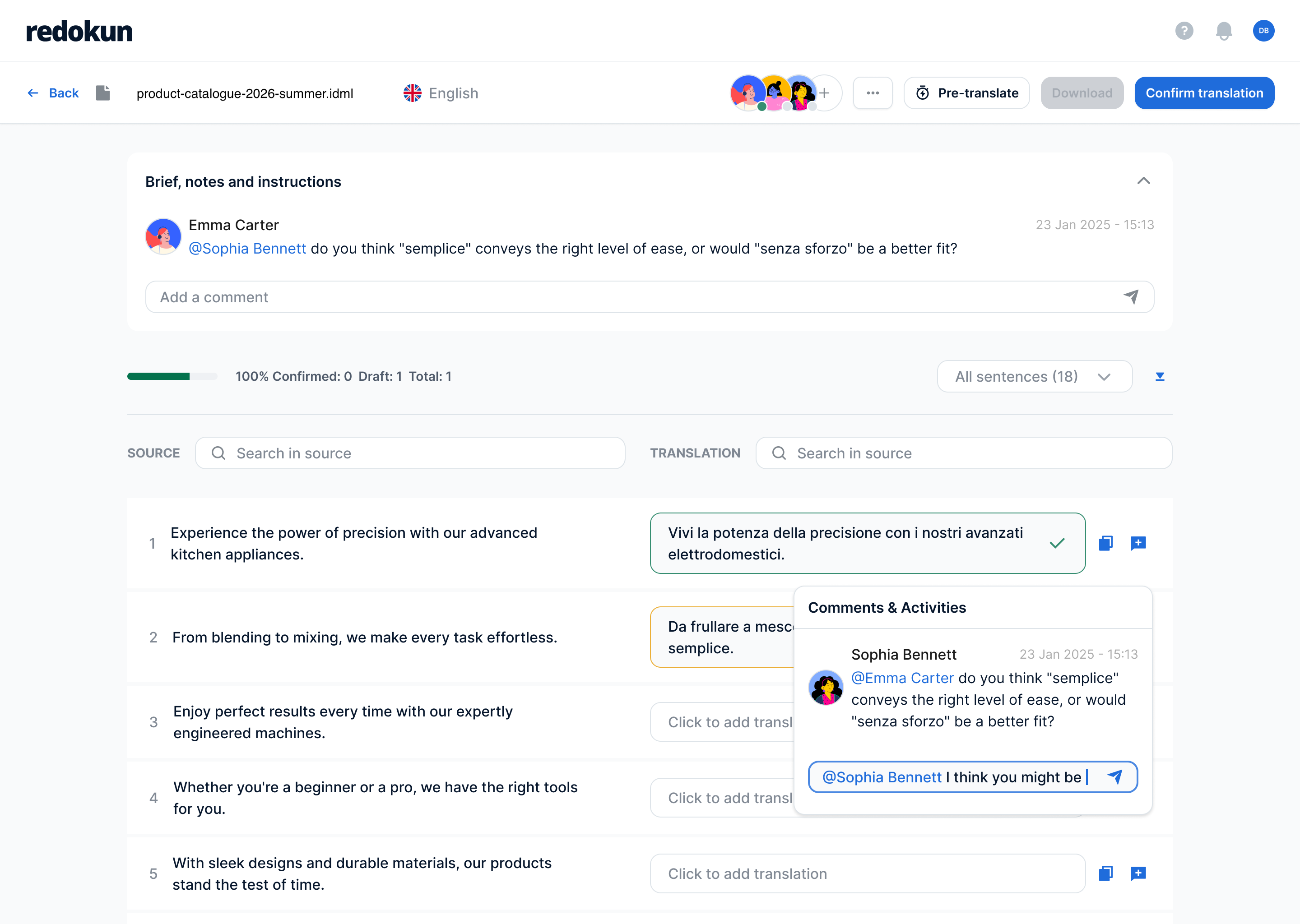
Eine cloudbasierte Übersetzungsmanagement-Plattform, entwickelt für Marketing- und Exportteams in mittelständischen Unternehmen der Fertigungsindustrie, die Kataloge, Datenblätter und Broschüren in mehrere Sprachen übersetzen – ganz ohne eigenes Lokalisierungsteam. |
| Typ: |
Übersetzungsmanagement-System, CAT-Tool |
| Geeignet für: |
Dokumente – InDesign, Word, PowerPoint, Excel, XLIFF, JSON, SRT und mehr |
| Wer nutzt es: |
Marketingteams und technische Redakteur:innen aus der Fertigungsindustrie, Grafikagenturen, Verlage, E-Learning-Content-Ersteller:innen |
| Cloud oder Desktop: |
Cloud |
| Highlights: |
- Super einfach zu bedienen, kaum Einarbeitung nötig
- Organisiere und verwalte deine Projektdateien in Ordnern – ganz wie bei Google Drive
- Unterstützt InDesign-, Word-, PowerPoint-, Excel-, JSON-, HTML- und XLIFF-Dateien direkt (insgesamt 11 kompatible Dateiformate) und gibt sie im Originalformat zurück
- Schnelle Aktualisierungen: Wenn sich ein Dokument ändert, muss nur der neue oder bearbeitete Text neu übersetzt werden – nicht die ganze Datei.
- Translation Memory und ein gemeinsames Glossar sorgen dafür, dass die Terminologie bei allen Übersetzer:innen im Projekt einheitlich bleibt.
- KI-Übersetzung mit DeepL, Google Translate oder ChatGPT verfügbar
|
| Preise: |
Project Pass für ein einzelnes Projekt – kein Abo nötig – oder die Abos für laufende Übersetzungsprojekte. Schau dir unseren kompletten Guide zur computerunterstützten Übersetzung ohne Lokalisierungsteam an. |
| Was Nutzer:innen sagen: |
- Die Nutzer:innen lieben, wie intuitiv und einfach die Zusammenarbeit mit der Software ist – und auch das Support-Team reagiert super schnell.
- Ursprünglich war das Tool vor allem für seine InDesign-Übersetzungsfeatures bekannt, aber inzwischen unterstützt es auch Microsoft Office-Dokumente und viele andere Dateiformate.
Alle Bewertungen lesen auf G2 | Capterra
🎥 Schau dir eine Demo von Redokun auf YouTube an
|
 |
Spring direkt zum Anfang der Liste!
 |
|
| Beschreibung: |
Eine cloudbasierte, KI-gestützte Lokalisierungs- und Übersetzungsplattform, die ein CAT-Tool, Übersetzungsmanagement und einen Marktplatz mit über 500.000 Freiberufler:innen-Linguisten kombiniert – perfekt für Unternehmen und Sprachdienstleister, die End-to-End-Übersetzung, Content-Erstellung und Qualitätssicherung brauchen. |
| Typ: |
Cloud-Übersetzungsmanagement-System / CAT-Tool mit Marktplatz |
| Geeignet für: |
Dokumente, Marketing- und Website-Inhalte, strukturierte Dateien, laufende mehrsprachige Content-Workflows |
| Wer nutzt es: |
Marketingteams/Lokalisierungsteams, Sprachdienstleister, interne Übersetzer:innen, Freiberufler:innen (über den Marktplatz) |
| Cloud oder Desktop: |
Nur Cloud |
| Highlights: |
- Integrierter Freiberufler:innen-Marktplatz (über 500.000 Linguisten)
- Translation Memory-Matches sind in jedem kostenpflichtigen Abo unbegrenzt
- Nutzungsbasiertes „Smartwords“-Modell statt fester Preise pro Nutzer:in
- Unbegrenzte Nutzer:innen in allen kostenpflichtigen Abos
- Als Leader in G2s Herbst 2026-Grids für computerunterstützte Übersetzung und Lokalisierung ausgezeichnet
|
| Preise: |
Adapt ab 1.200 $/Jahr, dann Accelerate (24.000 $/Jahr) und Anticipate (60.000 $/Jahr) bis hin zur individuellen Autonomous-Stufe, aktuelle Preise ansehen |
| Kostenlose Testphase: |
15 Tage kostenlos testen, inklusive API-Zugang |
| Was Nutzer:innen sagen: |
- Gelobt für die einfache Bedienung, den zentralisierten Workflow (Übersetzung + Projektmanagement + Zahlungen an einem Ort) und den starken Support. Häufige Kritikpunkte: Verzögerte Zahlungen an Freiberufler:innen (teilweise über 60 Tage), schwankende Qualität bei der KI-Übersetzung, große Preissprünge zwischen den Abostufen.
Alle Bewertungen auf G2 (4,6/5, 167 Bewertungen) | Capterra (4,5/5, 140 Bewertungen) lesen
🎥 Schau dir eine Demo von Smartcat auf YouTube an
|
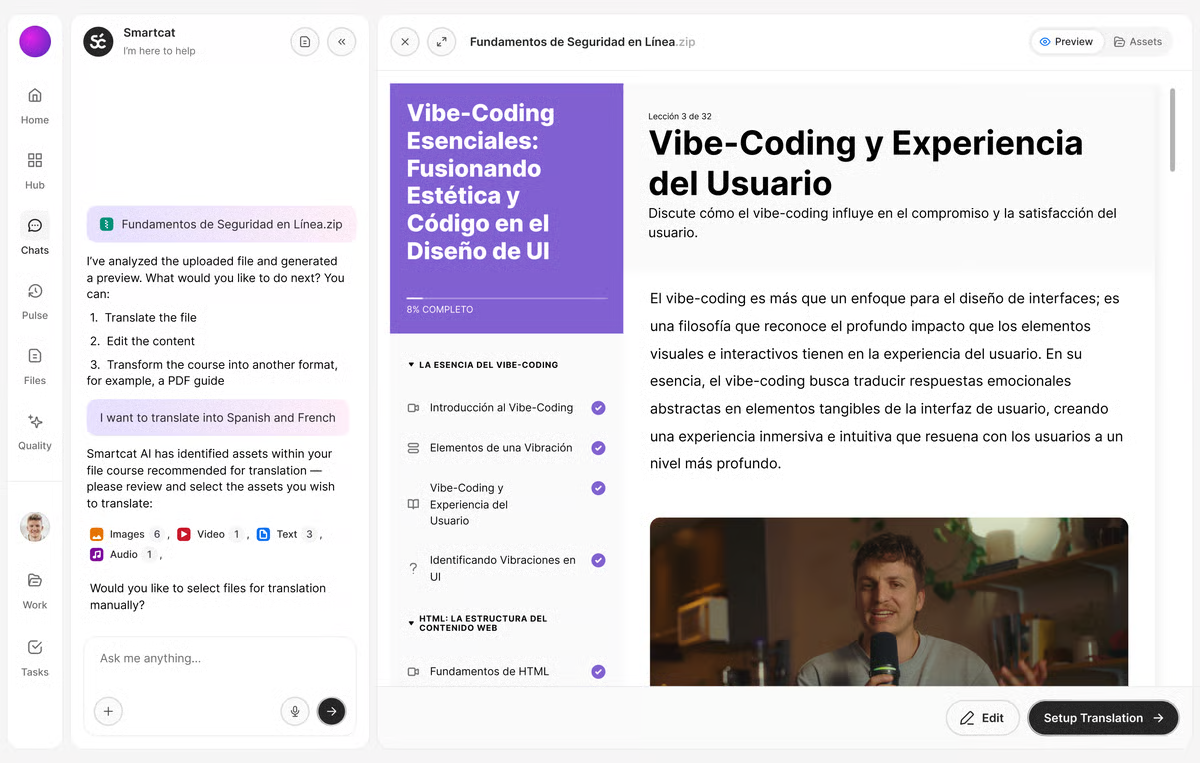 Bild von G2
|
Spring direkt zum Anfang der Liste!
 |
|
| Beschreibung: |
Ein Desktop- und Cloud-basiertes CAT-Tool von RWS (früher „SDL Trados Studio“, bevor RWS nach der Fusion 2020 „SDL“ gestrichen hat), das von professionellen Übersetzer:innen, Sprachdienstleistern und Lokalisierungsteams in Unternehmen als Branchenstandard für Übersetzungsproduktivität genutzt wird. |
| Typ: |
CAT-Tool und Übersetzungsproduktivitäts-Software (Desktop- und Cloud-Editoren) |
| Geeignet für: |
Dokumente (Word, PDF, PowerPoint und mehr), strukturierte und technische Dateien, professionelle Übersetzungsprojekte |
| Wer nutzt es: |
Freiberufler:innen, Sprachdienstleister, Lokalisierungsteams in Unternehmen |
| Cloud oder Desktop: |
Beides — Windows-exklusive Desktop-App plus browserbasierte Editoren, inklusive Trados Go |
| Highlights: |
- Neueste Version „Trados Studio 2026“ mit KI-Features über das integrierte „Language Weaver Pro“-Add-on
- Wird oft als Branchenstandard bezeichnet, den viele Agenturen verlangen
- Echtzeit-Zusammenarbeit, KI-Review und Qualitätsbewertung in den Team-/Business-Abos
- Als jährliches Abo und in manchen Business-Abos auch als unbefristete Lizenz erhältlich
- Das Enterprise-Abo enthält 26 Workflow-Vorlagen und vollständig anpassbare Workflows
|
| Preise: |
Ab £24/Monat (Trados Go) bis zu £34–408/Monat oder /Jahr für Freiberufler:innen-, Team-, Business- und Enterprise-Abos, aktuelle Preise ansehen |
| Kostenlose Testphase: |
14 Tage bei Freiberufler:innen-Abos; auch bei Pro-, Team- und Business-Abos verfügbar |
| Was Nutzer:innen sagen: |
- Geschätzt wegen Translation Memory, Funktionsvielfalt, Segment-Review und Branchenstandard-Status. Kritisiert wegen hoher Kosten, Performance-Problemen/Abstürzen bei großen Dateien, einer überladenen/veralteten Oberfläche und der Windows-Exklusivität.
Alle Bewertungen auf G2 (gelistet als „Trados“, 4,0/5, 154 Bewertungen) | Capterra (4,3/5, 88 Bewertungen) lesen
🎥 Schau dir eine Demo von Trados Studio auf YouTube an
|
 Bild von ALL PC World
|
Spring direkt zum Anfang der Liste!
 |
|
| Beschreibung: |
Ein Desktop-/Cloud-CAT-Tool von memoQ (Kilgray) – das auf Einzelübersetzer:innen ausgerichtete Produkt innerhalb der größeren memoQ TMS Suite – wird für Übersetzung, Bearbeitung und Terminologie-/Translation Memory-Verwaltung genutzt. |
| Typ: |
CAT-Tool (individuelle Desktop- plus Web-Lizenz, Teil der größeren memoQ TMS Plattform) |
| Geeignet für: |
Dokumente, strukturierte und technische Dateien, Übersetzungsprojekte für Einzelpersonen und kleine Teams |
| Wer nutzt es: |
Freiberufler:innen und Einzelübersetzer:innen (das separate memoQ TMS Produkt richtet sich an Sprachdienstleister und Unternehmens-Teams) |
| Cloud oder Desktop: |
Beides — Desktop-Anwendung plus webbasierter Online-Editor |
| Highlights: |
- Nur als Abo erhältlich, keine unbefristete Lizenz verfügbar
- Monatliches oder jährliches Abo, gleiche Features bei beiden
- 24/7 Support in jedem Abo inklusive
- Teil der größeren memoQ TMS Produktlinie (Starter, Essential, Professional, Enterprise)
- Bewertungen heben die hohe Stabilität im Vergleich zu manchen Mitbewerbern hervor
|
| Preise: |
€396/Lizenz/Jahr (oder €44/Lizenz/Monat), aktuelle Preise ansehen |
| Kostenlose Testphase: |
14-tägige Testphase, keine Zahlungsdaten erforderlich |
| Was Nutzer:innen sagen: |
- Gelobt für intuitives Design, starke Translation Memory-/Terminologie-Tools, schnellen Support und Stabilität. Kritisiert wegen steiler Lernkurve bei fortgeschrittenen Features, einer Web-Version, die hinter der Desktop-App zurückbleibt, einer überladenen Oberfläche und fehlender nativer Mac-Unterstützung.
Alle Bewertungen auf G2 (4,5/5, 132 Bewertungen – meist für memoQ allgemein, nicht diese spezielle Edition) | Capterra lesen
🎥 Schau dir ein Review zu memoQ auf YouTube an
|
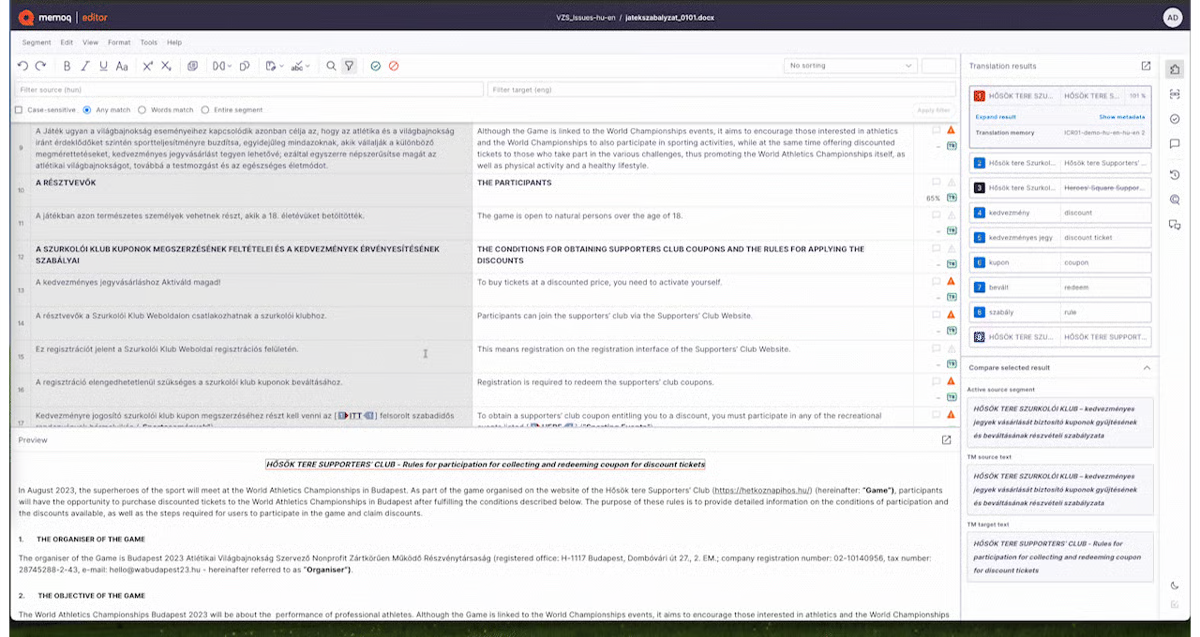 Bild von G2
|
Spring direkt zum Anfang der Liste!
 |
|
| Beschreibung: |
Eine Cloud-Lokalisierungs- und Übersetzungsmanagement-Plattform für Produkt- und Engineering-Teams, die Software-UI-Strings, App- und Website-Lokalisierung mit tiefen Dev-Tool-Integrationen verwaltet. |
| Typ: |
Cloud-Lokalisierungsplattform und Übersetzungsmanagementsystem |
| Geeignet für: |
App-Lokalisierung, Website-/UI-Strings, Softwareprodukte; Dokumente in geringerem Umfang |
| Wer nutzt es: |
Produktmanager:innen, Entwickler:innen und Lokalisierungsmanager:innen bei SaaS- und Tech-Unternehmen |
| Cloud oder Desktop: |
Nur Cloud (Web-Plattform, plus CLI, API und SDKs) |
| Highlights: |
- Unbegrenzte Übersetzer:innen- und Reviewer-Plätze sowie gehostete Wörter in jedem kostenpflichtigen Abo
- Preisgestaltung nach verarbeiteten Wörtern und Anzahl der Advanced-Plätze (Manager/Entwickler)
- Integrationen mit GitHub, Figma, Jira und 14+ weiteren Tools
- KI-gestützte Übersetzung und Translation Memory sind integriert
|
| Preise: |
Ab $149/Monat (Explorer) bis zu $1.049/Monat (Advanced) oder ein individuelles Enterprise-Abo. Monatliche oder jährliche Abrechnung. aktuelle Preise ansehen |
| Kostenlose Testphase: |
14 Tage, keine Kreditkartenangabe erforderlich, bei allen Abos |
| Was Nutzer:innen sagen: |
- Gelobt für einfache Bedienung, schnellen Support und Integrationen (GitHub, Figma, Jira). Kritisiert wegen umständlicher Schlüssel-, Tag- und Screenshot-Verwaltung, oberflächlicher Glossar-Funktionalität und teurer Figma-Integrationsstufen.
Alle Bewertungen auf G2 lesen (4,7/5, 763 Bewertungen) | Capterra
🎥 Schau dir eine Demo von Lokalise auf YouTube an
|
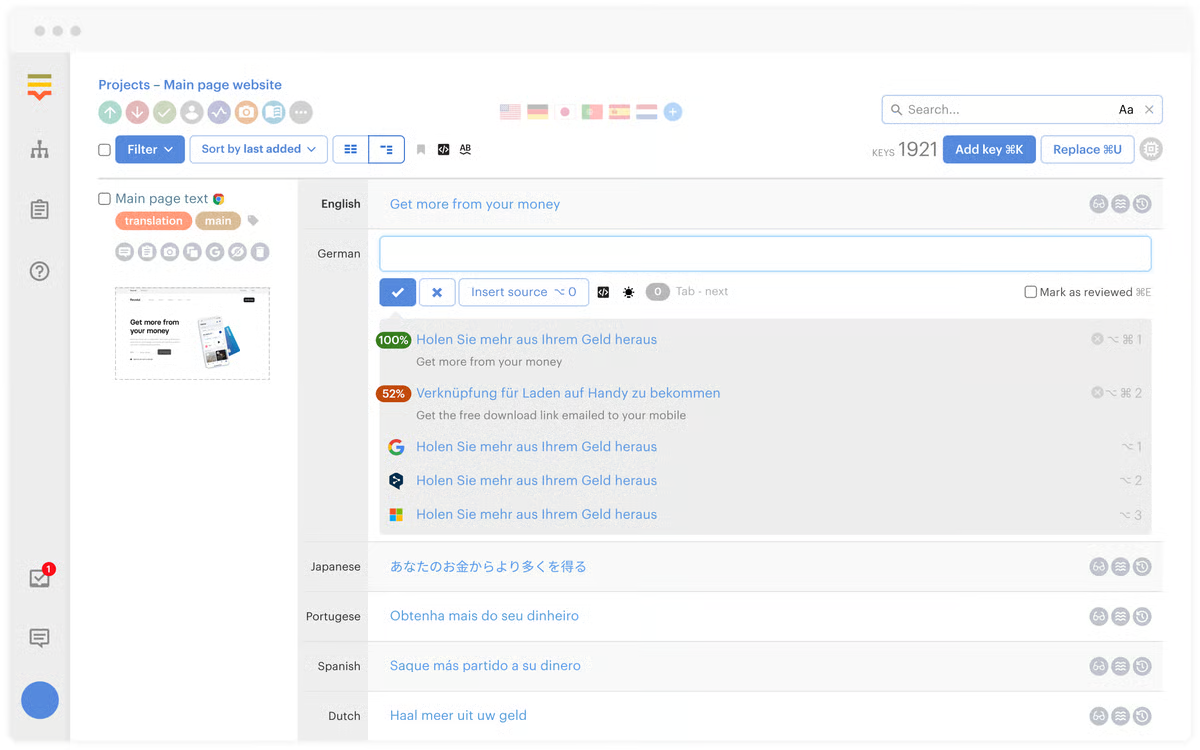 Bild von G2
|
Spring direkt zum Anfang der Liste!
 |
|
| Beschreibung: |
Eine cloudbasierte Übersetzungsmanagement-Plattform, die KI-/maschinelle Übersetzung, ein Self-Service-Portal und verwaltete Übersetzungsdienste kombiniert – für Unternehmen, die Dokumenten-/Inhaltslokalisierung mit optionaler Überprüfung durch professionelle Linguisten benötigen. |
| Typ: |
Cloud-Translation-Management-System und CAT-Tool |
| Geeignet für: |
Dokumente (inklusive PDF), Website-Lokalisierungs-Widget-Inhalte, geschäftliche Inhalte, die eine Teamüberprüfung benötigen |
| Wer nutzt es: |
Business-Teams und Sprachdienstleister, die eine Mischung aus Self-Service-KI-Übersetzung und ausgelagerter professioneller Übersetzung möchten |
| Cloud oder Desktop: |
Nur Cloud |
| Highlights: |
- Kostenlose Self-Service-Stufe: 15.000 Wörter/Monat für eine:n Nutzer:in
- Website-Lokalisierungs-Widget ab der kostenlosen Stufe inklusive
- KI übernimmt automatisch kundenspezifische Terminologie und Stil
- Höhere Stufen bieten API, Integrationen, SSO und überwachte KI-Workflows
- Optional kostenpflichtiges Outsourcing an die eigenen professionellen Übersetzer:innen von Text United
|
| Preise: |
Self-Service FREE 0 €/Monat (15.000 Wörter, 1 Nutzer:in); Self-Service TEAM 150 €/Monat (100.000 Wörter, 10 Nutzer:innen); OnePlatform 780 €/Monat (500.000 Wörter, unbegrenzt Nutzer:innen); OneEnterprise = individuell, aktuelle Preise ansehen |
| Kostenlose Testphase: |
Kostenlose Self-Service-Stufe; Testphasen auch für kostenpflichtige Stufen verfügbar |
| Was Nutzer:innen sagen: |
- Gelobt für Kundenservice und Qualität der maschinellen Übersetzung. Einige Rezensenten merken gelegentliche Langsamkeit und Preise an, die für kleinere Teams recht hoch erscheinen.
Alle Bewertungen auf G2 lesen (4,3/5, 58 Bewertungen) | Capterra (4,7/5, 53 Bewertungen)
🎥 Schau dir eine Demo von Text United auf YouTube an
|
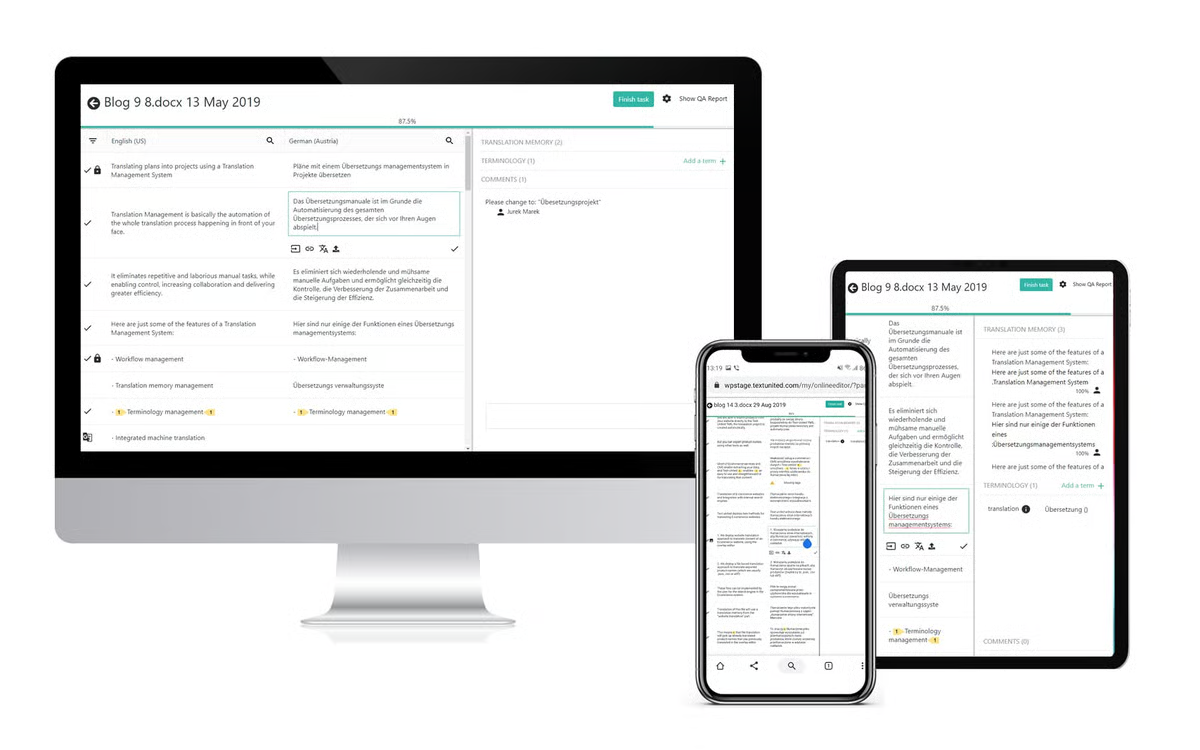 Bild von G2
|
Spring direkt zum Anfang der Liste!
 |
|
| Beschreibung: |
Eine cloudbasierte Lokalisierungs-/Übersetzungsmanagement-Plattform für Produkt- und Marketingteams. Im Januar 2025 von XTM International übernommen. |
| Typ: |
Cloud-Lokalisierungsplattform und Übersetzungsmanagementsystem |
| Geeignet für: |
Software- und App-Strings, Website-Inhalte, Marketinginhalte, Entwickler-gesteuerte Lokalisierung |
| Wer nutzt es: |
Produktteams, Marketingteams, Entwickler:innen und Lokalisierungsmanager:innen |
| Cloud oder Desktop: |
Nur Cloud |
| Highlights: |
- Im Januar 2025 von XTM International übernommen; weiterhin aktiv und eigenständig als Transifex vermarktet
- Unbegrenzte Projekte und Dateien, sogar schon im Starterabo
- Inklusive KI-Übersetzungs-Wortkontingente, die je nach Stufe skalieren
- Über 46 gelistete Integrationen
|
| Preise: |
Starter ab 160 $/Monat (monatlich) oder 135 $/Monat (jährlich), 10 Mitarbeitende; Growth ab 236 $/Monat (monatlich) oder 200 $/Monat (jährlich), 30 Mitarbeitende, skaliert mit Wortvolumen; Enterprise+ = individuell, 100 Mitarbeitende, aktuelle Preise ansehen |
| Kostenlose Testphase: |
Kostenloser Einstieg, keine Kreditkartenangabe erforderlich — aktuelle Bedingungen ansehen |
| Was Nutzer:innen sagen: |
- Gelobt für Benutzerfreundlichkeit, GitHub/GitLab-Integrationen, Echtzeit-Synchronisierung und TM-/Glossar-Konsistenz. Kritisiert wegen hoher Preise für kleinere Teams, Verlangsamungen bei großen Dateien, umständlicher Rechteverwaltung und schwacher mobiler Erfahrung.
Alle Bewertungen auf G2 lesen (gelistet als „XTM Transifex“, 4,2/5, 723 Bewertungen) | Capterra
🎥 Schau dir eine Demo von Transifex auf YouTube an
|
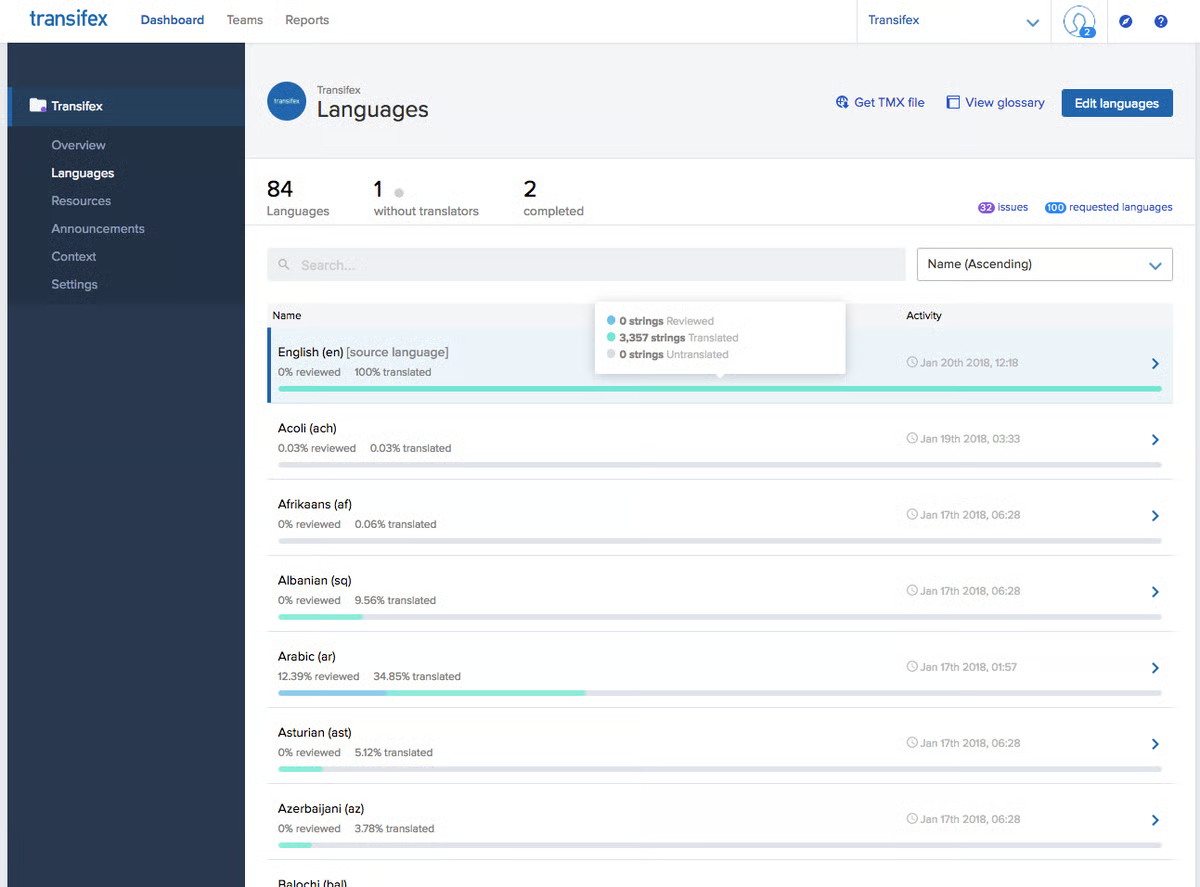 Bild von G2
|
Spring direkt zum Anfang der Liste!
 |
|
| Beschreibung: |
Eine cloudbasierte Lokalisierungsmanagement-Plattform für Software-/Produktteams, die KI-gestützte Übersetzung, Translation Memory und Entwickler-Tool-Integrationen für App-/Website-String-Lokalisierung bietet. |
| Typ: |
Cloud-Lokalisierungsplattform und Übersetzungsmanagementsystem |
| Geeignet für: |
App-Lokalisierung, Software-UI-Strings, Website-Inhalte |
| Wer nutzt es: |
Produkt- und Engineering-Teams, Lokalisierungsmanager:innen in Tech-Unternehmen |
| Cloud oder Desktop: |
Nur Cloud |
| Highlights: |
- Abrechnung auf Basis von „linguistischen Credits“ (wortbasierte Nutzung) statt fester Gebühren pro Nutzer:in
- Unbegrenzte Nutzer:innen inklusive, sogar schon im Starterabo
- Bitbucket- und Azure-DevOps-Integrationen ab Team-Stufe und höher, plus GitHub und GitLab
- Enterprise-Stufe bietet On-Premises-Verfügbarkeit und Enterprise-SSO/SCIM
- Bis zu 12 % Rabatt bei jährlicher Abrechnung
|
| Preise: |
Starter 45 €/Monat (100k Credits, ~15k Wörter/Monat); Team 115 €/Monat (500k Credits, ~75k Wörter/Monat); Pro 345 €/Monat (1M Credits, ~150k Wörter/Monat); Enterprise = individuell. USD/GBP ebenfalls verfügbar, aktuelle Preise ansehen |
| Kostenlose Testphase: |
14 Tage, keine Kreditkartenangabe erforderlich |
| Was Nutzer:innen sagen: |
- Gelobt für intuitive Oberfläche, schnellen Support und GitHub/GitLab-Integrationen. Kritisiert wegen eines kürzlichen UI-Redesigns, das als verwirrender/fehleranfälliger empfunden wird, unzureichender Such-/Filterfunktionen und Preisen, die für kleinere Teams als teuer gelten.
Alle Bewertungen auf G2 lesen (4,5/5, 72 Bewertungen) | Capterra (4,6/5, 78 Bewertungen)
🎥 Schau dir eine Demo von LingoHub auf YouTube an
|
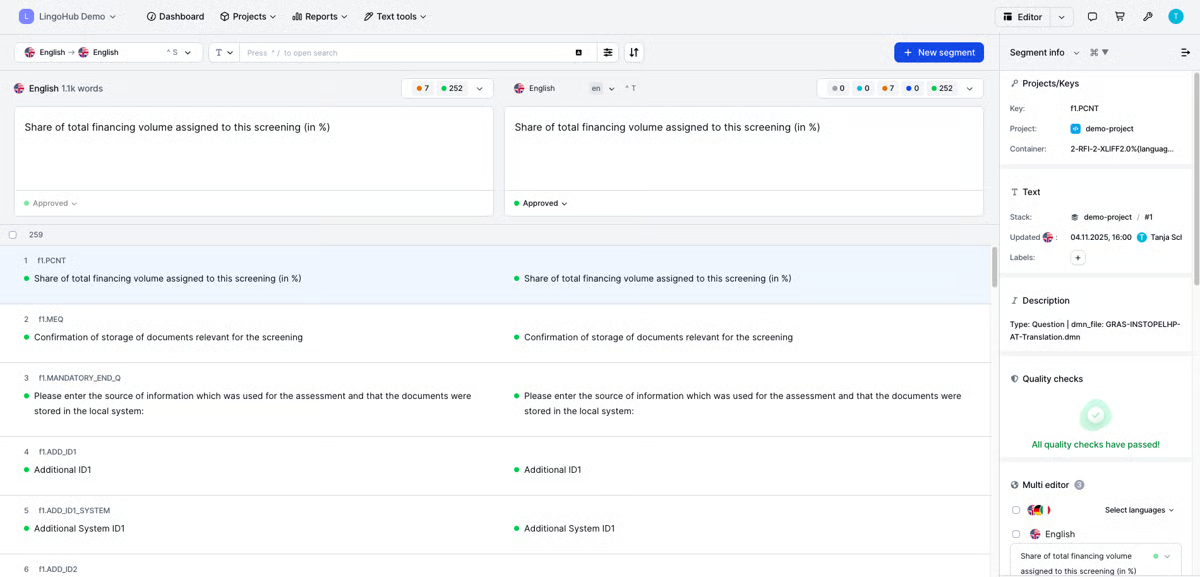 Bild von G2
|
Spring direkt zum Anfang der Liste!
 |
|
| Beschreibung: |
Eine KI-gestützte Übersetzungs- und Lokalisierungsmanagement-Plattform, die Automatisierung mit menschlicher Überprüfung kombiniert – zum Übersetzen und Verwalten von Inhalten auf Websites, in Apps und Dokumenten. |
| Typ: |
Cloud-Translation-Management-System |
| Geeignet für: |
Dokumente (Word, Excel, PowerPoint, PDF), Websites, mobile Apps, Software-Strings, Design-Dateien, Untertitel |
| Wer nutzt es: |
Marketingteams, Engineering-Teams, Lokalisierungsprofis und Unternehmen |
| Cloud oder Desktop: |
Nur Cloud |
| Highlights: |
- Der visuelle Kontexteditor zeigt Übersetzungen direkt auf der Seite oder dem Bildschirm an
- Translation Memory und Glossar/Terminologieverwaltung sind integriert
- Design-Plugins für Adobe und Sketch sowie CI/CD-Integration für Engineering-Teams
- On-Demand, Pay-per-Document-Option zusätzlich zu den Abo-Stufen
|
| Preise: |
Basic ab $200/Monat jährlich abgerechnet (50.000 gehostete Wörter), Pro ab $800/Monat jährlich abgerechnet (300.000 gehostete Wörter) oder eine individuelle Enterprise/On-Demand-Stufe, aktuelle Preise ansehen |
| Kostenlose Testphase: |
Wird nicht auf der Preisseite beworben; On Demand ermöglicht Pay-as-you-go ohne Verpflichtung |
| Was Nutzer:innen sagen: |
- Gelobt für die intuitive Oberfläche, starke TM-/Glossar-Tools und das visuelle Kontext-Feature. Kritisiert wegen einer „altmodischen“ Benutzeroberfläche mit vielen Klicks, inkonsistenter KI-Übersetzungsqualität und hohen/unerwarteten Enterprise-Preisen.
Alle Bewertungen auf G2 lesen (4,4/5, 709 Bewertungen) | Capterra
🎥 Schau dir eine Demo von Smartling auf YouTube an
|
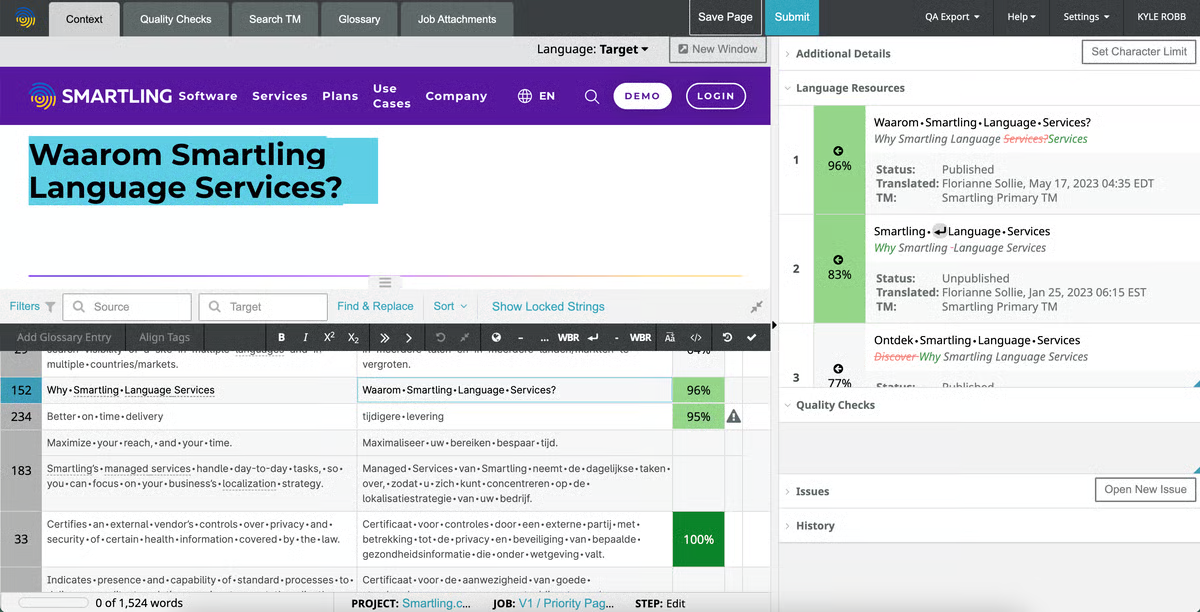 Bild von G2
|
Spring direkt zum Anfang der Liste!
 |
|
| Beschreibung: |
Eine KI-gestützte Sprach- und Lokalisierungsplattform für Unternehmen, entstanden durch die Fusion von Memsource und Phrase im Jahr 2023, mit Translation Management, KI-Orchestrierung über MT-Engines/LLMs und Multimedia-/Software-Lokalisierung. |
| Typ: |
Lokalisierungsplattform und Translation-Management-System |
| Geeignet für: |
Websites, Software- und App-Strings, Spiele, Video (Untertitelung und Synchronisation), Unternehmensdokumentation |
| Wer nutzt es: |
Lokalisierungsmanager:innen, Entwickler:innen und Marketer in Unternehmen |
| Cloud oder Desktop: |
Cloud, API-first |
| Highlights: |
- KI-gestützte Orchestrierung verteilt Inhalte über mehrere maschinelle Übersetzungs-Engines und LLMs
- Automatisierte Qualitätsbewertung und -benotung
- Multimedia-Lokalisierung (Synchronisation, Untertitel) sowie Software- und Web-Lokalisierung
- Entstanden durch die Fusion von Memsource und Phrase im Jahr 2023
|
| Preise: |
Team-Plan ab $1.245/Monat jährlich abgerechnet (20 Plätze), Software UI/UX-Plan ab $525/Monat jährlich abgerechnet (15 Plätze) oder individuelle Business-/Enterprise-Stufen, aktuelle Preise ansehen |
| Kostenlose Testphase: |
14-tägige kostenlose Testphase für alle Abos |
| Was Nutzer:innen sagen: |
- Gelobt für die intuitive Navigation, effiziente TM-/Terminologie-Workflows und schnellen Support. Kritisiert wegen inkonsistenter KI-Übersetzungsgenauigkeit, hoher/steigender Preise und gelegentlicher Langsamkeit bei großen Dateien.
Alle Bewertungen auf G2 lesen (4,5/5, 1.327 Bewertungen)
🎥 Schau dir eine Demo von Phrase auf YouTube an
|
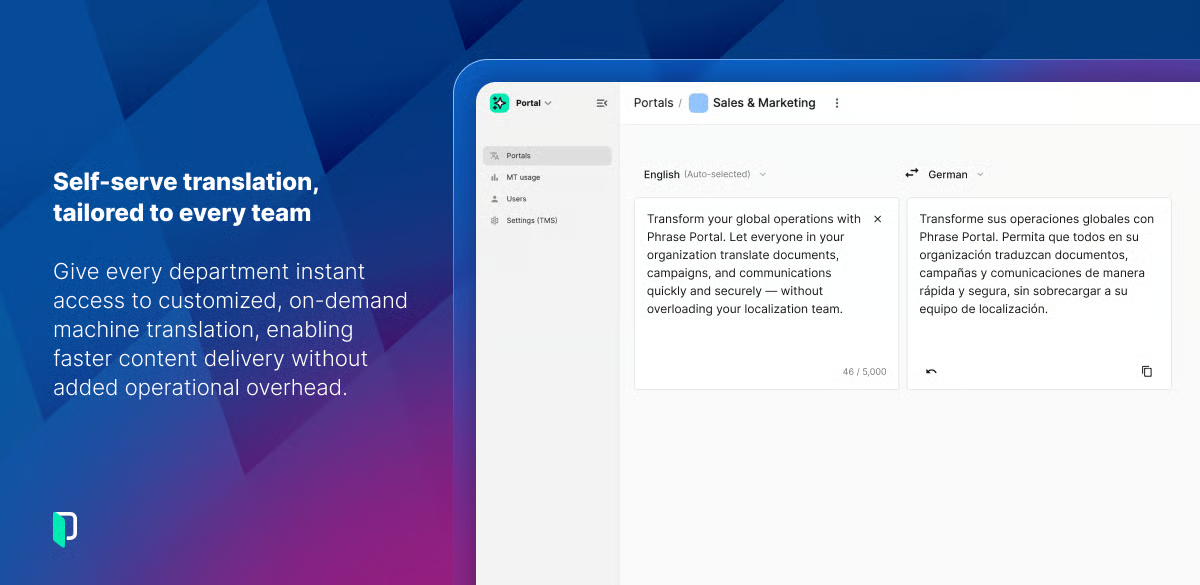 Bild von G2
|
Spring direkt zum Anfang der Liste!
 |
|
| Beschreibung: |
Eine KI-gestützte Cloud-Lokalisierungsplattform zur Verwaltung von Übersetzungen für Software, Websites, Apps und Spiele mit tiefen Entwickler-Tool-Integrationen. |
| Typ: |
Lokalisierungsplattform und Translation-Management-System |
| Geeignet für: |
Softwareanwendungen, Mobile Apps, Websites, Videospiele, Marketingmaterialien, technische Dokumentation |
| Wer nutzt es: |
Entwicklergeführte Teams, von kleinen Teams bis zu großen Unternehmen |
| Cloud oder Desktop: |
Nur Cloud |
| Highlights: |
- Tiefe Entwickler-Tool-Integrationen für automatische Inhalts-Synchronisierung (GitHub, GitLab, Bitbucket)
- KI-Assistent und Auswahl an maschinellen Übersetzungs-Engines
- Kostenlose Stufen für Open-Source- und akademische Projekte
- CDN für Übersetzungen Add-on (kostenlos bis zu 1 Mio. Anfragen/10GB Transfer)
|
| Preise: |
Bezahlte Stufen skalieren mit dem Wortvolumen — aktuelle Preise ansehen für genaue Zahlen |
| Kostenlose Testphase: |
Kostenloses Abo verfügbar; 14-tägige Testphase für das Team-Abo; 30-tägige Enterprise-Testphase; 30 Tage Geld-zurück-Garantie |
| Was Nutzer:innen sagen: |
- Gelobt für Benutzerfreundlichkeit, Kollaborations-/Integrationsfeatures (besonders GitHub) und Übersetzungsqualität. Kritisiert wegen einer überladenen/verwirrenden Oberfläche, steiler Lernkurve und hoher Preise für Freiberufler:innen/kleine Teams.
Alle Bewertungen auf G2 lesen (4,4/5, 729 Bewertungen) | Capterra
🎥 Schau dir eine Demo von Crowdin auf YouTube an
|
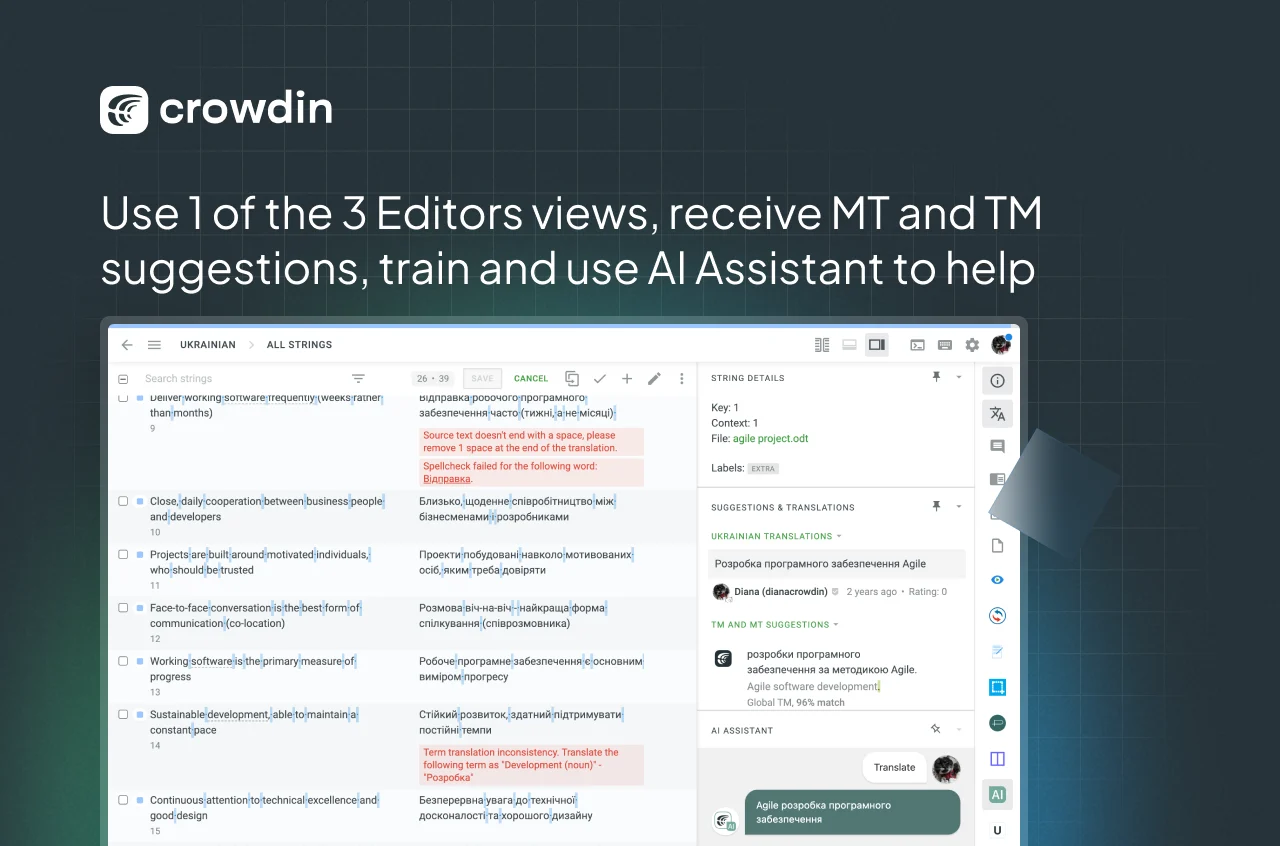 Bild von G2
|
Spring direkt zum Anfang der Liste!
 |
|
| Beschreibung: |
Ein No-Code-Website-Übersetzungs- und mehrsprachiges SEO-Tool, das Website-Inhalte automatisch per KI erkennt und übersetzt – mit einer Ebene für menschliche Nachbearbeitung. |
| Typ: |
No-Code-Website-Übersetzungs- und mehrsprachiges SEO-Tool (kein allgemeines Dokumenten-CAT-Tool) |
| Geeignet für: |
Nur Website-Inhalte – Produktseiten, Blogposts, Metadaten |
| Wer nutzt es: |
E-Commerce-Shops, Marketingagenturen und Organisationen, die eine Website statt Dokumente übersetzen |
| Cloud oder Desktop: |
Cloud-SaaS, kein Code erforderlich |
| Highlights: |
- Der visuelle Editor zeigt Übersetzungen direkt im Kontext auf der Live-Seite an
- Erkennt und übersetzt neue Inhalte automatisch, sobald die Seite aktualisiert wird
- Mehrsprachiges SEO ist integriert, inklusive hreflang-Tags und übersetzter URLs
- Zugang zu professionellen menschlichen Übersetzer:innen ab der Business-Stufe
- Über 70 native Integrationen, darunter WordPress, Shopify und individuell erstellte Seiten
|
| Preise: |
Free $0/Monat (2.000 Wörter, 1 Sprache); Starter $17/Monat oder $170/Jahr (10.000 Wörter, 1 Sprache); Business $32/Monat oder $320/Jahr (50.000 Wörter, 3 Sprachen); Pro $87/Monat oder $870/Jahr (200.000 Wörter, 5 Sprachen); Advanced $329/Monat oder $3.290/Jahr (1.000.000 Wörter, 10 Sprachen); Extended $769/Monat oder $7.690/Jahr (5.000.000 Wörter, 20 Sprachen); Enterprise = individuell, aktuelle Preise ansehen |
| Kostenlose Testphase: |
Freemium (2.000 Wörter/1 Sprache) plus eine angegebene 14-tägige Testphase |
| Was Nutzer:innen sagen: |
- Gelobt für die schnelle Einrichtung, den visuellen Editor und den super reaktionsschnellen Support. Kritisiert wegen Preisen, die mit der Wortanzahl schnell steigen, und weil die MT-Qualität oft manuell nachgebessert werden muss.
Alle Bewertungen auf G2 lesen (4,7/5, 763 Bewertungen)
🎥 Schau dir eine Demo von Weglot auf YouTube an
|
 Bild von Weglot
|
Spring direkt zum Anfang der Liste!
 |
|
| Beschreibung: |
Ein cloudbasiertes Translation-Management-System zum Lokalisieren von Software-Strings, Websites, Apps und Spielen, das KI-Übersetzung mit menschlicher bzw. Team-Zusammenarbeit kombiniert. |
| Typ: |
Cloud Translation-Management-System (stringbasiertes Lokalisierungstool) |
| Geeignet für: |
Mobile Apps, Websites, Videospiele, Marketingtexte, allgemeine Software-Strings |
| Wer nutzt es: |
Software- und Produktteams |
| Cloud oder Desktop: |
Nur Cloud, gehostet in der EU |
| Highlights: |
- Stringbasiertes (nicht wortbasiertes) Preismodell
- Gratis-Tarif: 1.000 Strings, unbegrenzt viele Projekte und Mitwirkende
- REST-API zur Automatisierung von Lokalisierungs-Pipelines, plus Git-Integrationen
- Kostenlos für Open-Source-Projekte mit OSI-zertifizierten Lizenzen
- Mitwirkende an fremden Projekten zahlen nichts
|
| Preise: |
Gratis-Tarif für $0/Monat (1.000 Strings); kostenpflichtige Tarife skalieren mit der String-Anzahl — aktuelle Preise ansehen für genaue Zahlen |
| Kostenlose Testphase: |
Automatische 10-tägige Testphase, keine Kreditkartenangabe erforderlich, plus dauerhaft kostenloser Tarif |
| Was Nutzer:innen sagen: |
- Gelobt für die einfache, intuitive Oberfläche, REST-API-Automatisierung und Git-Integrationen. Kritisiert wegen umständlicher Nutzer-/Zugriffsverwaltung, starker Tarif-Sprünge und dem Wunsch nach besseren In-Context-Übersichtsfunktionen.
Alle Bewertungen auf G2 lesen (4,5/5, 93 Bewertungen) | Capterra
🎥 Schau dir eine Demo von POEditor auf YouTube an
|
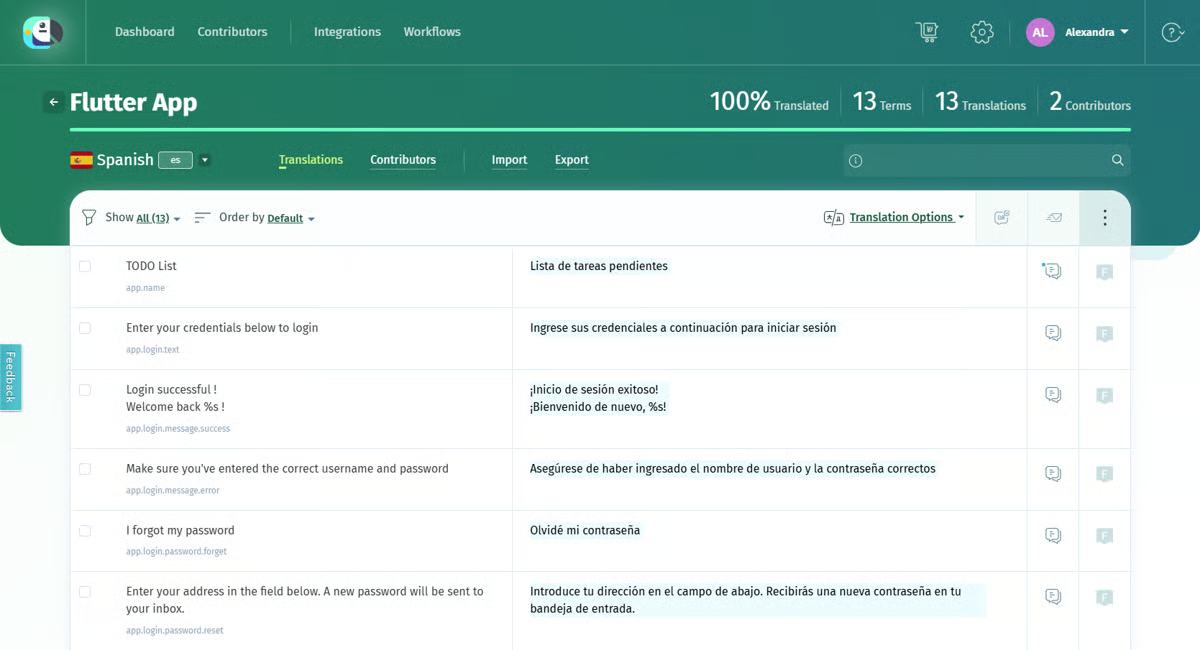 Bild von G2
|
Spring direkt zum Anfang der Liste!
 |
|
| Beschreibung: |
Eine sichere, dokumentenorientierte KI-Übersetzungsmanagement-Plattform für Organisationen (Bildung, Gesundheitswesen, Unternehmen, Behörden, Sprachdienstleister), die kontrollierte und konforme Übersetzungen von Dateien statt lockerer Webtexte benötigen. |
| Typ: |
Translation-Management-System (dokumentenfokussiert, KI-unterstützt) |
| Geeignet für: |
Word, PDF, Excel, PowerPoint, Google Workspace-Dateien, gescannte Dokumente (OCR), Untertitel, XLIFF, JSON, XML, Audio/Video (30+ Dateitypen) |
| Wer nutzt es: |
Organisationen aus Bildung, Gesundheitswesen, Unternehmen, Behörden und Sprachdienstleister, die kontrollierte und konforme Dokumentenübersetzungen brauchen |
| Cloud oder Desktop: |
Cloud (Web-App); eine ergänzende Mobile-App, PairaVoice, wird ebenfalls angeboten |
| Highlights: |
- Mehrere KI-Übersetzungs-Engines (PairaphraseGPT, DeepL, Google, Microsoft), pro Auftrag auswählbar
- Formatierung bleibt bei übersetzten Dokumenten erhalten
- Sicherheits- und Zugriffskontrollen für sensible oder regulierte Inhalte
- Sprachdienstleister-Partnerprogramm für Agenturen, die Kundenprojekte betreuen
- Nebeneinander-Vergleichsansicht für Sprachen
|
| Preise: |
Bronze $3.420/Jahr (1–2 Nutzer, 600.000 Wörter/Jahr, 2 MT-Engines, Word/Excel/PPT); Silber $5.988/Jahr (bis zu 5 Nutzer, 12 Mio. Wörter/Jahr, 5 MT-Engines inkl. ChatGPT/PairaphraseGPT, 30+ Dateiformate); Gold $10.200/Jahr (bis zu 15 Nutzer, 25 Mio. Wörter/Jahr, alle KI-Features); Custom/Enterprise = individuell; Sprachdienstleister-Partnerprogramm $7.500/Jahr (25 Plätze), aktuelle Preise ansehen |
| Kostenlose Testphase: |
Nicht auf der Preisseite angegeben — direkt nachfragen |
| Was Nutzer:innen sagen: |
- Gelobt für die Multi-Engine-Flexibilität, Zeitersparnis und den schnellen Support. Kritisiert wegen Formatierungsproblemen (zerschossene Listen, unerwünschtes Fett/Kursiv, Layout-Probleme in PowerPoint/Excel), die manuell behoben werden müssen.
Alle Bewertungen auf Capterra lesen (4,3/5, 25 Bewertungen)
🎥 Schau dir eine Demo von Pairaphrase auf YouTube an
|
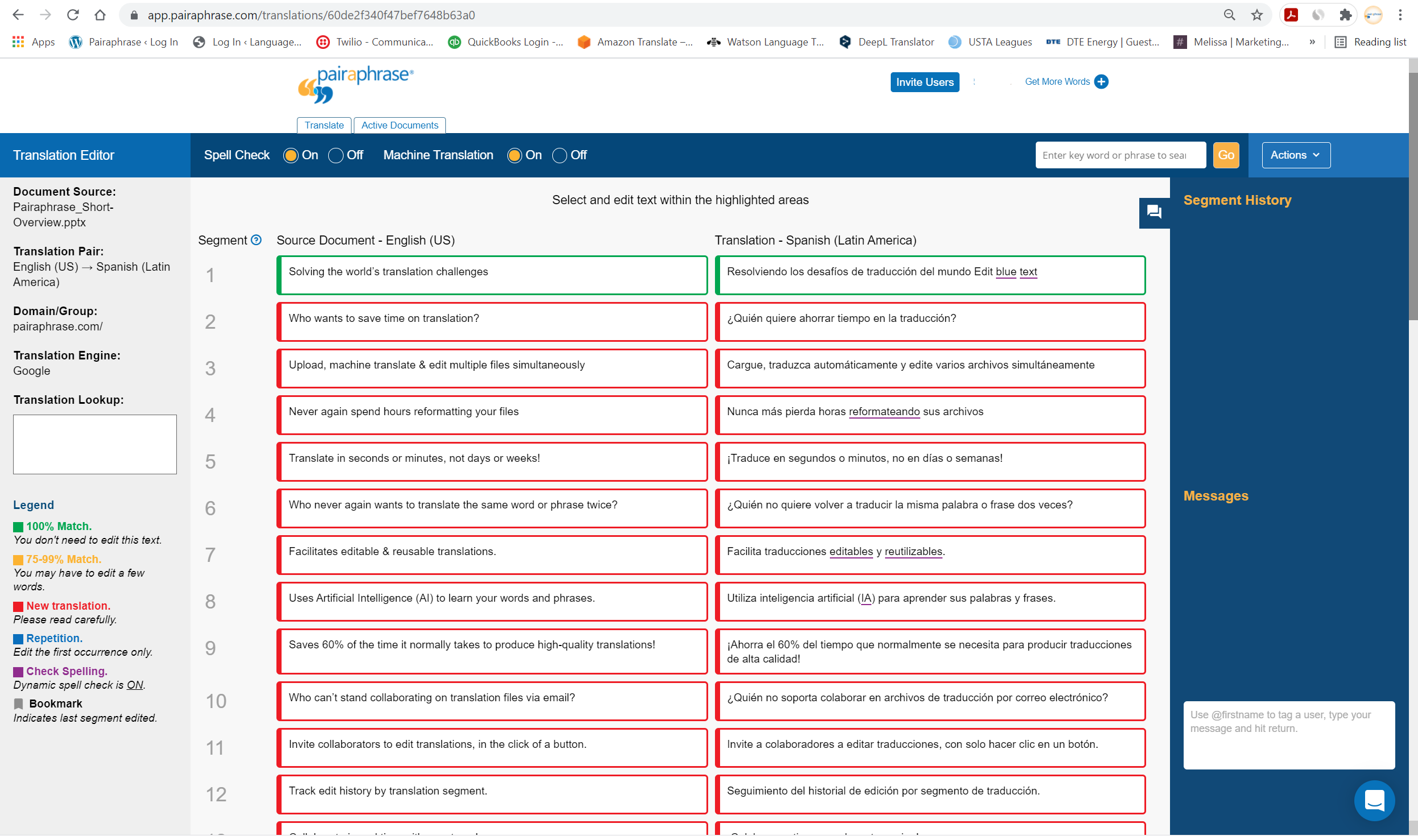 Bild von Capterra
|
Spring direkt zum Anfang der Liste!
 |
|
| Beschreibung: |
TransPerfects Enterprise-Language-Intelligence-/Translation-Management-Plattform-Suite, die TMS, Website-, App-String- und Medienlokalisierung für große globale Marken abdeckt – kombiniert KI (TowerLLM-Orchestrierung) mit menschlicher Überprüfung. |
| Typ: |
Enterprise Translation-Management-System und Lokalisierungsplattform (Produktsuite) |
| Geeignet für: |
Dokumente und Workflow, Websites, mobile und Software-Strings, regulatorische Inhalte, Medien und Untertitel |
| Wer nutzt es: |
Große Unternehmen — Marketer, Content-Autoren und IT-Teams — in E-Commerce, Finanzen, Life Sciences und Medien |
| Cloud oder Desktop: |
Cloudbasierte Enterprise-Plattform |
| Highlights: |
- Modulare Produktsuite (TMS, Web, Strings, Media und mehr) statt nur einem einzelnen Tool
- TowerLLM: eine modellunabhängige KI-Schicht, die zwischen maschineller Übersetzung und LLM-Engines routet
- Unterstützt durch TransPerfects Netzwerk aus menschlichen Linguisten und Sprachdienstleistern
- Wiederholt in den Translation-Management-System-Reports von G2 ausgezeichnet
|
| Preise: |
Nicht öffentlich gelistet — Vertrieb für ein Angebot kontaktieren |
| Kostenlose Testphase: |
Nicht verfügbar – Enterprise-Modell, vertriebsorientiert |
| Was Nutzer:innen sagen: |
- Gelobt für die intuitive Oberfläche, viele Integrationen, Übersetzungsqualität und schnelle Reaktion vom Support. Kritisiert wegen hoher/unklarer Kosten („explodierende Kosten“), langsamer Performance bei großen Dateien und komplexer Ersteinrichtung.
Alle Bewertungen auf G2 lesen (4,5/5, 193 Bewertungen) | Capterra
🎥 Schau dir eine Demo von GlobalLink auf YouTube an
|
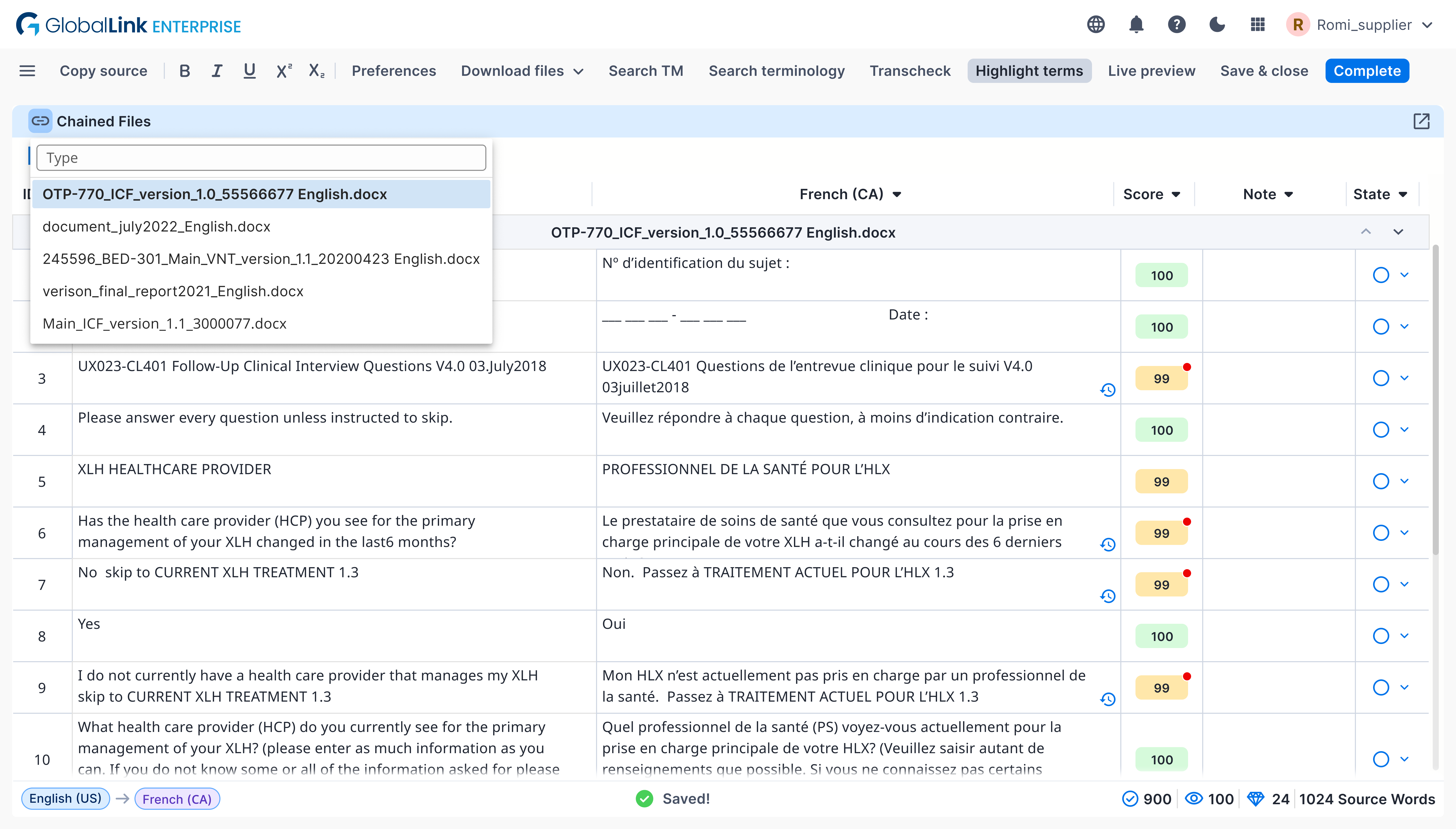 Bild von G2
|
Spring direkt zum Anfang der Liste!
 |
|
| Beschreibung: |
Ein KI-gestütztes Translation-Management-System (TMS) für Enterprise-Lokalisierungsteams, Teil der größeren XTM-Plattform (inklusive Transifex für Software-Lokalisierung, Rigi und XTRF für Abläufe von Sprachdienstleistern). |
| Typ: |
Translation-Management-System (Cloud-TMS) |
| Geeignet für: |
Dokumente, Websites, Software- und App-Strings, Marketinginhalte |
| Wer nutzt es: |
Enterprise-Lokalisierungs- und Globalisierungsteams, große Marken und Sprachdienstleister |
| Cloud oder Desktop: |
Nur Cloud |
| Highlights: |
- Über 60 vorgefertigte Konnektoren und Integrationen, plus API-Zugang
- KI-gestütztes Post-Editing und Qualitätsbewertung für maschinelle Übersetzung
- Anpassbare, automatisierte Übersetzungs-Workflows mit Translation Memory und Terminologieverwaltung
- Modulare Produktfamilie (TMS, Plattform, XTRF, Rigi, Video Creation Cloud) einzeln oder kombiniert erhältlich
|
| Preise: |
Nicht öffentlich gelistet – Vertrieb kontaktieren oder Demo buchen |
| Kostenlose Testphase: |
Keine Angabe – nur Demo/Beratung, keine beworbene Selbstbedienungs-Testversion |
| Was Nutzer:innen sagen: |
- Gelobt für starken Kundensupport, TM-/Terminologie-Tools und Integrationen. Kritisiert wegen verwirrender/veralteter Oberfläche, steigender Kosten bei Skalierung und MT/KI-Features, die hinter der Konkurrenz zurückbleiben.
Alle Bewertungen auf G2 lesen (4,3/5, 145 Bewertungen) | Capterra
🎥 Schau dir eine Demo von XTM Cloud auf YouTube an
|
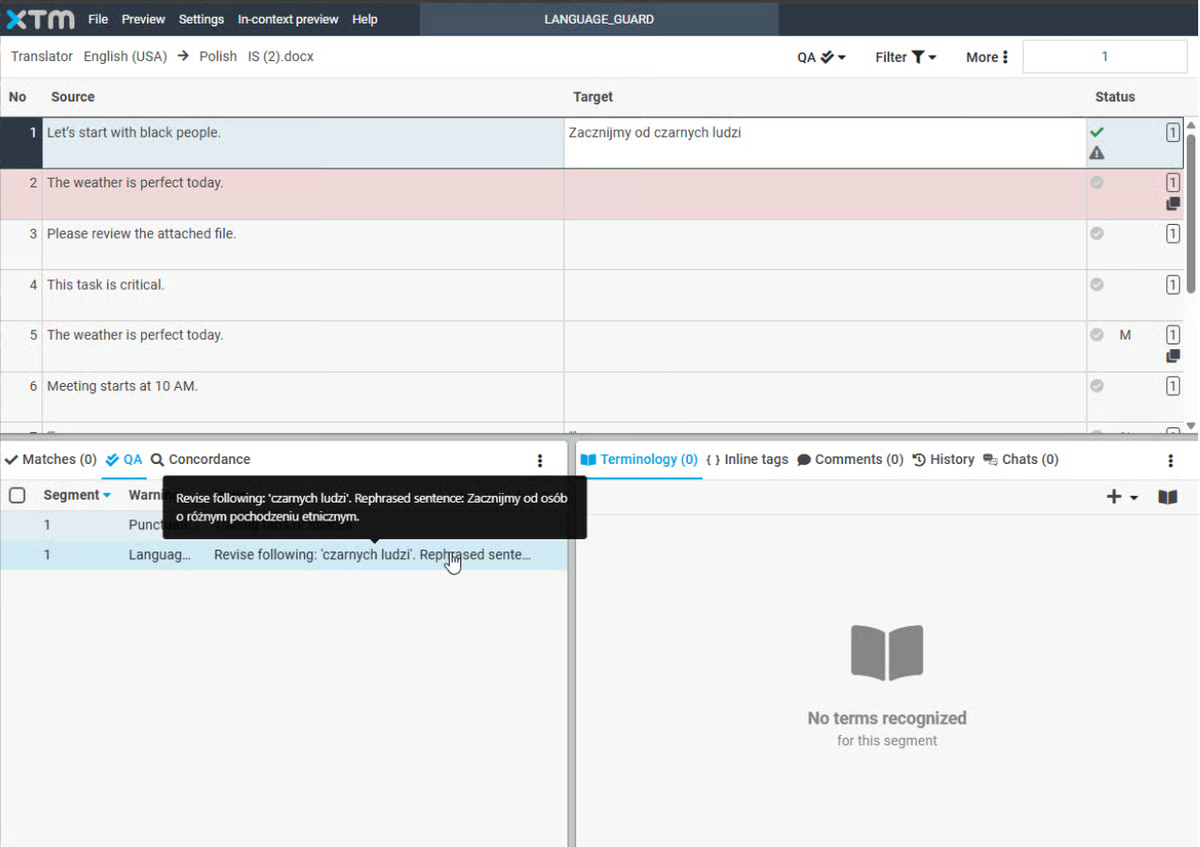 Bild von G2
|
Spring direkt zum Anfang der Liste!
 |
|
| Beschreibung: |
Ein kostenloses, quelloffenes CAT-Tool für professionelle und ehrenamtliche Übersetzer:innen, mit Translation Memory, Fuzzy Matching und Glossar-Support für über 30 Dateiformate. |
| Typ: |
CAT-Tool (Desktop, Open Source) |
| Geeignet für: |
Dokumente (Office, HTML, XML und mehr), Software-/App-String-Dateien, Untertitel |
| Wer nutzt es: |
Freiberufliche und ehrenamtliche Übersetzer:innen, kleine Sprachdienstleister |
| Cloud oder Desktop: |
Desktop (Windows, macOS, Linux – Java-basiert) |
| Highlights: |
- Komplett kostenlos und Open Source, ohne Einschränkungen bei Nutzung, Kopieren oder Modifikation
- Fuzzy Matching und Translation Memory-Nutzung
- Läuft nativ auf Windows, macOS und Linux
- Wird aktiv weiterentwickelt – neueste Version 6.1.1, veröffentlicht im September 2026
|
| Preise: |
Kostenlos (Open-Source-Lizenz) |
| Kostenlose Testphase: |
Nicht zutreffend – unbegrenzt kostenlos |
| Was Nutzer:innen sagen: |
- Geschätzt als kostenlos, stabil, zuverlässig, mit starkem TM/Fuzzy Matching. Die Oberfläche wird immer wieder als veraltet im Vergleich zu kostenpflichtigen Tools bezeichnet, mit schwächeren Projektmanagement-Features.
Alle Bewertungen auf G2 lesen (3,7/5, 16 Bewertungen)
🎥 Schau dir eine Demo von OmegaT auf YouTube an
|
 Bild von OmegaT
|
Spring direkt zum Anfang der Liste!
 |
|
| Beschreibung: |
Ein funktionsreiches Desktop-CAT-Tool für Freiberufler:innen, mit KI-/MT-Integration, smarter Autovervollständigung und Kompatibilität mit Dateiformaten anderer CAT-Tools. |
| Typ: |
CAT-Tool (Desktop) |
| Geeignet für: |
Dokumente (Word, Excel, PowerPoint, InDesign, PDF und mehr) |
| Wer nutzt es: |
Freiberufliche und unabhängige professionelle Übersetzer:innen |
| Cloud oder Desktop: |
Nur Desktop (Windows, macOS, Linux); Lizenz erlaubt Nutzung auf 2 Rechnern |
| Highlights: |
- Von einem Übersetzer entwickelt, mit KI- und maschineller Übersetzungsintegration
- Intelligente Autovervollständigung mit Ein-Klick-Textübernahme
- Liest und schreibt Dateien, die mit Trados, memoQ und Wordfast kompatibel sind
- Kostenlose, zeitlich unbegrenzte Nutzung mit Größenbeschränkungen für Translation Memory und Glossar
- Teamarbeit über TM-Server-Funktionalität
|
| Preise: |
Einmalige Dauerlizenz 200 €, oder ein Jahresabo für 80 €/Jahr, aktuelle Preise ansehen |
| Kostenlose Testphase: |
Freemium – unbegrenzte kostenlose Nutzung mit Translation-Memory-/Glossar-Größenbeschränkungen; alle Features durch Kauf freischaltbar |
| Was Nutzer:innen sagen: |
- Für dieses Tool gibt es keinen G2- oder Capterra-Eintrag. Auf ProZ beschreiben Rezensenten es als einfach und stabil, entwickelt von einem Übersetzer, der die Bedürfnisse von Übersetzern versteht – manche merken aber an, dass der Import von Dateien anderer CAT-Tools schwierig sein kann.
Lies dir Bewertungen auf ProZ durch
🎥 Schau dir eine Demo von CafeTran Espresso auf YouTube an
|
 Bild von CafeTran Espresso
|
Spring direkt zum Anfang der Liste!
 |
|
| Beschreibung: |
Ein kostenloses, quelloffenes, browserbasiertes CAT-Tool, das Translation Memory und maschinelle Übersetzung kombiniert, um die Trefferquote zu maximieren; entwickelt mit Translated S.r.l. als wichtigem Partner. |
| Typ: |
CAT-Tool (browserbasiert, Open Source) |
| Geeignet für: |
Dokumente werden für MT-unterstütztes Post-Editing hochgeladen; unterstützt außerdem Outsourcing über den Marktplatz von Translated |
| Wer nutzt es: |
Freiberufliche Übersetzer:innen, kleine Unternehmen und Agenturen, Studierende |
| Cloud oder Desktop: |
Nur Cloud (browserbasiert) — kein Offline-Modus |
| Highlights: |
- Kostenlos und Open Source (LGPL-Lizenz), Quellcode auf GitHub
- Eingebaute maschinelle Übersetzung mit mehreren Engines und Genauigkeitsstufen
- Translation Memory und Glossar-Unterstützung, um die Trefferquote zu erhöhen
- Kollaborative/Team-Features für Outsourcing-Projekte
|
| Preise: |
Kostenlos |
| Kostenlose Testphase: |
Nicht zutreffend — kostenloses Tool |
| Was Nutzer:innen sagen: |
- Wird besonders von Freiberufler:innen/Studierenden für die saubere/minimalistische Oberfläche und den kostenlosen Zugang geschätzt. Bekannte Nachteile: Benötigt eine Internetverbindung (kein Offline-Modus), Speicher-/Absturzprobleme, Übersegmentierung und Datenschutzbedenken beim Hochladen von Kundendateien auf externe Server.
Alle Bewertungen auf G2 lesen (4,0/5, 13 Bewertungen)
🎥 Schau dir eine Demo von Matecat auf YouTube an
|
 Bild von Wikipedia
|
Spring direkt zum Anfang der Liste!
 |
|
| Beschreibung: |
Ein plattformunabhängiges, eigenständiges Desktop-Translation Memory-Tool für Übersetzer:innen, Sprachdienstleister und Unternehmen; Teil der größeren Wordfast-Familie (Classic, Anywhere, Server). |
| Typ: |
CAT-Tool (Desktop, eigenständig) |
| Geeignet für: |
Dokumente in vielen Formaten (Word, Excel, PowerPoint und spezielle Übersetzungsdateitypen) |
| Wer nutzt es: |
Freiberufliche Übersetzer:innen (insbesondere Mac-Nutzer:innen), Sprachdienstleister, unternehmenseigene Übersetzungsabteilungen |
| Cloud oder Desktop: |
Desktop (Windows 64-Bit, macOS, Linux) |
| Highlights: |
- Eines der wenigen CAT-Tools mit nativer macOS-Unterstützung
- Stapelverarbeitung über mehrere Dateiformate hinweg
- Transcheck-Feature für automatisierte Konsistenz- und QA-Prüfung
- Das gebündelte "Wordfast Translation Studio" kombiniert Pro- und Classic-Lizenzen
- Vergünstigte Preiskategorie für Entwicklungsländer
|
| Preise: |
Wordfast Pro $480 Standard / $240 Entwicklungsländer; Wordfast Classic $480 Standard / $260 Entwicklungsländer; Wordfast Translation Studio (Bundle) $580 Standard / $290 Entwicklungsländer; Wordfast Server = individuell. Alle Preise in USD, aktuelle Preise ansehen |
| Kostenlose Testphase: |
Verfügbar über die Wordfast-Website |
| Was Nutzer:innen sagen: |
- Wird als günstiger als Trados oder memoQ gelobt, mit einer einfacheren Lernkurve und nativer macOS-Unterstützung. Rezensent:innen empfehlen, die kostenlosen Einsteiger-Angebote von Wordfast auszuprobieren, bevor man sich für Pro entscheidet.
Alle Bewertungen auf Capterra (4,3/5, 31 Bewertungen) | G2 (4,0/5, 3 Bewertungen — kleine Stichprobe) lesen
🎥 Schau dir eine Demo von Wordfast Pro auf YouTube an
|
 Bild von G2
|
Spring direkt zum Anfang der Liste!
 |
|
| Beschreibung: |
Ein XLIFF-basiertes, standardorientiertes CAT-Tool von Maxprograms, das über 50 Dateiformate und mehrere TM/MT-Engine-Integrationen für professionelle Übersetzer:innen und Sprachdienstleister unterstützt. |
| Typ: |
CAT-Tool (Desktop) |
| Geeignet für: |
Dokumente (Office, InDesign, DITA, HTML, JSON und über 50 weitere Formate) |
| Wer nutzt es: |
Freiberufliche und unabhängige professionelle Übersetzer:innen, kleine Sprachdienstleister, die offene Standard-Workflows schätzen |
| Cloud oder Desktop: |
Desktop (Windows, macOS; Quellcode für andere Plattformen auf GitHub verfügbar) |
| Highlights: |
- Auf offenen Standards (XLIFF, TMX) aufgebaut, um Anbieterbindung zu vermeiden
- Unterstützt über 50 Dateiformate
- Mehrere Integrationen für maschinelle Übersetzung (DeepL, Google, Azure, ModernMT) sowie KI-Assistenten
- Dateikompatibilität mit Trados, memoQ und Wordfast Pro
|
| Preise: |
Ein-Jahres-Abo, $140, aktuelle Preise ansehen |
| Kostenlose Testphase: |
30-tägige kostenlose Testversion nach Anforderung eines Evaluierungsschlüssels |
| Was Nutzer:innen sagen: |
- Für dieses Tool gibt es keinen G2- oder Capterra-Eintrag. Auf ProZ loben Rezensent:innen die plattformübergreifende Unterstützung, die niedrigen Kosten und den Entwicklersupport, auch wenn Terminologiedatenbanken nicht direkt in der App bearbeitet werden können.
Bewertungen auf ProZ lesen
🎥 Schau dir eine Demo von Swordfish auf YouTube an
|
 Bild von Maxprograms
|
Spring direkt zum Anfang der Liste!
 |
|
| Beschreibung: |
Ein seit über 30 Jahren etabliertes Translation Memory- und Lokalisierungstool von STAR Group (Schweiz), für Unternehmens-Lokalisierungsabteilungen, Projektmanager:innen und Sprachdienstleister, die mehrsprachige und multiformatige Projekte betreuen. |
| Typ: |
CAT-Tool und Lokalisierungsplattform (Desktop, mit flexiblen Lizenzierungsoptionen inklusive SaaS-Optionen) |
| Geeignet für: |
Dokumente, Software-Lokalisierung, Video-Untertitelung |
| Wer nutzt es: |
Unternehmens-Lokalisierungsabteilungen, Projektmanager:innen, Übersetzungsagenturen |
| Cloud oder Desktop: |
Beides — STAR Group bietet On-Premise-, Floating-, zeitlich begrenzte und SaaS-Lizenzen an |
| Highlights: |
- Multiformat- und mehrsprachiges Translation Memory, das auf Kontext statt auf Satz-für-Satz-Abgleich basiert
- Morphologische Unterstützung in über 80 Sprachen
- KI- und maschinelle Übersetzungs-Integrationen, darunter Amazon, DeepL, Google, Microsoft und OpenAI
- Integrierte Terminologieverwaltung über TermStar
- Netzwerkinstallation und flexible Lizenzierung (unbefristet, Abo, Floating, SaaS)
|
| Preise: |
Wird nicht direkt von STAR Group veröffentlicht — ein Wiederverkäufer listet die einfache „Professional“-Edition ab 2.860 $ (unbefristet), aber die genaue „Professional+“-Edition und der Preis sind nicht bestätigt; kontaktiere STAR Group für ein Angebot |
| Kostenlose Testphase: |
30-tägige kostenlose Evaluierungslizenz |
| Was Nutzer:innen sagen: |
- Für dieses Tool gibt es keinen G2- oder Capterra-Eintrag und es wurde keine unabhängige, bewertete Zusammenfassung gefunden.
Sieh dir die Vergleichsseite von ProZ an
🎥 Schau dir eine Demo von Transit NXT auf YouTube an
|
Spring direkt zum Anfang der Liste!
FAQ
Welches ist das meistgenutzte CAT-Tool?
Je nach Art der Arbeit passen unterschiedliche CAT-Tools zu unterschiedlichen Anforderungen. In dieser Liste haben wir einige der beliebtesten und meistgenutzten CAT-Tools vorgestellt.
Ist Google Translate ein CAT-Tool?
Die kurze Antwort: Nein, Google Translate ist kein CAT-Tool, sondern ein Anbieter für maschinelle Übersetzung. CAT-Tools bieten neben Übersetzungsvorschlägen durch maschinelle Übersetzung auch erweiterte Features.
Was sind CAT-Tools für Übersetzer:innen?
CAT-Tools für Übersetzer:innen sind Tools, die beim Übersetzen von Dokumenten unterstützen und dabei helfen, schneller und effizienter zu übersetzen.
Gibt es kostenlose CAT-Tools?
Ja, es gibt kostenlose CAT-Tools. Einige davon sind: Across, Matecat und OmegaT.
Am Ende kann keine Recherche und kein Testbericht deine eigene Nutzererfahrung ersetzen. Die meisten CAT-Tools kannst du kostenlos ausprobieren – nutze das auf jeden Fall aus!
Wenn du mehr wissen willst – hier gibt’s einen ausführlichen Guide zu CAT-Tools.